Status of this Document
This Version: 4.0.0-draft
Latest Stable Version: 3.0.0
Previous Version: 3.0
Editors:
-
Michael Appleby, Yale University
-
Dawn Childress, UCLA
-
Tom Crane, Digirati
-
Jeff Mixter, OCLC
-
Robert Sanderson, Yale University
-
Julie Winchester, Duke University
Copyright © 2012-2026 Editors and contributors. Published by the IIIF Consortium under the CC-BY license, see disclaimer.
Introduction
The purpose of the IIIF Presentation API specification is to provide a model and JSON serialization format of that model for cultural heritage organizations (and anyone else) to present objects in a standardized, interoperable way. This allows compatible software such as viewers and annotation tools to load and present complex digital objects on the web from thousands of different providers.
If you have existing images, audio, video and models on the web, you can easily provide IIIF Manifests for them by publishing the appropriate JSON documents.
The IIIF Presentation API is concerned with enabling user experiences—providing enough information to present objects in compatible software, and leaving the meaning of the objects to external descriptive metadata standards.
This document acts as an introduction to the specification through a set of typical (but non-exhaustive) use cases. The Presentation API 4.0 Data Model document provides the formal specification of the model and terms used in this introduction.
IIIF Use cases
- Artwork - a Manifest that represents a painting, comprising a single image and accompanying display information.
- Book - a Manifest that represents a digitized bound volume made up of many separate images in order. The IIIF model provides structural elements to indicate the chapters. The text of the book is made available in machine-readable form as Web Annotations.
- Periodical - a IIIF Collection that provides multiple child Collections and Manifests, representing the publication run of a newspaper over many years. The IIIF model provides structural elements to indicate individual articles and other elements.
- 45 Single - a Manifest that represents the digitized audio from the two sides of a vinyl 7 inch record.
- Movie - a Manifest that represents the digitized video of a film. A transcript of the audio is provided as Web Annotations, and additional machine-readable files provide subtitles and captions.
- Reconstruction of a Separated Object - a Manifest that represents a view of two separated parts, now in different repositories with their own transcriptions
- 3D Chessboard - a Manifest that represents the 3D modeling of a chessboard with increasing complexity and richness
- Commenting on Specific Features - a Manifest that represents a painting, similar to Use Case 1, with a comment that discusses part of it.
- Interactive Light Switch - a Manifest that represents a Scene containing a light and a 3D model of a light switch, where a user can click or otherwise interact with the switch to turn the light on and off.
These use cases were chosen as a broad sample to introduce IIIF concepts. Many more use cases are provided as recipes in the IIIF Cookbook.
Foundations
This section is what you need to know to make sense of the examples that follow it.
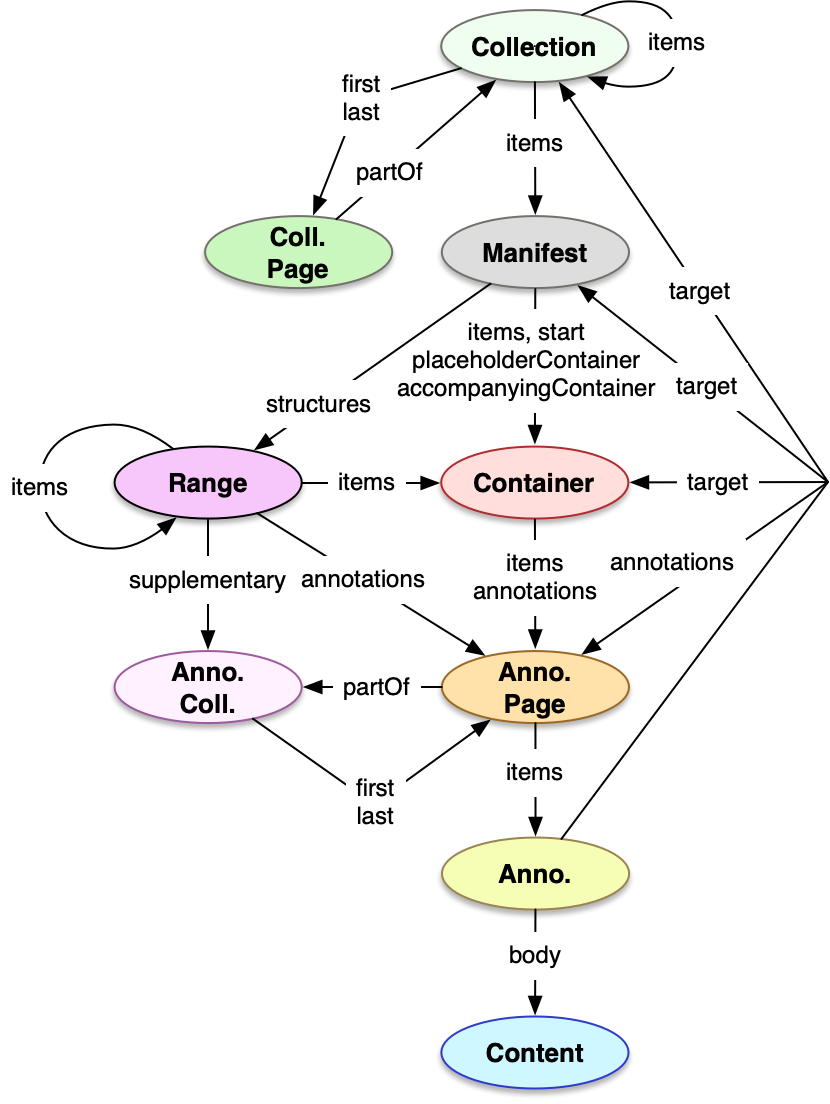
To the right is an overall diagram of the major classes and relationships between them. The details of each class are described in the sections below.
Manifests
A Manifest is the primary unit of distribution of IIIF. Each Manifest usually describes how to present an object, such as a book, statue, music album or 3 dimensional scene. It is a JSON document that carries information needed for the client to present content to the user, such as a title and other descriptive information. The scope of what constitutes an object, and thus its Manifest, is up to the publisher of that Manifest. The Manifest contains sufficient information for the client to initialize itself and begin to display something quickly to the user.
The Manifest’s items property is an ordered list of Containers of Content Resources (images, 3D models, audio, etc). Client software loads the Manifest and presents each Container’s Content Resources. The client software also presents user interface controls to navigate the list of Content Containers.
Manifests have descriptive, technical and linking properties. The required properties of Manifests are id, type, items and label. Other commonly used properties include summary, metadata, rights, thumbnail, homepage and provider. See the Manifest Documentation for more detail.
{
  "@context": "http://iiif.io/api/presentation/4/context.json",
  "id": "https://iiif.io/api/cookbook/recipe/0001-mvm-image/manifest.json",
  "type": "Manifest",
  "label": {
    "en": ["Single Image Example"]
  },
  "items": [
    // A list of Containers
  ]
}
Containers
A Container is a frame of reference that allows the relative positioning of Content Resources, a concept borrowed from standards like PDF and HTML, or applications like Photoshop and PowerPoint, where an initially blank display surface has images, video, text and other content “painted” on to it. The frame is defined by a set of dimensions, with different types of Container having different dimensions. The IIIF Presentation API defines three sub-classes of Container: Timeline (which only has a duration), Canvas (which has bounded height and width, and may have a duration), and Scene (which has infinite height, width and depth, and may have a duration).
The required properties of all Containers are id, and type. Most Containers also have the items and label properties. Further properties are required for the different types of Container. See the Container Documentation for more detail.
The Container sub-classes are discussed below.
Timeline
A Container that represents a bounded temporal range, without any spatial coordinates. It is typically used for audio-only content.
Timelines have an additional required property of duration, which gives the extent of the Timeline as a floating point number of seconds.
  {
  "id": "https://iiif.io/api/presentation/4.0/example/02",
  "type": "Timeline",
  "duration": 1985.024,
  "items": [
    {
      "id": "https://iiif.io/api/presentation/4.0/example/02/page",
      "type": "AnnotationPage",
      "items": [
        {
          "id": "https://iiif.io/api/presentation/4.0/example/02/page/anno",
          "type": "Annotation",
          "motivation": ["painting"],
          "body": {
            "id": "https://fixtures.iiif.io/audio/indiana/mahler-symphony-3/CD1/medium/128Kbps.mp4",
            "type": "Audio",
            "format": "audio/mp4",
            "duration": 1985.024
          },
          "target": {
            "id": "https://iiif.io/api/presentation/4.0/example/02",
            "type": "Timeline"
          }
        }
      ]
Canvas
A Container that represents a bounded, two-dimensional space, optionally with a bounded temporal range. Canvases are typically used for Image and Video content.
Canvases have two additional required properties: height and width, which give the spatial extent as integers. Canvases may also have the duration property in the same manner as Timelines.
  {
  "id": "https://iiif.io/api/presentation/4.0/example/03_canvas/canvas/p1",
  "type": "Canvas",
  "height": 1800,
  "width": 1200,
  "items": [
    {
      "id": "https://iiif.io/api/presentation/4.0/example/03_canvas/page/p1/1",
      "type": "AnnotationPage",
      "items": [
        {
          "id": "https://iiif.io/api/presentation/4.0/example/03_canvas/annotation/p0001-image",
          "type": "Annotation",
          "motivation": [ "painting" ],
          "body": {
            "id": "http://iiif.io/api/presentation/2.1/example/fixtures/resources/page1-full.png",
            "type": "Image",
            "format": "image/png",
            "height": 1800,
            "width": 1200
          },
          "target": {
            "id": "https://iiif.io/api/presentation/4.0/example/03_canvas/canvas/p1",
            "type": "Canvas"
          }
        }
      ]
    }
  ]
Scene
A Scene is a Container that represents a 3D boundless space with infinite height (y axis), width (x axis) and depth (z axis), where 0 on each axis (the origin of the coordinate system) is treated as the center of the scene’s space. The positive y axis points upwards, the positive x axis points to the right, and the positive z axis points forwards (a right-handed cartesian coordinate system).
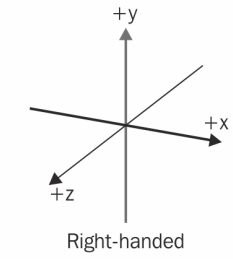
(Image: Wikipedia)
Scenes may also have a bounded temporal range via the duration property, in the same way as Canvases and Timelines. Scenes are typically used for rendering 3D models, and can additionally have Cameras and Lights.
      {
        "id": "https://iiif.io/api/presentation/4.0/example/scene/1",
        "type": "Scene",
        "label": {
            "en": [
                "A Scene"
            ]
        },
        "items": [
            {
                "id": "https://iiif.io/api/presentation/4.0/example/scene/1/annotationPage/1",
                "type": "AnnotationPage",
                "items": [
                    {
                        "id": "https://iiif.io/api/presentation/4.0/example/scene/1/annotationPage/1/anno/1",
                        "type": "Annotation",
                        "motivation": [
                            "painting"
                        ],
                        "body": {
                            "id": "https://raw.githubusercontent.com/IIIF/3d/main/assets/astronaut/astronaut.glb",
                            "type": "Model",
                            "format": "model/gltf-binary"
                        },
                        "target": {
                            "id": "https://iiif.io/api/presentation/4.0/example/scene/1",
                            "type": "Scene"
                        }
                    }
                ]
            }
        ]
    }
]
Scenes use several 3D specific constructions to manage rendering, discussed below.
Lights
It is necessary for there to be a Light within a Scene that illuminates the objects, and if no Light is defined for the Scene, then the client will provide its own default lighting. There are five types of Light: Ambient Light (emits evenly throughout the Scene), Directional Light (emits in a given direction), Image Based Light (emits using an image), Point Light (emits from a point), and Spot Light (emits from a point, in a given direction).
Cameras
A Camera provides a view of a region of the Scene’s space from a particular position within the Scene; the client constructs a viewport into the Scene and uses the view of one or more Cameras to render that region. There are two types of Camera, Perspective Camera and Orthographic Camera.
Audio Emitters
Audio is supported within Scenes through Audio Emitter classes, in the same way as light is added to a Scene using Light subclasses. There are three types of Audio Emitter: Ambient Audio (emits evenly throughout the Scene), Point Audio (emits from a point) and Spot Audio (emits from a point in a given direction). They have source (an audio Content Resource) and volume properties.
Annotations
IIIF uses the concept of annotation to link resources together from around the web. This specification uses a World Wide Web Consortium (W3C) standard for this called the Web Annotation Data Model. This is a structured linking mechanism useful for making comments about Content Resources, but IIIF’s primary use of it is to associate the images, audio and other Content Resources with their Containers for presentation.
In each of the three Containers above, an Annotation links the Container to a Content Resource. The Content Resource in the body property is painted into the Container by an Annotation whose target property references the id of the Container.
Different uses of Annotation are distinguished through their motivation property. This specification defines a value for motivation called painting for associating Content Resources with Containers, which this specification calls a Painting Annotation. The verb “paint” is also used to refer to the associating of a Content Resource with a Container by a Painting Annotation. This is from the notion of painting onto a canvas, a metaphor borrowed from art and used for image-based digital applications, and expanded by IIIF into “painting” any Content Resource into a Container of any number of dimensions.
The same linking mechanism is also used in IIIF with other motivations for transcriptions, commentary, tags and other content. This provides a single, unified method for aligning content, and provides a standards-based framework for referencing parts of resources. As Annotations can be added later, it promotes a distributed system in which further content such as commentary can be aligned with the objects published on the web.
Annotations are grouped within the items property of an Annotation Page, and the items property of the Container is a list of Annotation Pages. This allows consistent grouping of Annotations when required. Annotation Pages can be part of Annotation Collections, both described below.
The required properties of Annotations, as used in IIIF, are id, type, target and motivation. Most Annotations also have the body property. See the Annotation Documentation for more detail.
  {
    "id": "https://iiif.io/api/presentation/4.0/example/959340ee-ab1a-44a6-a889-fa89f806101f",
    "type": "Annotation",
    "motivation": [
        "supplementing"
    ],
    "body": {
        "type": "TextualBody",
        "value": "as fine as their dashing ancestors. I expected to see a brick Temple in some commanding height a brick minster with its unrivalled carving. All in vain. Twenty five centuries have not passed for naught. What had it would have escaped the touch of time fell before the attack of barbarian invaders. That a vestige to ... one of the ..."
    },
    "target": {
        "id": "https://iiif.io/api/presentation/4.0/example/09/canvas/1#xywh=6,2473,2234,678",
        "type": "Canvas"
    }
},
Annotation Page
Annotation Pages are used to group Annotations. In cases where many annotations are present, such as when transcription, translation, and commentary are associated with a manuscript, it can be useful to separate these annotations into groups that can facilitate improved user interactions in a client.
Each Annotation Page can be embedded or externally referenced. Clients should process the Annotation Pages and their items in the order given in the Container. Publishers may choose to expedite the processing of embedded Annotation Pages by ordering them before external pages, which will need to be dereferenced by the client. Order within the Annotation Page can be significant, as Annotations are assigned an ascending z-index from the first annotation encountered when displayed on a Canvas. Annotations with a higher z-index will render in front of those with a lower z-index, thus the last Annotation in the Annotation Page will display on top of any others that come before it. This does not hold true for Scenes, which have an explicit z axis.
  {
    "@context": "http://iiif.io/api/presentation/4/context.json",
    "id": "https://iiif.io/api/presentation/4.0/example/09_anno_page_1.json",
    "type": "AnnotationPage",
    "next": {
        "id": "https://iiif.io/api/presentation/4.0/example/09_anno_page_2.json",
        "type": "AnnotationPage"
    },
    "partOf": [{
        "id": "https://iiif.io/api/presentation/4.0/example/09_anno_collection.json",
        "type": "AnnotationCollection"
    }],
    "items": [
        {
            "id": "https://iiif.io/api/presentation/4.0/example/959340ee-ab1a-44a6-a889-fa89f806101f",
            "type": "Annotation",
            "motivation": [
                "supplementing"
            ],
            "body": {
                "type": "TextualBody",
                "value": "as fine as their dashing ancestors. I expected to see a brick Temple in some commanding height a brick minster with its unrivalled carving. All in vain. Twenty five centuries have not passed for naught. What had it would have escaped the touch of time fell before the attack of barbarian invaders. That a vestige to ... one of the ..."
            },
            "target": {
                "id": "https://iiif.io/api/presentation/4.0/example/09/canvas/1#xywh=6,2473,2234,678",
                "type": "Canvas"
            }
        },
        {
            "id": "https://iiif.io/api/presentation/4.0/example/d236588e-31df-4b6e-af4b-13f74a2ba002",
            "type": "Annotation",
            "motivation": [
                "supplementing"
            ],
            "body": {
                "type": "TextualBody",
                "value": "in the gulf, the wild mountains, the lovely bays and promontories make a fascinating picture. The few extremely small villages perched high on the mountain side or lying in some pretty, retired bay, the absolute quiet which prevails cause one to imagine himself no longer in this world. He's transported back 2500 years to the balmy days of ancient Greece. The Greek expressions he hears from the few workmen whom he passes completes the spell. If only they looked as handsome, poetic, ..."
            },
            "target": {
                "id": "https://iiif.io/api/presentation/4.0/example/09/canvas/1#xywh=0,1576,2251,907",
                "type": "Canvas"
            }
        },
        {
            "id": "https://iiif.io/api/presentation/4.0/example/50d3bb57-966b-4c2c-b085-8638e7824fdf",
            "type": "Annotation",
            "motivation": [
                "supplementing"
            ],
            "body": {
                "type": "TextualBody",
                "value": "In my last book I stopped in a description of the road between Patras and Athens. I had gone as far as Corinth. From there to Athens nothing could be better for cycling, the road was perfect, being hard, white and smooth. The scenery was equally so. It would be difficult to find a more pleasant combination of surroundings to make a bicycle tour or a better road. Taking the road as a whole from Patras some persons would consider it bad. In parts there is nothing but a mule path which becomes so uneven as to compel one to walk now and then. This is, however the exception and where ever there is a road it is a good one. A cyclist will easily overlook what small difficulties there may be in this way for the pleasure of seeing the charming panorama constantly unrolled before his delighted eyes. The lovely tint of the waters"
            },
            "target": {
                "id": "https://iiif.io/api/presentation/4.0/example/09/canvas/1#xywh=4,213,2246,1345",
                "type": "Canvas"
            }
        }
    ]
}
Annotation Collection
Annotation Collections represent groupings of Annotation Pages that should be managed as a single whole, regardless of which Container or resource they target. This allows, for example, all of the Annotations that make up a particular translation of the text of a book to be collected together. A client might then present a user interface that allows all of the Annotations in an Annotation Collection to be displayed or hidden according to the user’s preference.
For Annotation Collections with many Annotations, there will be many pages. The Annotation Collection refers to the first and last page, and then the pages refer to the previous and next pages in the ordered list. Each page is part of the Annotation Collection.
  {
    "@context": "http://iiif.io/api/presentation/4/context.json",
    "id": "https://iiif.io/api/presentation/4.0/example/09_anno_collection.json",
    "type": "AnnotationCollection",
    "label": { "en": [ "Diplomatic Transcription" ] },
    "total": 5,
    "first": {
        "id": "https://iiif.io/api/presentation/4.0/example/09_anno_page_1.json",
        "type": "AnnotationPage"
    },
    "last": {
        "id": "https://iiif.io/api/presentation/4.0/example/09_anno_page_2.json",
        "type": "AnnotationPage"
    }
}
Content Resources
Content Resources are external web resources, including images, video, audio, 3D models, data, web pages or any other format. Typically these are the resources that will be painted into a Container using a Painting Annotation.
In addition to the required properties id and type, other commonly used properties include format, and width, height and duration as appropriate to the Content Resource format. The values of these properties are often the source of the equivalent Container properties. See the Content Resource Documentation for more detail.
Containers as Content Resources
Containers may also be treated as Content Resources and painted into other Containers. This allows composition of content, such as painting a Canvas bearing a Video into a Scene, or painting a 3D model along with its associated Lights into an encompassing Scene. This capability is described further in Nesting Containers.
Referencing Parts of Resources
A common scenario is to refer to only part of a resource, either a Container or a Content Resource. There are two primary methods for achieving this: adding a fragment to the end of the URI for the resource, or creating a Specific Resource that describes the method for selecting the desired part.
Parts of resources on the Web can be identified using URIs with a fragment component that both describes how to select the part from the resource, and, as a URI, also identifies it. In HTML this is frequently used to refer to part of the web page, called an anchor. The URI with the fragment can be used in place of the URI without the fragment in order to refer to this part.
There are different types of fragment based on the format of the resource. The most commonly used type in IIIF is the W3C’s Media Fragments specification, as it can define a temporal and 2D spatial region.
    "id": "https://iiif.io/api/presentation/4.0/example/05/annotation/p0001-comment",
  "type": "Annotation",
  "motivation": [ "commenting" ],
  "body": {
    "id": "https://iiif.io/api/presentation/4.0/example/05/annotation/bodies/koto-body",
    "type": "TextualBody",
    "value": "Koto with a cover being carried",
    "language": ["en"],
    "format": "text/plain"
  },
  "target": {
    "id": "https://iiif.io/api/presentation/4.0/example/05/canvas/p1#xywh=1650,1200,925,1250",
    "type": "Canvas"
  }
}
Here the Canvas id from the earlier example is still the target of an Annotation, but it has been qualified to a specific region of that Canvas by a URI fragment #xywh=6050,3220,925,1250. Note that the x, y, w, and h are in the Canvas coordinate space, not the image pixel dimensions space. This annotation has no knowledge of or dependency on the particular image we painted onto the Canvas; we could replace that image with one of a different, higher resolution without affecting this annotation or the region of the Canvas it targets.
Specific Resource
URIs with fragments are insufficient for complex referencing, like circular regions or arbitrary text spans, and do not support other useful features such as describing styling or transformation. The Web Annotation Data Model introduces a class called Specific Resource that represents the resource in a specific context or role, which IIIF uses to describe these more complex requirements.
Several different classes of Selector are used in IIIF, including an alternative implementation of the fragment pattern called Fragment Selector. The fragment is given in the value property of the Fragment Selector, and the resource it should be applied to is given in source.
The required properties of Specific Resources are id, type, and source. Other commonly used properties include selector, transform, and scope. See the Specific Resource Documentation for more detail.
The fragment example above can be expressed using a Specific Resource:
              "id": "https://iiif.io/api/presentation/4.0/example/06/annotation/p0001-comment",
            "type": "Annotation",
            "motivation": [ "commenting" ],
            "body": {
              "id": "https://iiif.io/api/presentation/4.0/example/06/annotation/bodies/koto-body",
              "type": "TextualBody",
              "value": "Koto with a cover being carried",
              "language": ["en"],
              "format": "text/plain"
            },
            "target": {
              "id": "https://iiif.io/api/presentation/4.0/example/06/resources/koto-sr",
              "type": "SpecificResource",
              "source": {
                "id": "https://iiif.io/api/presentation/4.0/example/06/canvas/p1",
                "type": "Canvas"
              },
              "selector": {
                "id": "https://iiif.io/api/presentation/4.0/example/06/selectors/koto-selector",
                "type": "FragmentSelector",
                "value": "xywh=1650,1200,925,1250"
              }
            }
          }
        ]
      }
    ]
  }
]
Transforms
When painting resources into Scenes, it is often necessary to resize, rotate or move them relative to the coordinate space of the Scene. These operations are specified using three Transforms: ScaleTransform, RotateTransform and TranslateTransform. Each Transform has three properties, x, y and z which determine how the Transform affects that axis in the local coordinate space.
Transforms are added to a SpecificResource using the transform property, and there may be more than one applied when adding a model to a Scene. Different orders of the same set of transforms can have different results, so attention must be paid when creating the array and when processing it. Note that the effect of including a Transform in a Specific Resource is only defined when the target is a Scene, and is not defined when the target is another type of container or for other uses of Specific Resource.
Navigational Resources
Navigational resources provide structure for IIIF resources that allow viewing clients to guide users through IIIF content and collections. They define how resources are organized for discovery and interaction across multiple resources, like Collections, or within a resource, like Ranges, that help clients construct meaningful navigational interfaces, such as hierarchies, groupings, lists, or tables of contents.
Collection
IIIF Collections are ordered lists of Manifests and Collections. Collections allow these resources to be grouped in a hierarchical structure for navigation and other purposes.
Collections may include both other Collections and Manifests, forming a tree-structured hierarchy that expresses relationships among IIIF resources. This organization can represent archival or curatorial structures, logical groupings such as volumes or series, or dynamically generated sets of related items. As such, they enable clients to load predefined sets of resources at initialization, render dynamically generated sets such as search results, visualize lists or hierarchies of related content, and facilitate navigation through structured aggregations of Manifests and Collections.
The required properties of Collections are id, type, and label. Other commonly used properties include summary, metadata, thumbnail, and provider. See the Collection Documentation for more detail.
  {
    "@context": "http://iiif.io/api/presentation/4/context.json",
    "id": "https://iiif.io/api/presentation/4.0/example/07_collection.json",
    "type": "Collection",
    "label": { "en": [ "Top-level Collection" ] },
    "items": [
        {
            "id": "https://iiif.io/api/presentation/4.0/example/07_sub_collection.json",
            "type": "Collection",
            "label": { "en": [ "Sub-Collection 1" ] }
        },
        {
            "id": "https://iiif.io/api/presentation/4.0/example/02_canvas.json",
            "type": "Manifest",
            "label": { "en": [ "Manifest 1" ] }
        },
        {
            "id": "https://iiif.io/api/presentation/4.0/example/05_fragment.json",
            "type": "Manifest",
            "label": { "en": [ "Manifest 2" ] }
        }
    ]
}
Range
IIIF Ranges are used to represent structure within a Manifest beyond the default order of the Containers in the items property. Ranges define meaningful divisions or sequences—such as chapters in a book, sections of a newspaper, or movements of a musical work—that allow clients to present hierarchical or linear navigation interfaces that enable the user to quickly move through the object’s content.
Ranges may include Containers, parts of Containers via Specific Resources or fragment URIs, or other Ranges, creating tree-like structures that reflect the logical or intellectual organization of the resource, such as a table of contents or an alternative ordering of items.
The required properties of Ranges are id and type. Other commonly used properties include label and items. See the Range Documentation for more detail.
            "id": "https://iiif.io/api/presentation/4.0/example/08/canvas/p1",
          "type": "Canvas",
          "label": { "en": [ "Page 1" ] }
        },
        {
          "id": "https://iiif.io/api/presentation/4.0/example/08/canvas/p2",
          "type": "Canvas",
          "label": { "en": [ "Page 2" ] }
        },
        {
          "id": "https://iiif.io/api/presentation/4.0/example/08/chapter2",
          "type": "Range",
          "label": { "en": [ "Chapter 2" ] },
          "items": [
            {
              "id": "https://iiif.io/api/presentation/4.0/example/08/canvas/p3",
              "type": "Canvas",
              "label": { "en": [ "Page 3" ] }
            }
          ]
        }
      ]
    }
  ]
}
Image Content
Use Case 1: Artwork
This example is a Manifest with one Canvas, representing an artwork. The content resource, a JPEG image of the artwork, is associated with the Canvas via a Painting Annotation.
The unit integer coordinates of the Canvas (6000 x 3813) are not the same as the pixel dimensions of the JPEG image (2000 x 1271), but they are proportional—the Canvas has a 4:3 landscape aspect ratio, and so does the JPEG image.The target property of the Annotation is the Canvas id, unqualified by any particular region; this is taken to mean the content (the image) should fill the Canvas completely. As the Canvas and the image are the same aspect ratio, no distortion will occur. This approach allows the current image to be replaced by a higher resolution image in future, on the same Canvas. The Canvas dimensions establish a coordinate system for painting annotations and other kinds of annotation that link content with the Canvas; they are not pixels of images.
The example demonstrates the use of the common descriptive properties label for the title of the artwork, metadata for additional information to display to the user, summary for a brief description of the artwork, rights to assert a rights statement or license from a controlled vocabulary, homepage to link to the artwork’s specific web page, thumbnail to provide a small image to stand for the Manifest, provider to give information about the publisher of the Manifest, and finally, service to specify a IIIF Image API service that provides features such as deep zooming, derivative generation, image fragment referencing, rotation, and more. The example also demonstrates the use of the backgroundColor property to provide a background color for the Canvas.
  {
    "@context": "http://iiif.io/api/presentation/4/context.json",
    "id": "https://iiif.io/api/presentation/4.0/example/uc01_artwork.json",
    "type": "Manifest",
    "label": {
        "en": [
            "Use case 1: Artwork"
        ]
    },
    "metadata": [
        {
            "label": {
                "en": [
                    "Artist"
                ]
            },
            "value": {
                "en": [
                    "Henry Gillard Glindoni"
                ]
            }
        },
        {
            "label": {
                "en": [
                    "Date"
                ]
            },
            "value": {
                "en": [
                    "1800-1899"
                ]
            }
        }
    ],
    "summary": {
        "en": [
            "A longer piece of text to be shown when the metadata is not."
        ]
    },
    "rights": "http://creativecommons.org/licenses/by-nc/4.0/",
    "homepage": [
        {
            "id": "https://wellcomecollection.org/works/nydjbrr7",
            "type": "Text",
            "format": "text/html",
            "label": {
                "en": [
                    "Homepage for artwork"
                ]
            }
        }
    ],
    "thumbnail": [
        {
            "id": "https://fixtures.iiif.io/images/Wellcome/thumbnail.jpg",
            "type": "Image",
            "format": "image/jpeg",
            "width": 200,
            "height": 123
        }
    ],
    "provider": [
        {
            "id": "https://example.org/about",
            "type": "Agent",
            "label": {
                "en": [
                    "Example Organization"
                ]
            },
            "homepage": [
                {
                    "id": "https://wellcomecollection.org",
                    "type": "Text",
                    "label": {
                        "en": [
                            "Example Organization Homepage"
                        ]
                    },
                    "format": "text/html"
                }
            ],
            "logo": [
                {
                    "id": "https://example.org/images/logo.png",
                    "type": "Image",
                    "format": "image/png",
                    "height": 100,
                    "width": 120
                }
            ]
        }
    ],
    "seeAlso": [
        {
            "id": "https://api.wellcomecollection.org/catalogue/v2/works/nydjbrr7",
            "type": "Dataset",
            "profile": "https://api.wellcomecollection.org/catalogue/v2/context.json",
            "label": {"en":[ "Wellcome Collection Catalogue API" ]},
            "format": "application/json"
        }
    ],
    "partOf": [
        {
            "id": "https://iiif.wellcomecollection.org/presentation/collections/genres/Oil_paintings",
            "type": "Collection",
            "label": {"en":[ "Genre: Oil paintings" ]}
        }
    ],
    "items": [
        {
            "id": "https://iiif.io/api/presentation/4.0/example/09/canvas",
            "type": "Canvas",
            "width": 6000,
            "height": 3813,
            "backgroundColor": "#99CCFF",
            "items": [
                {
                    "id": "https://iiif.io/api/presentation/4.0/example/09/page/p2",
                    "type": "AnnotationPage",
                    "items": [
                        {
                            "id": "https://iiif.io/api/presentation/4.0/example/09/annotation/c1",
                            "type": "Annotation",
                            "motivation": [
                                "painting"
                            ],
                            "body": {
                                "id": "https://iiif.io/api/presentation/example/image/painting/full/max/0/default.jpg",
                                "type": "Image",
                                "format": "image/jpeg",
                                "width": 2000,
                                "height": 1271,
                                "service": [
                                    {
                                        "id": "https://iiif.io/api/image/3.0/example/reference/421e65be2ce95439b3ad6ef1f2ab87a9-dee-natural",
                                        "type": "ImageService3",
                                        "profile": "level1"
                                    }
                                ]
                            },
                            "target": {
                                "id": "https://iiif.io/api/presentation/4.0/example/09/canvas",
                                "type":"Canvas"
                            }
                        }
                    ]
                }
            ],
            "spatialScale": {
                "type": "Quantity",
                "quantityValue": 0.0004,
                "unit": "m"
            }
        }
    ]
}
Key Points
- All IIIF documents begin with the
@contextkey, which maps the JSON structure into a linked data representation. The value identifies the version of the specification in use. See JSON-LD Documentation- Every JSON object that has a
typeproperty also has anidproperty and vice versa.- Text elements intended for display to the user are conveyed by Language Maps, JSON objects in which the keys are language codes and the values are lists of one or more strings in that language. See Language Documentation
- The Painting Annotation is a member of the
itemsproperty of an Annotation Page. While in this case there is only one Annotation Page and one Annotation, the mechanism is needed for consistency when there are multiple Annotation Pages, and it allows for Annotation Pages in general to be separate resources on the web.- The
metadatalabel and value pairs are for display to the user rather than for machines to interpret.- The
rightsproperty is always a single string value which is a URI.- Any resource can have a
providerproperty which a client can display to the user. This typically tells the user who the publisher is and how they might be contacted. The value of this property is an Agent.- The
serviceproperty specifies a software application that a client might interact with to gain additional information or functionality, in this case, the IIIF Image API. Images in IIIF do not require an Image Service—we have included one here as an example, but do not include a service in the following image examples for brevity.- The
seeAlsoproperty links this Manifest to the catalogue record for the item it represents. In general,seeAlsolinks to any related machine readable data. Clients can choose to make use of it if they recognise it bytype,formatandprofile, but it is more likely to be consumed by machines, for example a process harvesting IIIF Manifests could index the linked descriptive metadata.- The
partOfproperty links to a IIIF Collection that contains a reference to this Manifest in itsitemsproperty. ThepartOfproperty allows a Manifest to assert its place in any hierarchical relationship, such as an archival description, or a volume of a periodical, allowing the user (or machines) to navigate “up” the hierarchy and explore further.- The
backgroundColorproperty on the Canvas specifies a hex value RGB color to use as the background color behind any painted resources. In this example, the resource to be painted on the Canvas fills the Canvas completely, and so as a result the background color will not be displayed.- The
spatialScaleproperty on the Canvas provides a corresponding real-world scale for a unit of the Canvas coordinate system, allowing clients to provide scale information to users, for example by an on-screen virtual ruler. If presenting more than one Canvas together, a client can usespatialScaleto show the Canvases correctly sized relative to one another.
Definitions
Classes: Manifest, Canvas, AnnotationPage, Annotation, Agent
Properties: id, type, label, metadata, summary, rights, homepage, thumbnail, provider, service, and backgroundColor
Use Case 2: Book
This example is a Manifest with multiple Canvases, each of which represents a page of a book. It demonstrates the use of the behavior property to indicate to a client that the object is paged—this helps a client generate the correct user experience. The viewingDirection property indicates that the book is read left-to-right. In this case, the property is redundant as left-to-right is the default value. The Manifest has a rendering property linking to a PDF representation; typically a client would offer this as a download or “view as” option. The start property is used to tell a client to initialize the view on a particular Canvas, useful if the digitized work contains a large amount of irrelevant front matter or blank pages. The requiredStatement is a message that a client must show to the user when presenting the Manifest.
  {
  "@context": "http://iiif.io/api/presentation/4/context.json",
  "id": "https://iiif.io/api/presentation/4.0/example/uc02_book.json",
  "type": "Manifest",
  "label": { "en": ["Use case 2: Book"] },
  "behavior": ["paged"],
  "viewingDirection": "left-to-right",
  "start": {
    "id": "https://iiif.io/api/presentation/4.0/example/uc02/canvas/p2",
    "type": "Canvas"
  },
  "rendering": [
    {
      "id": "https://fixtures.iiif.io/images/BnF/12148_bpt6k1526005v/book.pdf",
      "type": "Text",
      "label": { "en": ["PDF version"] },
      "format": "application/pdf"
    }
  ],
  "requiredStatement": {
    "label": { "en": ["Attribution"] },
    "value": { "en": ["Provided courtesy of Example Institution"] }
  },
  "items": [
    {
      "id": "https://iiif.io/api/presentation/4.0/example/uc02/canvas/p1",
      "type": "Canvas",
      "label": { "en": [ "Blank page" ] },
      "height": 4613,
      "width": 3204,
      "items": [
        {
          "id": "https://iiif.io/api/presentation/4.0/example/uc02/page/p1/1",
          "type": "AnnotationPage",
          "items": [
            {
              "id": "https://iiif.io/api/presentation/4.0/example/uc02/annotation/p0001-image",
              "type": "Annotation",
              "motivation": ["painting"],
              "body": {
                "id": "https://iiif.io/api/image/3.0/example/reference/59d09e6773341f28ea166e9f3c1e674f-gallica_ark_12148_bpt6k1526005v_f18/full/max/0/default.jpg",
                "type": "Image",
                "format": "image/jpeg",
                "height": 4613,
                "width": 3204,
                "service": [
                  {
                    "id": "https://iiif.io/api/image/3.0/example/reference/59d09e6773341f28ea166e9f3c1e674f-gallica_ark_12148_bpt6k1526005v_f18",
                    "type": "ImageService3",
                    "profile": "level1"
                  }
                ]
              },
              "target": {
                "id": "https://iiif.io/api/presentation/4.0/example/uc02/canvas/p1",
                "type": "Canvas"
              }
            }
          ]
        }
      ]
    },
    {
      "id": "https://iiif.io/api/presentation/4.0/example/uc02/canvas/p2",
      "type": "Canvas",
      "label": { "en": [ "Frontispiece" ] },
      "width": 3186,
      "height": 4612,
      "items": [
        {
          "id": "https://iiif.io/api/presentation/4.0/example/uc02/page/p2/1",
          "type": "AnnotationPage",
          "items": [
            {
              "id": "https://iiif.io/api/presentation/4.0/example/uc02/annotation/p0002-image",
              "type": "Annotation",
              "motivation": ["painting"],
              "body": {
                "id": "https://iiif.io/api/image/3.0/example/reference/59d09e6773341f28ea166e9f3c1e674f-gallica_ark_12148_bpt6k1526005v_f19/full/max/0/default.jpg",
                "type": "Image",
                "format": "image/jpeg",
                "width": 3186,
                "height": 4612,
                "service": [
                  {
                    "id": "https://iiif.io/api/image/3.0/example/reference/59d09e6773341f28ea166e9f3c1e674f-gallica_ark_12148_bpt6k1526005v_f19",
                    "type": "ImageService3",
                    "profile": "level1"
                  }
                ]
              },
              "target": {
                "id": "https://iiif.io/api/presentation/4.0/example/uc02/canvas/p2",
                "type": "Canvas"
              }
            }
          ]
        }
      ]
    },
    {
      "id": "https://iiif.io/api/presentation/4.0/example/uc02/canvas/p3",
      "type": "Canvas",
      "label": { "en": [ "Title page" ] },
      "width": 3204,
      "height": 4613,
      "items": [
        {
          "id": "https://iiif.io/api/presentation/4.0/example/uc02/page/p3/1",
          "type": "AnnotationPage",
          "items": [
            {
              "id": "https://iiif.io/api/presentation/4.0/example/uc02/annotation/p0003-image",
              "type": "Annotation",
              "motivation": ["painting"],
              "body": {
                "id": "https://iiif.io/api/image/3.0/example/reference/59d09e6773341f28ea166e9f3c1e674f-gallica_ark_12148_bpt6k1526005v_f20/full/max/0/default.jpg",
                "type": "Image",
                "format": "image/jpeg",
                "width": 3204,
                "height": 4613,
                "service": [
                  {
                    "id": "https://iiif.io/api/image/3.0/example/reference/59d09e6773341f28ea166e9f3c1e674f-gallica_ark_12148_bpt6k1526005v_f20",
                    "type": "ImageService3",
                    "profile": "level1"
                  }
                ]
              },
              "target": {
                "id":"https://iiif.io/api/presentation/4.0/example/uc02/canvas/p3",
                "type":"Canvas"
              }
            }
          ]
        }
      ]
    },
    {
      "id": "https://iiif.io/api/presentation/4.0/example/uc02/canvas/p4",
      "type": "Canvas",
      "label": { "en": [ "Blank page" ] },
      "width": 3174,
      "height": 4578,
      "items": [
        {
          "id": "https://iiif.io/api/presentation/4.0/example/uc02/page/p4/1",
          "type": "AnnotationPage",
          "items": [
            {
              "id": "https://iiif.io/api/presentation/4.0/example/uc02/annotation/p0004-image",
              "type": "Annotation",
              "motivation": ["painting"],
              "body": {
                "id": "https://iiif.io/api/image/3.0/example/reference/59d09e6773341f28ea166e9f3c1e674f-gallica_ark_12148_bpt6k1526005v_f21/full/max/0/default.jpg",
                "type": "Image",
                "format": "image/jpeg",
                "width": 3174,
                "height": 4578,
                "service": [
                  {
                    "id": "https://iiif.io/api/image/3.0/example/reference/59d09e6773341f28ea166e9f3c1e674f-gallica_ark_12148_bpt6k1526005v_f21",
                    "type": "ImageService3",
                    "profile": "level1"
                  }
                ]
              },
              "target": {
                "id":"https://iiif.io/api/presentation/4.0/example/uc02/canvas/p4",
                "type":"Canvas"
              }
            }
          ]
        }
      ]
    },
    {
      "id": "https://iiif.io/api/presentation/4.0/example/uc02/canvas/p5",
      "type": "Canvas",
      "label": { "en": [ "Bookplate" ] },
      "width": 3198,
      "height": 4632,
      "items": [
        {
          "id": "https://iiif.io/api/presentation/4.0/example/uc02/page/p5/1",
          "type": "AnnotationPage",
          "items": [
            {
              "id": "https://iiif.io/api/presentation/4.0/example/uc02/annotation/p0005-image",
              "type": "Annotation",
              "motivation": ["painting"],
              "body": {
                "id": "https://iiif.io/api/image/3.0/example/reference/59d09e6773341f28ea166e9f3c1e674f-gallica_ark_12148_bpt6k1526005v_f22/full/max/0/default.jpg",
                "type": "Image",
                "format": "image/jpeg",
                "width": 3198,
                "height": 4632,
                "service": [
                  {
                    "id": "https://iiif.io/api/image/3.0/example/reference/59d09e6773341f28ea166e9f3c1e674f-gallica_ark_12148_bpt6k1526005v_f22",
                    "type": "ImageService3",
                    "profile": "level1"
                  }
                ]
              },
              "target": {
                "id":"https://iiif.io/api/presentation/4.0/example/uc02/canvas/p5",
                "type":"Canvas"
              }
            }
          ]
        }
      ]
    }
  ]
}
Key Points
- Canvas labels are not required, but are recommended when a Manifest has more than one Canvas in order to provide visual labels for each Canvas for navigation within the IIIF client UI.
- As the Presentation API is about displaying content, not describing it semantically, many of the properties are hints to the client as to how to render the resources, such as
behavior,viewingDirectionandstart, or pointers to other resources that also render the content such asrendering.- The
requiredStatementproperty is often used for a rights or legal statement, however can be used for any message that the client must render. There can only be onerequiredStatementto avoid overloading the UI with dozens of popups that need to be closed.- The
renderingproperty provides an alternative representation of the Manifest, in this case a PDF. Clients would typically show links to anyrenderingproperties of resources such as Canvases or Manifests, making them available for download.
Definitions
Classes: Manifest, Canvas
Properties: behavior, viewingDirection, start, rendering, requiredStatement
Use Case 3: Periodical
This example demonstrates the use of IIIF Collections to group Manifests into a hierarchy. In this case, there is a Collection for a run of the Berliner Tageblatt, published from 1925 to 1926. This contains 2 child Collections each representing a year’s worth of issues. The parent Collection and each of its child Collections use the behavior “multi-part” to signal that the Collections and their Manifests are part of a logical set. Each of the year Collections has one Manifest for each issue of the newspaper.
The top-level Collection has a navPlace property that could be used on a “Newspapers of Germany” map to allow users to view newspapers by location. Each Manifest has a navDate property that could be used to plot the issues on a timeline or calendar-style user interface. Within each Manifest, the structures property provides Ranges which are used to identify individual sections of the Newspaper, and individual stories within those sections, which may be spread across multiple columns and pages. Each story’s Range includes the supplementary property to link to an Annotation Collection that provides the text of the story.
IIIF Collection with behavior “multi-part” that contains the individual “multi-part” Collections for each year/volume:
  {
  "@context": "http://iiif.io/api/presentation/4/context.json",
  "id": "https://iiif.io/api/presentation/4.0/example/uc03_periodical.json",
  "type": "Collection",
  "label": { "en": ["Berliner Tageblatt"] },
  "behavior": ["multi-part"],
  "navPlace": {
    "id": "https://iiif.io/api/presentation/4.0/example/uc03/place/1",
    "type": "FeatureCollection",
    "features": [
      {
        "id": "https://iiif.io/api/presentation/4.0/example/uc03/feature/1",
        "type": "Feature",
        "properties": { "label": { "en": ["Berlin, Germany"] } },
        "geometry": {
          "type": "Point",
          "coordinates": [13.405,  52.52]
        }
      }
    ]
  },
  "items": [
    {
      "id": "https://iiif.io/api/presentation/4.0/example/uc03_vol1.json",
      "type": "Collection",
      "label": { "en": ["Berliner Tageblatt - 1925"] }
    },
    {
      "id": "https://iiif.io/api/presentation/4.0/example/uc03_vol2.json",
      "type": "Collection",
      "label": { "en": ["Berliner Tageblatt - 1926"] }
    }
  ]
}
IIIF Collection with behavior “multi-part” for the first volume (1925), with individual Manifests for each issue:
  {
  "@context": "http://iiif.io/api/presentation/4/context.json",
  "type": "Collection",
  "id": "https://iiif.io/api/presentation/4.0/example/uc03_vol1.json",
  "label": {
    "en": [
      "Berliner Tageblatt - 1925"
    ]
  },
  "rights": "http://creativecommons.org/publicdomain/mark/1.0/",
  "behavior": ["multi-part"],
  "requiredStatement": {
    "label": { "en": [ "Attribution" ] },
    "value": { "en": [
        "<p><a href='https://www.europeana.eu/portal/record/9200355/BibliographicResource_3000096302605.html'>Berliner Tageblatt</a> - Staatsbibliothek zu Berlin - Preußischer Kulturbesitz. Public Domain Mark - http://creativecommons.org/publicdomain/mark/1.0/</p>"
      ] }
  },
  "items": [
    {
      "id": "https://iiif.io/api/presentation/4.0/example/uc03_issue1.json",
      "type": "Manifest",
      "label": { "de": [ "Berliner Tageblatt - 1925-02-16" ] }
    },
    {
Manifest for the February 16, 1925 issue, with Ranges for table of contents:
  {
  "@context": "http://iiif.io/api/presentation/4/context.json",
  "id": "https://iiif.io/api/presentation/4.0/example/uc03_issue1.json",
  "type": "Manifest",
  "label": { "de": [ "Berliner Tageblatt - 1925-02-16" ] },
  "behavior": ["paged"],
  "navDate": "1925-02-16T00:00:00Z",
  "rights": "http://creativecommons.org/publicdomain/mark/1.0/",
  "requiredStatement": {
    "label": { "en": [ "Attribution" ] },
    "value": {
      "en": [
        "<p><a href='https://www.europeana.eu/portal/record/9200355/BibliographicResource_3000096302605.html'>Berliner Tageblatt</a> - Staatsbibliothek zu Berlin - Preußischer Kulturbesitz. Public Domain Mark - http://creativecommons.org/publicdomain/mark/1.0/</p>"
      ]
    }
  },
  "items": [
    {
      "id": "https://iiif.io/api/presentation/4.0/example/uc03_issue1/canvas/p1",
      "type": "Canvas",
      "label": { "en": [ "p. 1" ] },
      "height": 5000,
      "width": 3602,
      "items": [
        {
          "id": "https://iiif.io/api/presentation/4.0/example/uc03_issue1/annotation_page_painting/ap1",
          "type": "AnnotationPage",
          "items": [
            {
              "id": "https://iiif.io/api/presentation/4.0/example/uc03_issue1/annotation/p1",
              "type": "Annotation",
              "motivation": ["painting"],
              "body": {
                "id": "https://iiif.io/api/image/3.0/example/reference/4ce82cef49fb16798f4c2440307c3d6f-newspaper-p1/full/max/0/default.jpg",
                "type": "Image",
                "format": "image/jpeg",
                "service": [
                  {
                    "id": "https://iiif.io/api/image/3.0/example/reference/4ce82cef49fb16798f4c2440307c3d6f-newspaper-p1",
                    "type": "ImageService3",
                    "profile": "level1"
                  }
                ]
              },
              "target":{
                "id":"https://iiif.io/api/presentation/4.0/example/uc03_issue1/canvas/p1",
                "type":"Canvas"
              }
            }
          ]
        }
      ]
    },
    {
      "id": "https://iiif.io/api/presentation/4.0/example/uc03_issue1/canvas/p2",
      "type": "Canvas",
      "label": { "none": [ "p. 2" ] },
      "height": 5000,
      "width": 3602,
      "items": [
        {
          "id": "https://iiif.io/api/presentation/4.0/example/uc03_issue1/annotation_page_painting/ap2",
          "type": "AnnotationPage",
          "items": [
            {
              "id": "https://iiif.io/api/presentation/4.0/example/uc03_issue1/annotation/p2",
              "type": "Annotation",
              "motivation": ["painting"],
              "body": {
                "id": "https://iiif.io/api/image/3.0/example/reference/4ce82cef49fb16798f4c2440307c3d6f-newspaper-p2/full/max/0/default.jpg",
                "type": "Image",
                "format": "image/jpeg",
                "service": [
                  {
                    "id": "https://iiif.io/api/image/3.0/example/reference/4ce82cef49fb16798f4c2440307c3d6f-newspaper-p2",
                    "type": "ImageService3",
                    "profile": "level1"
                  }
                ]
              },
              "target": {
                "id":"https://iiif.io/api/presentation/4.0/example/uc03_issue1/canvas/p2",
                "type":"Canvas"
              }
            }
          ]
        }
      ]
    }
  ],
  "structures": [
    {
      "id": "https://iiif.io/api/presentation/4.0/example/uc03_issue1/range/r0",
      "type": "Range",
      "label": { "en": ["February 16, 1925"] },
      "items": [
        {
          "id": "https://iiif.io/api/presentation/4.0/example/uc03_issue1/range/r1",
          "type": "Range",
          "label": { "en": ["The arrests in Moscow"] },
          "supplementary": {
            "id": "https://iiif.io/api/presentation/4.0/example/uc03_anno_collection.json",
            "type": "AnnotationCollection"
          },
          "items": [
            {
              "id": "https://iiif.io/api/presentation/4.0/example/uc03_issue1/canvas/p1",
              "type": "Canvas"
            }
          ]
        }
      ]
    }
  ]
}
Key Points
- Navigation between Manifests is managed via Collections, potentially in a hierarchy, which are each separate documents.
- Navigation within a single Manifest (beyond the default order of the Containers) is managed via Ranges in the
structuresproperty.- Further navigation, managed by the client, is possible via the
navPlaceandnavDateproperties. These are not semantic metadata, they are used by the client to generate navigation maps and timelines, respectively.
Definitions
Classes: Collection, Range, AnnotationCollection
Properties: behavior, navPlace, navDate, structure, supplementary
Audio and Video Content
Use Case 4: A 45 Single with 2 Tracks
This example is a Manifest with two Timelines, each of which represent a temporal extent during which a song is played. As in most cases, the Timeline duration is the same length as that of Content Resource painted into it. This example is a recording digitized from a 45 RPM 7 inch single. It demonstrates the use of format for the audio files’ content type, language (One song is in English and one is in German), behavior with value “auto-advance” that tells a client to automatically advance to the second Timeline after playing the first, annotations that link to Annotation Pages of annotations with the motivation supplementing that provide the lyrics (one example is given afterwards) - and an accompanyingContainer that carries a picture of the single’s cover that is shown while the songs are playing.
  {
    "@context": "http://iiif.io/api/presentation/4/context.json",
    "id": "https://iiif.io/api/presentation/4.0/example/uc04_audio.json",
    "type": "Manifest",
    "label": { "en": [ "Use case 3: 45 single with 2 tracks" ] },
    "behavior": [ "auto-advance" ],
    "accompanyingContainer": {
        "id": "https://iiif.io/api/presentation/4.0/example/uc04_audio/accompany/c1",
        "type": "Canvas",
        "label": { "en": [ "Photo of cover sleeve" ] },
        "height": 1024,
        "width": 1024,
        "items": [
            {
                "id": "https://iiif.io/api/presentation/4.0/example/uc04_audio/accompany/c1/page",
                "type": "AnnotationPage",
                "items": [
                    {
                        "id": "https://iiif.io/api/presentation/4.0/example/uc04_audio/accompany/c1/image",
                        "type": "Annotation",
                        "motivation": [ "painting" ],
                        "body":
                            {
                                "id": "https://fixtures.iiif.io/audio/mock/99_luftbaloons/mock_cover_image.png",
                                "type": "Image",
                                "format": "image/png",
                                "height": 1024,
                                "width": 1024
                            }
                        ,
                        "target": {
                           "id": "https://iiif.io/api/presentation/4.0/example/uc04_audio/accompany/c1",
                           "type": "Canvas"
                        }
                    }
                ]
            }
        ]
    },
    "items": [
        {
            "id": "https://iiif.io/api/presentation/4.0/example/uc04_audio/timeline/t1",
            "type": "Timeline",
            "label": {
                "en": [
                    "Side A: 99 Luftballons"
                ]
            },
            "duration": 98.25,
            "items": [
                {
                    "id": "https://iiif.io/api/presentation/4.0/example/uc04_audio/track/tr1",
                    "type": "AnnotationPage",
                    "items": [
                        {
                            "id": "https://iiif.io/api/presentation/4.0/example/uc04_audio/annotation/a1",
                            "type": "Annotation",
                            "motivation": [ "painting" ],
                            "body": {
                                "id": "https://fixtures.iiif.io/audio/mock/99_luftbaloons/99_luftballons.mp4",
                                "type": "Audio",
                                "duration": 98.25,
                                "format": "audio/mp4",
                                "language": [ "de" ]
                            },
                            "target": {
                                "id":"https://iiif.io/api/presentation/4.0/example/uc04_audio/timeline/t1",
                                "type":"Timeline"
                            }
                        }
                    ]
                }
            ]
        },
        {
            "id": "https://iiif.io/api/presentation/4.0/example/uc04_audio/timeline/t2",
            "type": "Timeline",
            "label": { "en": [ "Side B: 99 Red Balloons" ] },
            "duration": 58.312,
            "items": [
                {
                    "id": "https://iiif.io/api/presentation/4.0/example/uc04_audio/track/tr2",
                    "type": "AnnotationPage",
                    "items": [
                        {
                            "id": "https://iiif.io/api/presentation/4.0/example/uc04_audio/annotation/a2",
                            "type": "Annotation",
                            "motivation": [ "painting" ],
                            "body": {
                                "id": "https://fixtures.iiif.io/audio/mock/99_luftbaloons/99_red_balloons.mp4",
                                "type": "Audio",
                                "duration": 58.312,
                                "format": "audio/mp4",
                                "language": [ "en" ]
                            },
                            "target": {
                                "id": "https://iiif.io/api/presentation/4.0/example/uc04_audio/timeline/t2",
                                "type": "Timeline"
                            }
                        }
                    ]
                }
            ]
        }
    ],
    "annotations": [
        {
            "id": "https://iiif.io/api/presentation/4.0/example/uc04_annotations.json",
            "type": "AnnotationPage"
        }
    ]
}
  {
    "@context": "http://iiif.io/api/presentation/4/context.json",
    "id": "https://iiif.io/api/presentation/4.0/example/uc04_annotations.json",
    "type": "AnnotationPage",
    "items": [
        {
            "id": "https://iiif.io/api/presentation/4.0/example/uc04_annotations/a1",
            "type": "Annotation",
            "motivation": [ "supplementing" ],
            "body": {
                "id": "https://iiif.io/api/presentation/4.0/example/uc04_annotations/text/1",
                "type": "TextualBody",
                "language": [ "de" ],
                "format": "text/plain",
                "value": "Hast du etwas Zeit für mich?"
            },
            "target": {
                "id":"https://iiif.io/api/presentation/4.0/example/uc04_audio/timeline/t1#t=8,10",
                "type": "Timeline"
            }
        }
    ]
}
Key Points
- Timeline is a type of Container intended to manage audio content, or other temporal information.
- Any Container, but especially Timelines, can have a
accompanyingContainerwith additional content to render to make the user experience more attractive.- Information about external resources such as
format,language,durationcan be added to assist with rendering, especially when the user or client needs to make a choice between representations. See the next use case more for details about Choice.- In the external annotation for the song lyrics, we append
#t=8,10to the target URI to define the temporal extent in the target timeline that corresponds to the song lyric.
Definitions
Classes: Manifest, Timeline,TextualBody
Properties: duration, format, language, behavior, annotations, accompanyingContainer
Use Case 5: Movie with Subtitles
This example is a Manifest with one Canvas that represents the temporal extent of the movie (the Canvas duration) and its aspect ratio (given by the width and height of the Canvas). The example demonstrates the use of a Choice annotation body to give two alternative versions of the movie, indicated by their label and fileSize properties as well as height and width. Subtitles are provided by an annotation that links to a VTT file. The motivation of this annotation is supplementing and the provides property of this annotation indicates what accessibility feature it provides, in this case the term subtitles. The timeMode property in this case is redundant as trim is the default value. The Canvas has a placeholderContainer that provides a poster image to show in place of the video file before the user initiates playback.
  {
    "@context": "http://iiif.io/api/presentation/4/context.json",
    "id": "https://iiif.io/api/presentation/4.0/example/uc05_movie.json",
    "type": "Manifest",
    "label": { "en": [ "Use Case 4: Movie with Subtitles" ] },
    "items": [
        {
            "id": "https://iiif.io/api/presentation/4.0/example/uc05/canvas",
            "type": "Canvas",
            "height": 360,
            "width": 480,
            "duration": 572.034,
            "timeMode": "trim",
            "placeholderContainer": {
                "id": "https://iiif.io/api/presentation/4.0/example/uc05/placeholder",
                "type": "Canvas",
                "height": 728,
                "width": 962,
                "items": [
                    {
                        "id": "https://example.org/image/placeholder/annopage",
                        "type": "AnnotationPage",
                        "items": [
                            {
                                "id": "https://iiif.io/api/presentation/4.0/example/uc05/placeholder/image",
                                "type": "Annotation",
                                "motivation": ["painting"],
                                "body": {
                                    "id": "https://fixtures.iiif.io/video/indiana/lunchroom_manners/thumbnail.png",
                                    "type": "Image",
                                    "format": "image/png",
                                    "height": 728,
                                    "width": 962
                                },
                                "target": {
                                    "id": "https://iiif.io/api/cookbook/recipe/0013-placeholderCanvas/canvas/donizetti/placeholder",
                                    "type": "Canvas"
                                }
                            }
                        ]
                    }
                ]
            },
            "items": [
                {
                    "id": "https://iiif.io/api/presentation/4.0/example/uc05/annopage1",
                    "type": "AnnotationPage",
                    "items": [
                        {
                            "id": "https://iiif.io/api/presentation/4.0/example/uc05/anno1",
                            "type": "Annotation",
                            "motivation": ["painting"],
                            "body": {
                                "type": "Choice",
                                "items": [
                                    {
                                        "id": "https://fixtures.iiif.io/video/indiana/lunchroom_manners/low/lunchroom_manners_256kb.mp4",
                                        "type": "Video",
                                        "label": { "en": [ "Low resolution (75 MB)" ] },
                                        "height": 360,
                                        "width": 480,
                                        "duration": 572.034,
                                        "format": "video/mp4",
                                        "fileSize": 78666676
                                    },
                                    {
                                        "id": "https://fixtures.iiif.io/video/indiana/lunchroom_manners/high/lunchroom_manners_1024kb.mp4",
                                        "type": "Video",
                                        "label": { "en": [ "High resolution (75 MB)" ] },
                                        "height": 360,
                                        "width": 480,
                                        "duration": 572.034,
                                        "format": "video/mp4",
                                        "fileSize": 78666676
                                    }
                                ]
                            },
                            "target": {
                                "id": "https://iiif.io/api/presentation/4.0/example/uc05/canvas",
                                "type": "Canvas"
                            }
                        }
                    ]
                }
            ],
            "annotations": [
                {
                    "id": "https://iiif.io/api/presentation/4.0/example/uc05/subtitles",
                    "type": "AnnotationPage",
                    "items": [
                        {
                            "id": "https://iiif.io/api/presentation/4.0/example/uc05/subtitles/anno",
                            "type": "Annotation",
                            "motivation": ["supplementing"],
                            "provides": [ "subtitles" ],
                            "body": {
                                "id": "https://fixtures.iiif.io/video/indiana/lunchroom_manners/lunchroom_manners.vtt",
                                "type": "Text",
                                "format": "text/vtt",
                                "label": { "en": [ "Subtitles in WebVTT format" ] },
                                "language": ["en"]
                            },
                            "target": {
                                "id": "https://iiif.io/api/presentation/4.0/example/uc05/canvas",
                                "type": "Canvas"
                            }
                        }
                    ]
                }
            ]
        }
    ]
}
Key Points
- The decision about which item in the Choice to play by default is client dependent. In the absence of any other decision process the client should play the first item. In this specific example, the user might make the decision after reading the
label, or the client might make the decision based on thefileSizeproperty and an assessment of the user’s available bandwidth. However, the client may have no way of determining why the publisher has offered the choices, and should not prevent the user from making the choice. The cookbook demonstrates several uses of Choice for common image and AV use cases.- Clients should not interpret very minor discrepancies between
durationon the different Choices and the Containerdurationas an instruction to stretch or compress the audio/video stream to match the Container duration. There is no real way to quantify exactly how big a difference would count as not “minor” and thus it is also client dependent.
Definitions
Classes: Manifest, Canvas, Choice
Properties: fileSize, format, provides, timeMode, behavior, placeholderContainer
Nesting Containers
A Container can be painted into another Container as an Annotation with motivation “painting”. For example, a Timeline may be painted into a Canvas, a Canvas may be painted into another Canvas, a Canvas may be painted into a Scene (described in the following section about 3D), and a Scene may be painted into another Scene. Multiple Containers may be hierarchically nested within each other, and so the list of examples above could be implemented as a single nesting sequence of five Containers.
Use Case 6: Reconstruction of a Separated Object
Physical objects such as manuscripts, or even individual folios, can be dispersed amongst multiple institutions, each of which digitizes and publishes the parts of the original that they look after. However, in order to reconstruct how a manuscript might have looked in the past, along with all of the other commentary and other digital affordances available via IIIF, it is possible to reference Canvases from external Manifests.
This example comprises three Manifests. The first contains a miniature - an illustration from a manuscript that has been cut out at some point, acquired as an independent object by institution A, and digitized. A large number of annotations have accumulated for this miniature, they are referenced from the Canvas in this Manifest. The second Manifest contains a Canvas that represents the page from which the miniature was cut - the image painted onto this Canvas has a hole in it. This Canvas too has accumulated a large body of annotations. While it would be possible in a third Manifest to create a new Canvas and simply paint the two source images onto it, the example here instead paints the two Canvases by referencing them and their source Manifests. A client rendering this reconstruction can bring in any transcriptions, translations, commentary or other annotations aligned with their respective images from both sources, including those made after the reconstruction itself was made.
  {
    "@context": "http://iiif.io/api/presentation/4/context.json",
    "id": "https://iiif.io/api/presentation/4.0/example/uc07_image_composite.json",
    "type": "Manifest",
    "label": {
        "en": [
            "Use case 7: Composite of two canvases"
        ]
    },
    "items": [
        {
            "id": "https://iiif.io/api/presentation/4.0/example/uc07/canvas/1",
            "type": "Canvas",

      "label": {
        "fr": [
          "f. 033v-034r [Chilpéric Ier tue Galswinthe, se remarie et est assassiné] - reconstitué"
        ]
      },
      "width": 14432,
      "height": 10624,
      "items": [
        {
          "id": "https://iiif.io/api/presentation/4.0/example/uc07_image_composite/canvas/1/annotations",
          "type": "AnnotationPage",
          "items": [
            {
              "id": "https://iiif.io/api/presentation/4.0/example/uc07_image_composite/canvas/1/annotations/1",
              "type": "Annotation",
              "motivation": [ "painting" ],
              "body": {
                "id": "https://iiif.io/api/presentation/4.0/example/uc07_image_composite_source_b/canvas/1",
                "type": "Canvas",
                "partOf": [
                    {
                        "id": "https://iiif.io/api/presentation/4.0/example/uc07_image_composite_source_b.json",
                        "type": "Manifest"
                    }
                ]
              },
              "target": {
                "id": "https://iiif.io/api/presentation/4.0/example/uc07_image_composite_source_a/canvas/1",
                "type": "Canvas"
              }
            },
            {
              "id": "https://iiif.io/api/presentation/4.0/example/uc07_image_composite/canvas/1/annotations/2",
              "type": "Annotation",
              "motivation": [ "painting" ],
              "body": {
                "id": "https://iiif.io/api/presentation/4.0/example/uc07_image_composite_source_a/canvas/1",
                "type": "Canvas",
                "partOf": [
                    {
                        "id": "https://iiif.io/api/presentation/4.0/example/uc07_image_composite_source_a.json",
                        "type": "Manifest"
                    }
                ]
              },
              "target": {
                "id": "https://iiif.io/api/presentation/4.0/example/uc07/canvas/1#xywh=7898,1988,2182,2464",
                "type": "Canvas"
              }
            }
          ]
        }
      ]
    }
  ]
}
Key Points
- The Manifest contains a single Canvas, which has a single Annotation Page, and two painting annotations.
- Each painting annotation paints a Canvas that is defined in a different Manifest.
- The
partOfproperty is essential. It allows the client to load the Manifest that contains the Canvases. Sometimes individual Canvases may be available online at the URIs given by theiridproperties, but this is not usually the case.- Both source Canvases are scaled. The Folio Canvas happens to be the same aspect ration as the new Canvas (but only half its actual width and height). The
targetproperty for painting the Folio image into the new Canvas therefore simply uses the Canvasid, and the client will fill the new Canvas with the source Canvas. The miniature Canvastargetis a region of the new Canvas, and it is scaled to fit that region.
3D Content
Use Case 7: 3D Chessboard
Basic Scene
The 3D Use Case is built up in several steps to demonstrate different aspects of how Scenes are able to be used. This first example is a Manifest with a single Scene, with a 3D model of a chess pawn painted at the center (or origin) of the Scene.
TODO: PNG of Scene
  {
    "@context": "http://iiif.io/api/presentation/4/context.json",
    "id": "https://iiif.io/api/presentation/4.0/example/uc06_3d.json",
    "type": "Manifest",
    "label": { "en": [ "Chess Pawn — Basic Scene" ] },
    "summary": {
        "en": [
            "Viewer should render the chess pawn model at the scene origin, and then viewer should add default lighting and camera"
        ]
    },
    "items": [
        {
            "id": "https://iiif.io/api/presentation/4.0/example/uc06/scene/1",
            "type": "Scene",
            "label": {
                "en": [
                    "Chess Pawn"
                ]
            },
            "items": [
                {
                    "id": "https://iiif.io/api/presentation/4.0/example/uc06/scene/1/page/1",
                    "type": "AnnotationPage",
                    "items": [
                        {
                            "id": "https://iiif.io/api/presentation/4.0/example/uc06/3d/anno/1",
                            "type": "Annotation",
                            "motivation":  ["painting"],
                            "body": {
                                "id": "https://fixtures.iiif.io/3d/thomas_flynn/chess/Pawn_black.glb",
                                "type": "Model",
                                "format": "model/gltf-binary"
                            },
                            "target": {
                                "id": "https://iiif.io/api/presentation/4.0/example/uc06/scene/1",
                                "type": "Scene"
                            }
                        }
                    ]
                }
            ]
        }
    ]
}
Key Points
- As this Scene only has one resource in it (the model), the client must provide lighting and a default camera.
- In this simplest use case, the Painting Annotation targets the whole Scene rather than a specific point. The client places the model’s origin at the Scene’s origin. This is in contrast to the bounded Containers Canvas and Timeline, where the painted resource fills the Container completely.
Configured Scene
This example adds a Light and a Camera to the previous example, and places the chess pawn at a specific point rather than at the default origin position.
Annotations may use a type of Selector called a Point Selector to align the Annotation to a point within the Scene that is not the Scene’s origin. PointSelectors have three spatial properties, x, y and z which give the value on that axis. They also have a temporal property instant which can be used if the Scene has a duration. The final commenting annotation in the Audio in 3D section has an example of this property.
The Light is green and has a position, but has its default orientation of looking along the negative-y axis as no rotation has been specified. The Camera has a position and is pointing at the model’s origin via the lookAt property. The Camera has a fieldOfView of 50. The near and far properties are included to ensure the model falls within the camera’s range (although unnecessary in a simple Scene like this). The Scene also has a background color.
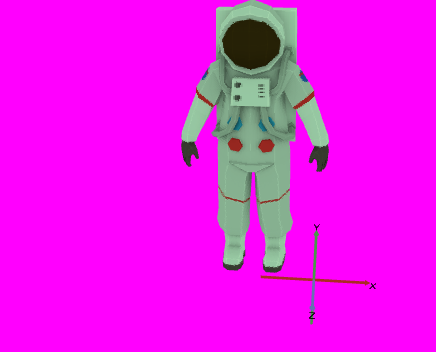
  {
    "@context": "http://iiif.io/api/presentation/4/context.json",
    "id": "https://iiif.io/api/presentation/4.0/example/uc06_3d_annotation.json",
    "type": "Manifest",
    "label": { "en": [ "Chess Pawn with Light and Camera" ] },
    "summary": {
        "en": [
            "Viewer should render the chess pawn at (-1,0,1), add the light, and base the viewport on the provided camera"
        ]
    },
    "items": [
        {
            "id": "https://iiif.io/api/presentation/4.0/example/uc06/scene/1",
            "type": "Scene",
            "label": { "en": [ "A Scene" ] },
            "backgroundColor": "#99CCFF",
            "items": [
                {
                    "id": "https://iiif.io/api/presentation/4.0/example/uc06/scene/1/page/1",
                    "type": "AnnotationPage",
                    "items": [
                        {
                            "id": "https://iiif.io/api/presentation/4.0/example/uc06/scene/1/anno/1",
                            "type": "Annotation",
                            "motivation": [ "painting" ],
                            "body": {
                                "id": "https://fixtures.iiif.io/3d/thomas_flynn/chess/Pawn_black.glb",
                                "type": "Model",
                                "format": "model/gltf-binary"
                            },
                            "target": {
                                "id": "https://iiif.io/api/presentation/4.0/example/uc06/scene/1/anno/2/specificResource/1",
                                "type": "SpecificResource",
                                "source": {
                                    "id": "https://iiif.io/api/presentation/4.0/example/uc06/scene/1",
                                    "type": "Scene"
                                },
                                "selector": [
                                    {
                                        "type": "PointSelector",
                                        "x": -1.0,
                                        "y": 1.0,
                                        "z": 1.0
                                    }
                                ]
                            }
                        },
                        {
                            "id": "https://iiif.io/api/presentation/4.0/example/uc06/scene/1/anno/2",
                            "type": "Annotation",
                            "motivation": [ "painting" ],
                            "body": {
                                "id": "https://iiif.io/api/presentation/4.0/example/uc06/scene/1/cameras/1",
                                "type": "PerspectiveCamera",
                                "label": { "en": [ "Perspective Camera 1" ] },
                                "lookAt": {
                                    "id": "https://iiif.io/api/presentation/4.0/example/uc06/scene/1/anno/1",
                                    "type": "Annotation"
                                },
                                "near": 1,
                                "far": 100,
                                "fieldOfView": 50
                            },
                            "target": {
                                "id": "https://iiif.io/api/presentation/4.0/example/uc06/scene/1/anno/2/specificResource/1",
                                "type": "SpecificResource",
                                "source": {
                                    "id": "https://iiif.io/api/presentation/4.0/example/uc06/scene/1",
                                    "type": "Scene"
                                },
                                "selector": [
                                    {
                                        "type": "PointSelector",
                                        "x": 0.0,
                                        "y": 6.0,
                                        "z": 10.0
                                    }
                                ]
                            }
                        },
                        {
                            "id": "https://iiif.io/api/presentation/4.0/example/uc06/scene/1/anno/3",
                            "type": "Annotation",
                            "motivation": [ "painting" ],
                            "body": {
                                "id": "https://iiif.io/api/presentation/4.0/example/uc06/scene/1/lights/1",
                                "type": "SpotLight",
                                "label": {
                                    "en": [
                                        "Spot Light 1"
                                    ]
                                },
                                "angle": 90.0,
                                "color": "#A0FFA0"
                            },
                            "target": {
                                "id": "https://iiif.io/api/presentation/4.0/example/uc06/scene/1/anno/3/specificResource/1",
                                "type": "SpecificResource",
                                "source": {
                                    "id": "https://iiif.io/api/presentation/4.0/example/uc06/scene/1",
                                    "type": "Scene"
                                },
                                "selector": [
                                    {
                                        "type": "PointSelector",
                                        "x": 0.0,
                                        "y": 3.0,
                                        "z": 1.0
                                    }
                                ]
                            }
                        }
                    ]
                }
            ]
        }
    ]
}
Key Points
- This example uses some of the Scene-specific resources introduced in Scene.
- A Point Selector explicitly places the model in the Scene via the Painting Annotation’s
targetproperty. In the previous example, there was an implicit Point Selector placing the model at (0,0,0) because no explicit Point Selector was provided.- The provided Light should replace any default lighting the client might have.
Definitions
Classes: Manifest, Scene, SpecificResource, PointSelector, PerspectiveCamera, SpotLight
Properties: backgroundColor, lookAt, near, far, fieldOfView, angle, color
Multiple Objects
Building on the previous example, this example extends the configured chess Scene to include multiple models painted into the Scene at specific positions with transforms applied. It represents a collection of chess game pieces with multiple pawns and a single queen. The example demonstrates painting multiple models into a Scene, including one Content Resource being painted into a Scene multiple times. Transforms and Point Selectors are used to establish position and scale for Annotations. Some external web resources referenced as Content Resources may include elements such as lights or audio that are undesirable within a Manifest, and the exclude property is used to prevent these from being rendered. The property interactionMode is used to guide clients in how to best guide or limit user interaction with rendered content. This example also introduces an Image-Based Light Annotation to simulate real-world lighting of the chess game pieces.
{
"@context": "http://iiif.io/api/presentation/4/context.json",
"id": "https://iiif.io/api/presentation/4.0/example/uc06_multiple_3d_objects.json",
"type": "Manifest",
"label": { "en": [ "Chess Pieces — Multiple Objects" ] },
"items": [
{
"id": "https://iiif.io/api/presentation/4.0/example/uc06/scene/1",
"type": "Scene",
"label": { "en": [ "Chess Game Pieces" ] },
"backgroundColor": "#99CCFF",
"interactionMode": [ "hemisphere-orbit" ],
"items": [
{
"id": "https://iiif.io/api/presentation/4.0/example/uc06/scene/1/page/1",
"type": "AnnotationPage",
"items": [
{
"id": "https://iiif.io/api/presentation/4.0/example/uc06/scene/1/anno/1",
"type": "Annotation",
"motivation": [ "painting" ],
"body": {
"id": "https://fixtures.iiif.io/3d/thomas_flynn/chess/Pawn_black.glb",
"label": { "en": [ "Pawn 1" ] },
"type": "Model",
"format": "model/gltf-binary"
},
"target": {
"id": "https://iiif.io/api/presentation/4.0/example/uc06/scene/1/anno/1/specificResource/1",
"type": "SpecificResource",
"source": {
"id": "https://iiif.io/api/presentation/4.0/example/uc06/scene/1",
"type": "Scene"
},
"selector": [
{
"type": "PointSelector",
"x": 1.0,
"y": 0.0,
"z": 0.0
}
]
}
},
{
"id": "https://iiif.io/api/presentation/4.0/example/uc06/3d/anno2",
"type": "Annotation",
"motivation": [ "painting" ],
"body": {
"id": "https://iiif.io/api/presentation/4.0/example/uc06/3d/anno2/specificResource/1",
"type": "SpecificResource",
"source": {
"id": "https://fixtures.iiif.io/3d/thomas_flynn/chess/Pawn_black.glb",
"label": { "en": [ "Pawn 2 tipped over" ] },
"type": "Model",
"format": "model/gltf-binary"
},
"transform": [
{
"type": "RotateTransform",
"x": 0.0,
"y": 0.0,
"z": -90.0
},
{
"type": "TranslateTransform",
"x": 0.0,
"y": 1.0,
"z": 0.0
}
]
},
"target": {
"type": "SpecificResource",
"id": "https://iiif.io/api/presentation/4.0/example/uc06/3d/anno2/specificResource/2",
"source": {
"id": "https://iiif.io/api/presentation/4.0/example/uc06/scene/1",
"type": "Scene"
},
"selector": [
{
"type": "PointSelector",
"x": 2.0,
"y": 0.0,
"z": 3.0
}
]
}
},
{
"id": "https://iiif.io/api/presentation/4.0/example/uc06/3d/anno3",
"type": "Annotation",
"motivation": [ "painting" ],
"exclude": [
"audio",
"lights"
],
"body": {
"id": "https://iiif.io/api/presentation/4.0/example/uc06/3d/anno3/specificResource/1",
"type": "SpecificResource",
"source": {
"id": "https://fixtures.iiif.io/3d/thomas_flynn/chess/Queen_black.glb",
"label": { "en": [ "Queen" ] },
"type": "Model",
"format": "model/gltf-binary"
},
"transform": [
{
"type": "ScaleTransform",
"x": 1.5,
"y": 1.5,
"z": 1.5
}
]
},
"target": {
"id": "https://iiif.io/api/presentation/4.0/example/uc06/3d/anno3/specificResource/2",
"type": "SpecificResource",
"source": {
"id": "https://iiif.io/api/presentation/4.0/example/uc06/scene/1",
"type": "Scene"
},
"selector": [
{
"type": "PointSelector",
"x": 1.0,
"y": 0.0,
"z": 2.0
}
]
}
},
{
"id": "https://iiif.io/api/presentation/4.0/example/uc06/3d/anno4",
"type": "Annotation",
"motivation": [ "painting" ],
"body": {
"id": "https://iiif.io/api/presentation/4.0/example/uc06/3d/lights/1",
"type": "ImageBasedLight",
"label": { "en": [ "Image-Based Light" ] },
"environmentMap": {
"id": "https://fixtures.iiif.io/3d/polyhaven/spruit_sunrise_4k.hdr",
"type": "Image",
"format": "image/vnd.radiance",
"profile": "equirectangular"
}
},
"target": {
"id": "https://iiif.io/api/presentation/4.0/example/uc06/scene/1",
"type": "Scene"
}
},
{
"id": "https://iiif.io/api/presentation/4.0/example/uc06/scene/1/anno/cam1",
"type": "Annotation",
"motivation": [ "painting" ],
"body": {
"id": "https://iiif.io/api/presentation/4.0/example/uc06/scene/1/cameras/1",
"type": "PerspectiveCamera",
"label": { "en": [ "Perspective Camera 1" ] },
"lookAt": {
"id": "https://iiif.io/api/presentation/4.0/example/uc06/scene/1/anno/1",
"type": "Annotation"
},
"near": 1,
"far": 100,
"fieldOfView": 50
},
"target": {
"id": "https://iiif.io/api/presentation/4.0/example/uc06/scene/1/anno/cam1/specificResource/1",
"type": "SpecificResource",
"source": {
"id": "https://iiif.io/api/presentation/4.0/example/uc06/scene/1",
"type": "Scene"
},
"selector": [
{
"type": "PointSelector",
"x": 0.0,
"y": 6.0,
"z": 10.0
}
]
}
},
{
"id": "https://iiif.io/api/presentation/4.0/example/uc06/scene/1/anno/light1",
"type": "Annotation",
"motivation": [ "painting" ],
"body": {
"id": "https://iiif.io/api/presentation/4.0/example/uc06/scene/1/lights/1",
"type": "SpotLight",
"label": { "en": [ "Spot Light 1" ] },
"angle": 90.0,
"color": "#A0FFA0"
},
"target": {
"id": "https://iiif.io/api/presentation/4.0/example/uc06/scene/1/anno/light1/specificResource/1",
"type": "SpecificResource",
"source": {
"id": "https://iiif.io/api/presentation/4.0/example/uc06/scene/1",
"type": "Scene"
},
"selector": [
{
"type": "PointSelector",
"x": 0.0,
"y": 3.0,
"z": 1.0
}
]
}
}
]
}
]
}
]
}
Key Points
- Each Annotation is painted into the Scene at a different point via Point Selectors.
- The second Annotation represents a pawn game piece that is tipped over, and Transforms are used to achieve this. RotateTransform is used to tip the pawn over and TranslateTransform is used to align the bottom of the pawn with the coordinate origin’s XY plane.
- The third Annotation represents a queen game piece that is scaled to be larger than the pawns using ScaleTransform.
- The fourth Annotation represents an Image-Based Light where an environment map texture image is used to simulate omnidirectional real-world light on the chess game pieces.
- The
excludeproperty instructs clients not to import or render any external audio or light content present in the Content Resource for the queen game piece.- The
interactionModeproperty instructs clients that, if possible, user interactions relating to orbiting the scene should be restricted to a hemisphere.- The PerspectiveCamera and SpotLight from the previous example are retained to establish the viewing and lighting configuration for the expanded scene.
Definitions
Classes: Manifest, Scene, SpecificResource, PointSelector, RotateTransform, TranslateTransform, ScaleTransform
Properties: exclude, interactionMode
Audio in 3D
Continuing to build on the previous examples, this Scene adds spatial audio to the chess game piece arrangement. Three Audio Emitter Annotations are painted into the Scene alongside the chess models, creating a dynamic 3D audio experience timed to the Scene’s duration.
This example is a Manifest with a single Scene with a duration. The chess game pieces from the previous example are retained, and multiple Audio Emitter Annotations are additionally painted into the Scene, with positional emitters used to create a 3D audio experience. Some of the Audio Emitter Annotations are only painted into the Scene for a limited period of time, producing dynamic change in the sounds heard within the Scene. A commenting Annotation is also provided to highlight the instant in time when a change in sound occurs.
A content resource may be annotated into a Scene for a period of time by use of a PointSelector that is temporally scoped by a FragmentSelector. The FragmentSelector has a value property, the value of which follows the media fragment syntax of t=. This annotation pattern uses the refinedBy property defined by the W3C Web Annotation Data Model. When using a URL fragment in place of a SpecificResource, the parameter t can be used to select the temporal region. Both patterns are used in this example.
An Annotation may target a specific point in time using a PointSelector’s instant property. The property’s value must be a positive floating point number indicating a value in seconds that falls within the Scene’s duration. In this example this is used for a comment Annotation.
In this example, the audio content resources have durations that do not match the Scene’s duration. The timeMode property is used to indicate the desired behavior when the duration of the content resource that is not equal to the temporal region targeted by the annotation.
{
"@context": "http://iiif.io/api/presentation/4/context.json",
"id": "https://iiif.io/api/presentation/4.0/example/uc06_audio_with_3d.json",
"type": "Manifest",
"label": {
"en": [
"Chess Pieces with Spatial Audio"
]
},
"items": [
{
"id": "https://iiif.io/api/presentation/4.0/example/uc06/scene/1",
"type": "Scene",
"label": {
"en": [
"Chess Pieces with Spatial Audio"
]
},
"backgroundColor": "#99CCFF",
"interactionMode": [ "hemisphere-orbit" ],
"duration": 60,
"items": [
{
"id": "https://iiif.io/api/presentation/4.0/example/uc06/scene/1/page/1",
"type": "AnnotationPage",
"items": [
{
"id": "https://iiif.io/api/presentation/4.0/example/uc06/3d/audio/anno1",
"type": "Annotation",
"motivation": [
"painting"
],
"body": {
"id": "https://iiif.io/api/presentation/4.0/example/uc06/audio/1",
"type": "AmbientAudio",
"source": {
"id": "https://fixtures.iiif.io/audio/bbc/bbcrewind/bbc_rewind_crowds_60s.mp3",
"type": "Audio",
"format": "audio/mp3"
},
"volume": {
"id": "https://iiif.io/api/presentation/4.0/example/uc06/quantity/1",
"type": "Quantity",
"unit": "relative",
"quantityValue": 0.1
}
},
"target": {
"id": "https://iiif.io/api/presentation/4.0/example/uc06/scene/1",
"type": "Scene"
}
},
{
"id": "https://iiif.io/api/presentation/4.0/example/uc06/3d/audio/anno2",
"type": "Annotation",
"motivation": [
"painting"
],
"timeMode": "trim",
"body": {
"id": "https://iiif.io/api/presentation/4.0/example/uc06/audio/2",
"type": "PointAudio",
"source": {
"id": "https://fixtures.iiif.io/audio/mock/GarageBand/orchestra_percussion_120s.mp3",
"type": "Audio",
"format": "audio/mp3",
"duration": 120.835
},
"volume": {
"id": "https://iiif.io/api/presentation/4.0/example/uc06/quantity/2",
"type": "Quantity",
"unit": "relative",
"quantityValue": 0.2
}
},
"target": {
"id": "https://iiif.io/api/presentation/4.0/example/uc06/selectors/anno2",
"type": "SpecificResource",
"source": {
"id": "https://iiif.io/api/presentation/4.0/example/uc06/scene/1",
"type": "Scene"
},
"selector": [
{
"id": "https://example.org/uuid/9fbd580b-895b-41b9-974a-1553329037f2",
"type": "PointSelector",
"x": -3.0,
"y": 0.0,
"z": -2.0,
"refinedBy": {
"id": "https://example.org/uuid/3d0d097b-2b37-4a15-b6a5-506e417d5115",
"type": "FragmentSelector",
"value": "t=0,30"
}
}
]
}
},
{
"id": "https://iiif.io/api/presentation/4.0/example/uc06/3d/audio/anno3",
"type": "Annotation",
"motivation": [
"painting"
],
"timeMode": "loop",
"body": {
"id": "https://iiif.io/api/presentation/4.0/example/uc06/audio/3",
"type": "SpotAudio",
"source": {
"id": "https://fixtures.iiif.io/audio/mock/GarageBand/orchestra_tuba_10s.mp3",
"type": "Audio",
"format": "audio/mp3",
"duration": 10.0
},
"angle": 45.0,
"volume": {
"id": "https://iiif.io/api/presentation/4.0/example/uc06/quantity/3",
"type": "Quantity",
"unit": "relative",
"quantityValue": 0.3
},
"lookAt": {
"id":"https://iiif.io/api/presentation/4.0/example/uc06/origin",
"type": "PointSelector",
"x": 0.0,
"y": 0.0,
"z": 0.0
}
},
"target": {
"id": "https://iiif.io/api/presentation/4.0/example/uc06/scene/1#3,0,-2&t=30,60",
"type": "Scene"
}
},
{
"id": "https://iiif.io/api/presentation/4.0/example/uc06/scene/1/anno/1",
"type": "Annotation",
"motivation": [ "painting" ],
"body": {
"id": "https://fixtures.iiif.io/3d/thomas_flynn/chess/Pawn_black.glb",
"label": { "en": [ "Pawn 1" ] },
"type": "Model",
"format": "model/gltf-binary"
},
"target": {
"id": "https://iiif.io/api/presentation/4.0/example/uc06/scene/1/anno/1/specificResource/1",
"type": "SpecificResource",
"source": {
"id": "https://iiif.io/api/presentation/4.0/example/uc06/scene/1",
"type": "Scene"
},
"selector": [
{
"type": "PointSelector",
"x": 1.0,
"y": 0.0,
"z": 0.0
}
]
}
},
{
"id": "https://iiif.io/api/presentation/4.0/example/uc06/3d/anno2",
"type": "Annotation",
"motivation": [ "painting" ],
"body": {
"id": "https://iiif.io/api/presentation/4.0/example/uc06/3d/anno2/specificResource/1",
"type": "SpecificResource",
"source": {
"id": "https://fixtures.iiif.io/3d/thomas_flynn/chess/Pawn_black.glb",
"label": { "en": [ "Pawn 2 tipped over" ] },
"type": "Model",
"format": "model/gltf-binary"
},
"transform": [
{
"type": "RotateTransform",
"x": 0.0,
"y": 0.0,
"z": -90.0
},
{
"type": "TranslateTransform",
"x": 0.0,
"y": 1.0,
"z": 0.0
}
]
},
"target": {
"type": "SpecificResource",
"id": "https://iiif.io/api/presentation/4.0/example/uc06/3d/anno2/specificResource/2",
"source": {
"id": "https://iiif.io/api/presentation/4.0/example/uc06/scene/1",
"type": "Scene"
},
"selector": [
{
"type": "PointSelector",
"x": 2.0,
"y": 0.0,
"z": 3.0
}
]
}
},
{
"id": "https://iiif.io/api/presentation/4.0/example/uc06/3d/anno3",
"type": "Annotation",
"motivation": [ "painting" ],
"exclude": [
"audio",
"lights"
],
"body": {
"id": "https://iiif.io/api/presentation/4.0/example/uc06/3d/anno3/specificResource/1",
"type": "SpecificResource",
"source": {
"id": "https://fixtures.iiif.io/3d/thomas_flynn/chess/Queen_black.glb",
"label": { "en": [ "Queen" ] },
"type": "Model",
"format": "model/gltf-binary"
},
"transform": [
{
"type": "ScaleTransform",
"x": 1.5,
"y": 1.5,
"z": 1.5
}
]
},
"target": {
"id": "https://iiif.io/api/presentation/4.0/example/uc06/3d/anno3/specificResource/2",
"type": "SpecificResource",
"source": {
"id": "https://iiif.io/api/presentation/4.0/example/uc06/scene/1",
"type": "Scene"
},
"selector": [
{
"type": "PointSelector",
"x": 1.0,
"y": 0.0,
"z": 2.0
}
]
}
},
{
"id": "https://iiif.io/api/presentation/4.0/example/uc06/3d/anno4",
"type": "Annotation",
"motivation": [ "painting" ],
"body": {
"id": "https://iiif.io/api/presentation/4.0/example/uc06/3d/lights/1",
"type": "ImageBasedLight",
"label": { "en": [ "Image-Based Light" ] },
"environmentMap": {
"id": "https://fixtures.iiif.io/3d/polyhaven/spruit_sunrise_4k.hdr",
"type": "Image",
"format": "image/vnd.radiance",
"profile": "equirectangular"
}
},
"target": {
"id": "https://iiif.io/api/presentation/4.0/example/uc06/scene/1",
"type": "Scene"
}
},
{
"id": "https://iiif.io/api/presentation/4.0/example/uc06/scene/1/anno/cam1",
"type": "Annotation",
"motivation": [ "painting" ],
"body": {
"id": "https://iiif.io/api/presentation/4.0/example/uc06/scene/1/cameras/1",
"type": "PerspectiveCamera",
"label": { "en": [ "Perspective Camera 1" ] },
"lookAt": {
"id": "https://iiif.io/api/presentation/4.0/example/uc06/scene/1/anno/1",
"type": "Annotation"
},
"near": 1,
"far": 100,
"fieldOfView": 50
},
"target": {
"id": "https://iiif.io/api/presentation/4.0/example/uc06/scene/1/anno/cam1/specificResource/1",
"type": "SpecificResource",
"source": {
"id": "https://iiif.io/api/presentation/4.0/example/uc06/scene/1",
"type": "Scene"
},
"selector": [
{
"type": "PointSelector",
"x": 0.0,
"y": 6.0,
"z": 10.0
}
]
}
},
{
"id": "https://iiif.io/api/presentation/4.0/example/uc06/scene/1/anno/light1",
"type": "Annotation",
"motivation": [ "painting" ],
"body": {
"id": "https://iiif.io/api/presentation/4.0/example/uc06/scene/1/lights/1",
"type": "SpotLight",
"label": { "en": [ "Spot Light 1" ] },
"angle": 90.0,
"color": "#A0FFA0"
},
"target": {
"id": "https://iiif.io/api/presentation/4.0/example/uc06/scene/1/anno/light1/specificResource/1",
"type": "SpecificResource",
"source": {
"id": "https://iiif.io/api/presentation/4.0/example/uc06/scene/1",
"type": "Scene"
},
"selector": [
{
"type": "PointSelector",
"x": 0.0,
"y": 3.0,
"z": 1.0
}
]
}
}
]
}
],
"annotations": [
{
"id": "https://iiif.io/api/presentation/4.0/example/uc06/3d/page/commenting",
"type": "AnnotationPage",
"items": [
{
"id": "https://iiif.io/api/presentation/4.0/example/uc06/3d/commenting",
"type": "Annotation",
"motivation": [
"commenting"
],
"body": {
"type": "TextualBody",
"value": "This is the point when the percussion fades and the tuba tone begins, marking the second phase of the scene's audio."
},
"target": {
"id": "https://iiif.io/api/presentation/4.0/example/uc06/scene/1/specificResource/1",
"type": "SpecificResource",
"source": {
"id": "https://iiif.io/api/presentation/4.0/example/uc06/scene/1",
"type": "Scene"
},
"selector": [
{
"type": "PointSelector",
"instant": 30.0
}
]
}
}
]
}
]
}
]
}
Key Points
- The Scene has a duration of 60 seconds.
- The Scene has three different Audio Emitter Annotations painted into the Scene—AmbientAudio, PointAudio, and SpotAudio. Each Audio Emitter uses the
volumeproperty to specify audio volume.- AmbientAudio targets the Scene via a reference to the Scene URI, which implicitly targets the Scene’s entire duration.
- PointAudio targets the Scene with a PointSelector to paint the Audio Emitter at a specific point in 3D space, and that PointSelector is temporally scoped by a FragmentSelector to target the first 30 seconds of the Scene duration.
- SpotAudio targets the Scene via a URL fragment to demonstrate an alternate approach to target a point and range of time in the Scene. It uses the
lookAtproperty to point the Audio Emitter cone toward the Scene origin.- The content resources for PointAudio and SpotAudio use the property
timeModeto specify different ways of handling mismatches between content resource audio length and Scene duration.- A commenting Annotation targets the Scene at the instant corresponding to 30 seconds of the Scene duration to highlight the point at which the percussion PointAudio stops playing and the tuba SpotAudio begins.
- It is an error to select a temporal region of a Scene that does not have a
duration, or to select a temporal region that is not within the Scene’s temporal extent. A Canvas or Scene with adurationmay not be annotated as a content resource into a Scene that does not itself have aduration.
Definitions
Classes: Manifest, Scene, SpecificResource, PointSelector, FragmentSelector, AmbientAudio, PointAudio, SpotAudio
Properties: duration, volume, angle, lookAt, timeMode
Painting a Scene into a Scene
Like Timelines or Canvases, Scenes can be painted into Scenes. As with other resources, it may be appropriate to modify the initial scale, rotation, or translation of a content resource Scene prior to painting it within another Scene. Scenes associated with SpecificResources may be manipulated through Transforms.
When a Scene is nested into another Scene, the backgroundColor of the Scene to be nested should be ignored as it would have no meaningful effect. Similarly, if both Scenes have ImageBasedLight Annotations, the ImageBasedLight Annotation of the Scene into which the Scene will be nested takes precedence. All other Annotations painted into the Scene to be nested will be painted into the Scene into which content is being nested, including Light or Camera resources. If the Scene to be nested has one or more Camera Annotations while the Scene into which content is being nested does not, the first Camera Annotation from the nested Scene will become the default Camera for the overall Scene.
This example paints the chess piece Scene from the previous examples into a parent Scene twice, placing the two chess pieces side by side.
  {
    "@context": "http://iiif.io/api/presentation/4/context.json",
    "id": "https://iiif.io/api/presentation/4.0/example/uc06_scene_in_scene.json",
    "type": "Manifest",
    "label": {
        "en": [
            "Chess Pieces — Scene in Scene"
        ]
    },
    "start": {
        "id": "https://iiif.io/api/presentation/4.0/example/uc06/scene/parent",
        "type": "Scene"
    },
    "items": [
        {
            "id": "https://iiif.io/api/presentation/4.0/example/uc06/scene/1",
            "type": "Scene",
            "label": {
                "en": [
                    "Chess Pawn"
                ]
            },
            "items": [
                {
                    "id": "https://iiif.io/api/presentation/4.0/example/uc06/scene/1/page/1",
                    "type": "AnnotationPage",
                    "items": [
                        {
                            "id": "https://iiif.io/api/presentation/4.0/example/uc06/3d/anno/1",
                            "type": "Annotation",
                            "motivation": [
                                "painting"
                            ],
                            "body": {
                                "id": "https://fixtures.iiif.io/3d/thomas_flynn/chess/Pawn_black.glb",
                                "type": "Model",
                                "format": "model/gltf-binary"
                            },
                            "target": {
                                "id": "https://iiif.io/api/presentation/4.0/example/uc06/scene/1",
                                "type": "Scene"
                            }
                        }
                    ]
                }
            ]
        },
        {
            "id": "https://iiif.io/api/presentation/4.0/example/uc06/scene/parent",
            "type": "Scene",
            "label": {
                "en": [
                    "Chess Pieces — Scene in Scene"
                ]
            },
            "items": [
                {
                    "id": "https://iiif.io/api/presentation/4.0/example/uc06/scene/parent/page/1",
                    "type": "AnnotationPage",
                    "items": [
                        {
                            "id": "https://iiif.io/api/presentation/4.0/example/uc06/scene/parent/anno/1",
                            "type": "Annotation",
                            "motivation": [
                                "painting"
                            ],
                            "body": {
                                "id": "https://iiif.io/api/presentation/4.0/example/uc06/scene/1",
                                "type": "Scene"
                            },
                            "target": {
                                "id": "https://iiif.io/api/presentation/4.0/example/uc06/scene/parent/anno/1/specificResource/1",
                                "type": "SpecificResource",
                                "source": {
                                    "id": "https://iiif.io/api/presentation/4.0/example/uc06/scene/parent",
                                    "type": "Scene"
                                },
                                "selector": [
                                    {
                                        "type": "PointSelector",
                                        "x": -2.0,
                                        "y": 0.0,
                                        "z": 0.0
                                    }
                                ]
                            }
                        },
                        {
                            "id": "https://iiif.io/api/presentation/4.0/example/uc06/scene/parent/anno/2",
                            "type": "Annotation",
                            "motivation": [
                                "painting"
                            ],
                            "body": {
                                "id": "https://iiif.io/api/presentation/4.0/example/uc06/scene/1",
                                "type": "Scene"
                            },
                            "target": {
                                "id": "https://iiif.io/api/presentation/4.0/example/uc06/scene/parent/anno/2/specificResource/1",
                                "type": "SpecificResource",
                                "source": {
                                    "id": "https://iiif.io/api/presentation/4.0/example/uc06/scene/parent",
                                    "type": "Scene"
                                },
                                "selector": [
                                    {
                                        "type": "PointSelector",
                                        "x": 2.0,
                                        "y": 0.0,
                                        "z": 0.0
                                    }
                                ]
                            }
                        }
                    ]
                }
            ]
        }
    ],
    "structures": [
        {
            "id": "https://iiif.io/api/cookbook/recipe/0027-alternative-page-order/range/r1",
            "type": "Range",
            "label": {
                "en": [
                    "Only the single parent scene should be shown"
                ]
            },
            "behavior": [
                "sequence"
            ],
            "items": [
                {
                    "id": "https://iiif.io/api/presentation/4.0/example/uc06/scene/parent",
                    "type": "Scene",
                    "label": {
                        "en": [
                            "Chess Pieces — Scene in Scene"
                        ]
                    }
                }
            ]
        }
    ]
}
Key Points
- Each Annotation’s body references the chess piece’s Scene by its URI.
- A PointSelector on each Annotation’s target places one instance to the left and one to the right of the parent Scene’s origin, resulting in two chess pieces side by side.
- The
backgroundColorof the nested chess piece Scene is ignored in the parent Scene.- Because the parent Scene has no Camera or ImageBasedLight of its own, the Camera and ImageBasedLight Annotations from the nested chess Scene are imported into the parent Scene.
- The
structuresproperty has aRangewith thebehaviorvalue “sequence”, indicating that the client should use the order within this Range, rather than the default order ofitems. This Range omits the chess piece Scene.- The
startproperty is used to indicate to the client that rendering should start with the secondScene, the parent, rather than theSceneholding the individual chess piece. This is technically redundant given the previous point, but is shown here for reference.
Definitions
Classes: Manifest, Scene, SpecificResource, PointSelector
Painting a Canvas or Timeline into a Scene
Painting nested content into a Scene has some special requirements that must be observed due to important distinctions relating to the infinite boundless 3D space described by a Scene. 2D image or video content resources can be painted into a Scene by first painting the image or video content resource on a Canvas and then painting the Canvas into the Scene. In the case of painting a Timeline into a Scene, an Audio Emitter can be painted into the scene where Timeline is the source of the Audio Emitter. This provides greater control over the intended presentation of the Timeline’s audio content within the 3D space of the Scene.
A Canvas can be painted into a Scene as an Annotation, though differences between the 2D space described by a Canvas and the 3D space described by a Scene must be considered. A Canvas describes a bounded 2D space with finite height and width measured in 2D integer coordinates with a coordinate origin at the top-left corner of the Canvas, while Scenes describe a boundless 3D space with x, y, and z axes of 3D continuous coordinates and a coordinate origin at the center of the space. Further, although 2D images or videos with pixel height and width can be painted into a Canvas, Canvas 2D coordinates are not equivalent to pixels. An image of any height and width in pixels can be painted into a Canvas with different height and width in coordinate units, and this has important consequences for painting Canvases into Scenes.
When a Canvas is painted as an Annotation targeting a Scene, the top-left corner of the Canvas (the 2D coordinate origin) is aligned with the 3D coordinate origin of the Scene. The top edge of the Canvas is aligned with (i.e., is collinear to) the positive x axis extending from the coordinate origin. The left edge of the Canvas is aligned with (i.e., is collinear to) the negative y axis extending from the coordinate origin. The direction terms “top”, “bottom”, “right”, and “left” used in this section refer to the frame of reference of the Canvas itself, not the Scene into which the Canvas is painted.
The Canvas is scaled to the Scene such that the 2D coordinate dimensions correspond to 3D coordinate units - a Canvas 16 units wide and 9 units high will extend 16 coordinate units across the x axis and 9 coordinate units across the y axis. Because Canvas coordinate units and image content resource pixels are not equivalent, any image with a 16:9 aspect ratio painted on this Canvas would extend 16 coordinate units by 9 coordinate units in the 3D space of the Scene, whether it was 160 pixels wide and 90 pixels high or 16,000 pixels wide and 9,000 pixels high. This provides one way to control the size of a Canvas painted into a Scene.
A Canvas in a Scene has a specific forward face and a backward face. By default, the forward face of a Canvas should point in the direction of the positive z axis. If the property backgroundColor is given on the Canvas, this color should also be used for the backward face of the Canvas as well as the background of the forward face. Otherwise, a reverse view of the forward face of the Canvas should be visible on the backward face.
A Point Selector can be used to modify the point at which the Canvas will be painted, by establishing a new point to align with the top-left corner of the Canvas instead of the Scene coordinate origin. Transforms can be used to modify Canvas rotation, scale, or translation, allowing in particular for an alternate method to control the size of a Canvas to be scaled appropriately to other contents within a Scene. The forward face and backward face of a Canvas can be interchanged with a Scale Transform scaling the z axis by -1.0, though this reflection will also produce mirroring.
This example paints both the chess piece Scene and a Canvas containing a chessboard image into the same parent Scene. The chess pieces from the previous examples are painted at the Scene origin, and a 2D chessboard Canvas is rotated and scaled to lie flat beneath them, so the chess pieces appear to be standing on the board.
  {
    "@context": "http://iiif.io/api/presentation/4/context.json",
    "id": "https://iiif.io/api/presentation/4.0/example/uc06_canvas_in_scene.json",
    "type": "Manifest",
    "label": { "en": [ "Chess Pieces with Chessboard Canvas" ] },
    "items": [
        {
            "id": "https://iiif.io/api/presentation/4.0/example/uc06/scene/canvas-scene",
            "type": "Scene",
            "label": { "en": [ "Chess Pieces with Chessboard Canvas" ] },
            "items": [
                {
                    "id": "https://iiif.io/api/presentation/4.0/example/uc06/scene/canvas-scene/page/1",
                    "type": "AnnotationPage",
                    "items": [
                        {
                            "id": "https://iiif.io/api/presentation/4.0/example/uc06/scene/canvas-scene/anno/1",
                            "type": "Annotation",
                            "motivation": [ "painting" ],
                            "body": {
                                "id": "https://iiif.io/api/presentation/4.0/example/uc06/scene/1",
                                "type": "Scene"
                            },
                            "target": {
                                "id": "https://iiif.io/api/presentation/4.0/example/uc06/scene/canvas-scene",
                                "type": "Scene"
                            }
                        },
                        {
                            "id": "https://iiif.io/api/presentation/4.0/example/uc06/scene/canvas-scene/anno/2",
                            "type": "Annotation",
                            "motivation": [ "painting" ],
                            "body": {
                                "id": "https://iiif.io/api/presentation/4.0/example/uc06/scene/canvas-scene/anno/2/specificResource/1",
                                "type": "SpecificResource",
                                "source": {
                                    "id": "https://iiif.io/api/presentation/4.0/example/uc06/canvas/chessboard",
                                    "type": "Canvas",
                                    "width": 8,
                                    "height": 8,
                                    "items": [
                                        {
                                            "id": "https://iiif.io/api/presentation/4.0/example/uc06/canvas/chessboard/page/1",
                                            "type": "AnnotationPage",
                                            "items": [
                                                {
                                                    "id": "https://iiif.io/api/presentation/4.0/example/uc06/canvas/chessboard/anno/1",
                                                    "type": "Annotation",
                                                    "motivation": [ "painting" ],
                                                    "body": {
                                                        "id": "https://fixtures.iiif.io/3d/thomas_flynn/chess/chessboard.png",
                                                        "type": "Image",
                                                        "format": "image/png",
                                                        "width": 1024,
                                                        "height": 1024
                                                    },
                                                    "target": {
                                                        "id": "https://iiif.io/api/presentation/4.0/example/uc06/canvas/chessboard",
                                                        "type": "Canvas"
                                                    }
                                                }
                                            ]
                                        }
                                    ]
                                },
                                "transform": [
                                    {
                                        "type": "ScaleTransform",
                                        "x": 0.5,
                                        "y": 0.5,
                                        "z": 1.0
                                    },
                                    {
                                        "type": "RotateTransform",
                                        "x": 90.0,
                                        "y": 0.0,
                                        "z": 0.0
                                    }
                                ]
                            },
                            "target": {
                                "id": "https://iiif.io/api/presentation/4.0/example/uc06/scene/canvas-scene/anno/2/specificResource/2",
                                "type": "SpecificResource",
                                "source": {
                                    "id": "https://iiif.io/api/presentation/4.0/example/uc06/scene/canvas-scene",
                                    "type": "Scene"
                                },
                                "selector": [
                                    {
                                        "type": "PointSelector",
                                        "x": -4.0,
                                        "y": 0.0,
                                        "z": -4.0
                                    }
                                ]
                            }
                        }
                    ]
                }
            ]
        }
    ]
}
Key Points
- The first Annotation paints the chess pieces Scene into the parent Scene by URI reference at the Scene origin.
- The second Annotation paints a Canvas containing a 2D chessboard image into the Scene. The Canvas is wrapped in a SpecificResource so that Transforms can be applied to it.
- A RotateTransform rotates the Canvas 90 degrees around the x-axis, so it lies flat in the plane made by the x-axis and z-axis of the Scene rather than facing toward the positive z axis.
- A ScaleTransform adjusts the size of the Canvas relative to the other Scene contents.
- A PointSelector on the Annotation’s target positions the top-left corner of the Canvas at a specific point in the Scene.
Definitions
Classes: Manifest, Scene, Canvas, SpecificResource, PointSelector, RotateTransform, ScaleTransform
Annotations
In the examples so far, Annotations have been used to associate the images, audio and other Content Resources with their Containers for presentation. IIIF uses the same W3C standard for the perhaps more familiar annotation concepts of commenting, tagging, describing and so on.
Use Case 8: Commenting on Specific Features
Commentary can be associated with a Timeline, Canvas, or Scene via Annotations with a commenting motivation.
Whereas annotations that associate content resources with Containers are included in the items property of the Container, all other types of Annotation are referenced from the annotations property. Containers, Manifests, Collections and Ranges can all have this property, linking to relevant annotations. As with the items property, annotations are grouped into one or more AnnotationPage resources. These are usually external references.
This example is a Manifest with a Canvas that contains a single photograph and an Annotation with the motivation commenting highlighting a specific feature of the photograph. It demonstrates the use of comments for contextualizing or describing specific elements of a resource. A comment on a Canvas can target a non-rectangular area. This example uses an SVG Selector to comment on a non-rectangular region of the photograph.
  {
    "@context": "http://iiif.io/api/presentation/4/context.json",
    "id": "https://iiif.io/api/presentation/4.0/example/uc08_image_annotation.json",
    "type": "Manifest",
    "label": {
        "en": [
            "Use case 8: Comment on feature of a painting"
        ]
    },
    "items": [
        {
            "id": "https://iiif.io/api/presentation/4.0/example/uc08/canvas/1",
            "type": "Canvas",
            "width": 4032,
            "height": 3024,
            "items": [
                {
                    "id": "https://iiif.io/api/presentation/4.0/example/uc08/page/1",
                    "type": "AnnotationPage",
                    "items": [
                        {
                            "id": "https://iiif.io/api/presentation/4.0/example/uc08/anno/1",
                            "type": "Annotation",
                            "motivation": [
                                "painting"
                            ],
                            "body": {
                                "id": "https://fixtures.iiif.io/images/Glen/photos/gottingen.jpg",
                                "type": "Image",
                                "format": "image/jpeg"
                            },
                            "target": {
                                "id": "https://iiif.io/api/presentation/4.0/example/uc08/canvas/1",
                                "type": "Canvas"
                            }
                        },
                        {
                            "id": "https://iiif.io/api/presentation/4.0/example/uc08/anno/2",
                            "type": "Annotation",
                            "motivation": [
                                "commenting"
                            ],
                            "body": {
                                "type": "TextualBody",
                                "language": [ "en" ],
                                "format": "text/plain",
                                "value": "This is the Goose Girl fountain in Göttingen, Germany."
                            },
                            "target": {
                                "id": "https://iiif.io/api/presentation/4.0/example/uc08/canvas/1/specificResource/1",
                                "type": "SpecificResource",
                                "source": {
                                    "id": "https://iiif.io/api/presentation/4.0/example/uc08/canvas/1",
                                    "type": "Canvas"
                                },
                                "selector": [
                                    {
                                        "id": "https://iiif.io/api/presentation/4.0/example/uc08/anno/2/selector/1",
                                        "type": "SvgSelector",
                                        "value": "<svg xmlns='http://www.w3.org/2000/svg' xmlns:xlink='http://www.w3.org/1999/xlink'><g><path d='M270.000000,1900.000000 L1530.000000,1900.000000 L1530.000000,1610.000000 L1315.000000,1300.000000 L1200.000000,986.000000 L904.000000,661.000000 L600.000000,986.000000 L500.000000,1300.000000 L270,1630 L270.000000,1900.000000' /></g></svg>"
                                    }
                                ]
                            }
                        }
                    ]
                }
            ]
        }
    ]
}
Key Points
- Annotations may alternately use a different type of Selector, called a WKT Selector, to align the Annotation to a target region within a Canvas or Scene.
Commenting about 3D sculpture
A commenting annotation can also reference a Content Resource, such as a Model, within a Scene. This is accomplished by targeting the annotation that paints the resource into the Scene. In this example, the commenting annotation targets an annotation that paints a model of a portrait bust into a scene.
In some cases it is desirable to influence the client’s positioning of the commenting annotation when rendered. This may be done to ensure that the annotation does not hide key visual elements or to ensure that the annotation itself is not obscured by resources painted in the Container, such as 3D models. In these cases, the position property may be used to define the position where a TextualBody should be rendered. The example shows a position that places the annotation at a specific coordinate within the Scene. The position is a Specific Resource that requires a source and selector.
  {
    "@context": "http://iiif.io/api/presentation/4/context.json",
    "id": "https://iiif.io/api/presentation/4.0/example/uc08_3d_annotation.json",
    "type": "Manifest",
    "label": { "en": ["2nd century BC Greek sculpture"] },
    "items": [
      {
        "id": "https://iiif.io/api/presentation/4.0/example/uc08/scene/1",
        "type": "Scene",
        "items": [
          {
            "id": "https://iiif.io/api/presentation/4.0/example/uc08/scene/1/pages/1",
            "type": "AnnotationPage",
            "items": [
                {
                    "id": "https://iiif.io/api/presentation/4.0/example/uc08/scene/1/sculpture",
                    "type": "Annotation",
                    "motivation": ["painting"] ,
                    "label": {
                        "en": ["A 1st century Roman portrait bust."]
                    },
                    "body":
                      {
                        "id": "https://fixtures.iiif.io/3d/smk/venus.glb",
                        "type": "Model"
                      },
                    "target": {
                      "id": "https://iiif.io/api/presentation/4.0/example/uc08/scene/1",
                      "type": "Scene"
                    }
                }
            ]
          }
        ]
      }
    ],
    "annotations": [
      {
        "id": "https://iiif.io/api/presentation/4.0/example/uc08/scene/1/commenting-annotation-pages/1",
        "type": "AnnotationPage",
        "items": [
          {
            "id": "https://example.org/iiif/presentation/examples/commenting/anno/3",
            "type": "Annotation",
            "motivation": ["commenting"],
            "body":
              {
                "id": "https://example.org/iiif/presentation/examples/commenting/anno/3/comment1",
                "type": "TextualBody",
                "language": "en",
                "format": "text/plain",
                "value": "This sculpture embodies the Hellenistic synthesis of idealised form and expressive naturalism that emerged in the late Greek period.",
                "position": {
                  "type": "SpecificResource",
                  "source": {
                    "id": "https://iiif.io/api/presentation/4.0/example/uc08/scene/1",
                    "type": "Scene"
                  },
                  "selector": [
                    {
                      "type": "PointSelector",
                      "x": 0.75,
                      "y": 1.5,
                      "z": 0.1
                    }
                  ]
                }
              },
            "target": {
              "id": "https://iiif.io/api/presentation/4.0/example/uc08/scene/1",
              "type": "Scene"
            }
          }
        ]
      }
    ]
}
3D Comments with Cameras
It is possible to associate a particular camera with a particular commenting annotation via activating annotations. In many complex 3D Scenes, it may not be clear from where to look at a particular point of interest. The view may be occluded by parts of the model, or other models in the Scene. In the following example, the user can explore the Scene freely, but when they select a particular comment, a specific Camera that was previously hidden (unavailable to the user) is shown, enabled, and selected. The selected Camera is now the active Camera, and the viewport into the Scene is moved to a chosen position suitable for looking at the point of interest.
{
"@context": "http://iiif.io/api/presentation/4/context.json",
"id": "https://iiif.io/api/presentation/4.0/example/uc08_3d_comments_with_cameras.json",
"type": "Manifest",
"label": {
"en": [
"Whale Cranium and Mandible with Dynamic Commenting Annotations and Custom Per-Anno Views"
]
},
"items": [
{
"id": "https://iiif.io/api/presentation/4.0/example/uc08/scene/1",
"type": "Scene",
"label": {
"en": [
"A Scene Containing a Whale Cranium and Mandible"
]
},
"items": [
{
"id": "https://iiif.io/api/presentation/4.0/example/uc08/scene/1/page/1",
"type": "AnnotationPage",
"items": [
{
"id": "https://iiif.io/api/presentation/4.0/example/uc08/3d/anno/1",
"type": "Annotation",
"motivation": [
"painting"
],
"body": {
"id": "https://iiif.io/api/presentation/4.0/example/uc08/3d/anno/1/body",
"type": "SpecificResource",
"source": {
"id": "https://fixtures.iiif.io/3d/smithsonian/whale/whale_mandible.glb",
"type": "Model",
"label": {
"en": [
"mandible"
]
},
"format": "model/gltf-binary"
},
"transform": [
{
"type": "ScaleTransform",
"x": 10,
"y": 10,
"z": 10
},
{
"type": "RotateTransform",
"x": 12.5,
"y": 0,
"z": 0
},
{
"type": "TranslateTransform",
"x": 0,
"y": 0,
"z": 0.5
}
]
},
"target": {
"id": "https://iiif.io/api/presentation/4.0/example/uc08/scene/1",
"type": "Scene"
}
},
{
"id": "https://iiif.io/api/presentation/4.0/example/uc08/3d/anno-that-paints-desired-camera-to-view-tooth",
"type": "Annotation",
"motivation": [
"painting"
],
"behavior": [
"hidden"
],
"body": {
"id": "https://iiif.io/api/presentation/4.0/example/uc08/3d/cameras/1",
"type": "PerspectiveCamera",
"label": {
"en": [
"Perspective Camera Pointed At Front of Cranium and Mandible"
]
},
"fieldOfView": 50.0,
"near": 0.10,
"far": 2000.0
},
"target": {
"id": "https://iiif.io/api/presentation/4.0/example/uc08/3d/anno/2/target",
"type": "SpecificResource",
"source": {
"id": "https://iiif.io/api/presentation/4.0/example/uc08/scene/1",
"type": "Scene"
},
"selector": [
{
"type": "PointSelector",
"x": 0.0,
"y": 0.15,
"z": 0.75
}
]
}
},
{
"id": "https://iiif.io/api/presentation/4.0/example/uc08/3d/anno2",
"type": "Annotation",
"motivation": [
"painting"
],
"body": {
"id": "https://iiif.io/api/presentation/4.0/example/uc08/3d/anno/3/body",
"type": "SpecificResource",
"source": {
"id": "https://fixtures.iiif.io/3d/smithsonian/whale/whale_cranium.glb",
"type": "Model",
"label": {
"en": [
"cranium"
]
},
"format": "model/gltf-binary"
},
"transform": [
{
"type": "ScaleTransform",
"x": 10,
"y": 10,
"z": 10
},
{
"type": "TranslateTransform",
"x": 0,
"y": 1.5,
"z": 0
}
]
},
"target": {
"id": "https://iiif.io/api/presentation/4.0/example/uc08/scene/1",
"type": "Scene"
}
}
]
}
]
}
],
"annotations": [
{
"id": "https://iiif.io/api/presentation/4.0/example/uc08/scene/1/annotations/page/1",
"type": "AnnotationPage",
"items": [
{
"id": "https://iiif.io/api/presentation/4.0/example/uc08/3d/commenting-anno-for-mandibular-tooth",
"type": "Annotation",
"motivation": [
"commenting"
],
"body": {
"type": "TextualBody",
"value": "Mandibular tooth"
},
"target": {
"id": "https://iiif.io/api/presentation/4.0/example/uc08/3d/comment/1/target",
"type": "SpecificResource",
"source": {
"id": "https://iiif.io/api/presentation/4.0/example/uc08/scene/1",
"type": "Scene"
},
"selector": [
{
"type": "PointSelector",
"x": -0.447287,
"y": 0.546212,
"z": 1.795195
}
]
}
},
{
"id": "https://iiif.io/api/presentation/4.0/example/uc08/3d/commenting-anno-for-right-pterygoid-hamulus",
"type": "Annotation",
"motivation": [
"commenting"
],
"body": {
"type": "TextualBody",
"value": "Right pterygoid hamulus"
},
"target": {
"id": "https://iiif.io/api/presentation/4.0/example/uc08/3d/comment/2/target",
"type": "SpecificResource",
"source": {
"id": "https://iiif.io/api/presentation/4.0/example/uc08/scene/1",
"type": "Scene"
},
"selector": [
{
"type": "PointSelector",
"x": -0.442066,
"y": 0.671795,
"z": 1.288055
}
]
}
},
{
"id": "https://iiif.io/api/presentation/4.0/example/uc08/3d/anno9",
"type": "Annotation",
"motivation": [
"activating"
],
"target": {
"id": "https://iiif.io/api/presentation/4.0/example/uc08/3d/commenting-anno-for-mandibular-tooth",
"type": "Annotation"
},
"body": {
"id": "https://iiif.io/api/presentation/4.0/example/uc08/3d/comment/3/body",
"type": "SpecificResource",
"source": {
"id": "https://iiif.io/api/presentation/4.0/example/uc08/3d/anno-that-paints-desired-camera-to-view-tooth",
"type": "Annotation"
},
"action": [
"show",
"enable",
"select"
]
}
}
]
}
]
}
Key Points
- The client will render a UI that presents the two commenting annotations in some form and allows the user to navigate between them. An active Camera is not provided. While there is a Camera in the Scene, it has
behavior“hidden”, and is inactive and not usable. - The commenting annotations are ordered. The client may either allow the user to navigate between annotations freely or mandate they must be explored in the given order.
- The above example instructs the client to activate the Camera when the user interacts with the first comment. The user is free to move away but any interaction with that comment will bring them back to the specific viewpoint.
Default camera:
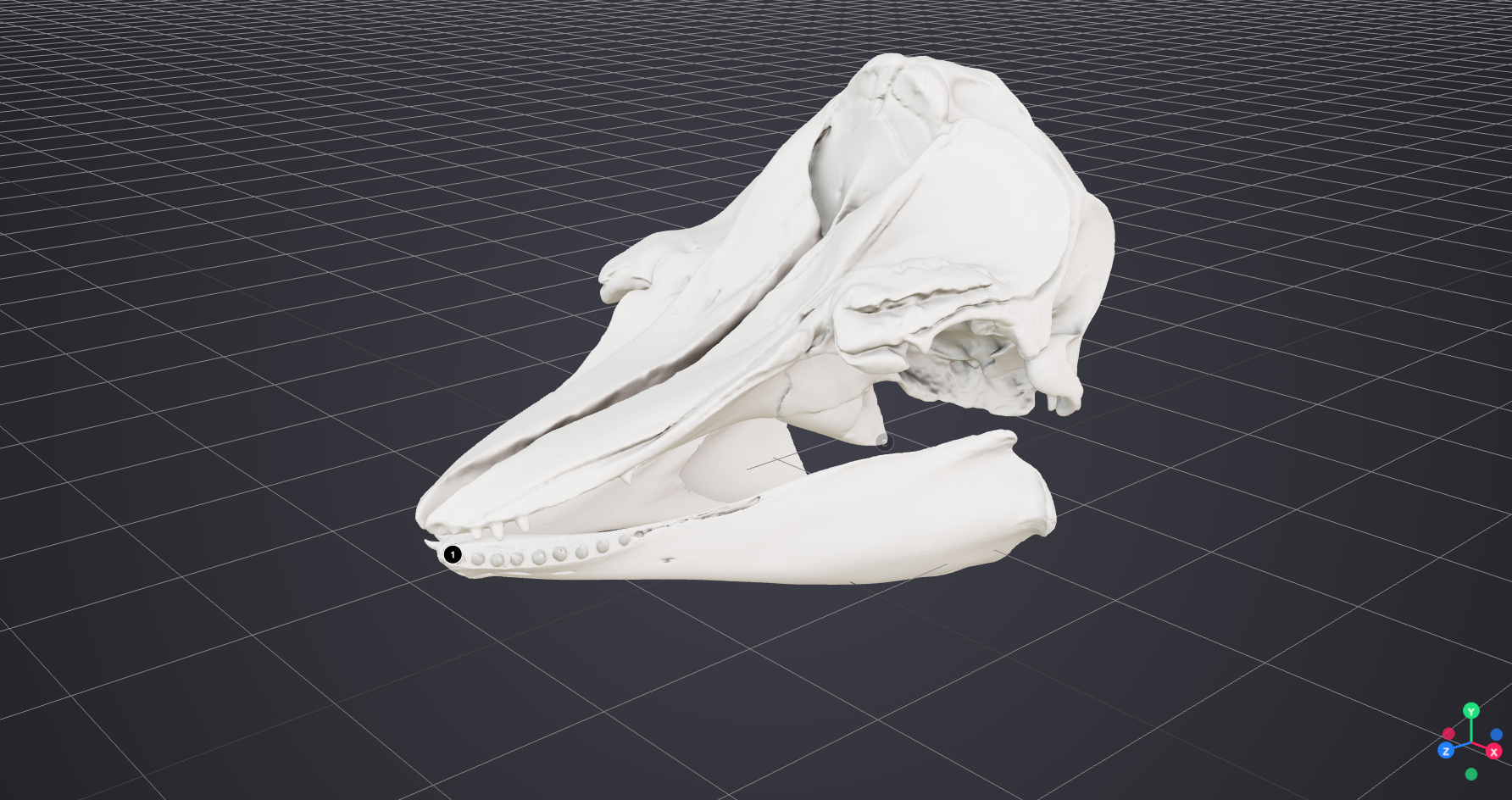
Camera when annotation selected:
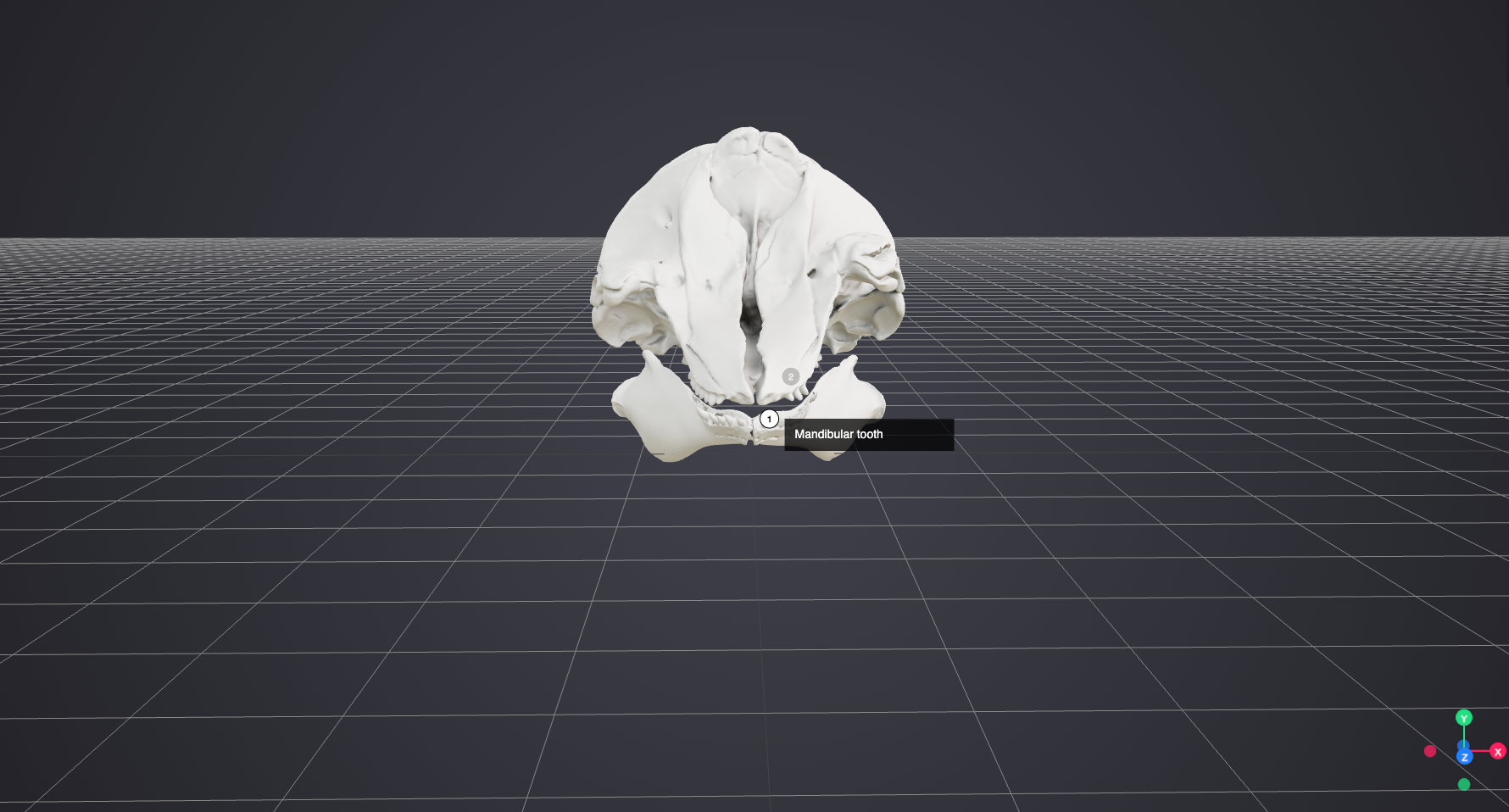
Using Scope to Select a Camera
The previous example can also be expressed in a more concise form by providing a reference to the Camera in the scope property of the commenting annotation. When scope is used in this way, it provides a short-hand way of specifying an Annotation with motivation activating that will show, enable, and select the resource(s) referenced by the scope property when a user interacts with the Annotation containing the scope property.
The commenting annotation now looks like this:
{
  "id": "https://example.org/iiif/3d/commenting-anno-for-mandibular-tooth",
  "type": "Annotation",
  "motivation": ["commenting"],
  "body": {
    "type": "TextualBody",
    "value": "Mandibular tooth"
  },
  "scope": [
    {
      "id": "https://example.org/iiif/3d/anno-that-paints-desired-camera-to-view-tooth",
      "type": "Annotation"
    }
  ],
  "target":
    {
      // SpecificResource with PointSelector
    }

},
Key Points
- This example would not include an explicit activating annotation, but it has functionality equivalent to the longer example above that does include an explicit activating annotation. When the user interacts with the comment, the Camera is shown, enabled, and selected to be the active Camera, moving the client viewport to the Camera target position.
- Compared to the example above, it is much shorter. This is the simplest and more direct approach for the common 3D use case of associating comments with Cameras.
- Although these examples concern comments and Cameras, it is also possible to use
scopein other situations where an activating annotation with anactionproperty value ofshow,enable, andselectwould be appropriate.
Use Case 9: Linking and Activating
An Annotation with the motivation linking is used to create links between resources, both within the Manifest or to external content on the web, including other IIIF resources. Examples include linking to the continuation of an article in a digitized newspaper in a different Canvas, or to an external web page that describes the diagram in the Canvas. A client typically renders the links as clickable “Hotspots” - but can offer whatever accessible affordance as appropriate. The user experience of whether the linked resource is opened in a new tab, new window or by replacing the current view is up to the implementation.
The resource the user should be taken to is the body of the annotation, and the region of the Container that the user clicks or otherwise activates to follow the link is the target:
{
  "id": "https://example.com/annotation/p0002-link",
  "type": "Annotation",
  "motivation": ["linking"],
  "body":
    {
    "id": "https://example.com/website1",
    "type": "Text"
    },
  "target": {
    "id": "https://example.com/canvas/p1#xywh=265,661,1260,1239",
    "type": "Canvas"
  }
}
Sometimes it is necessary to modify the state of resources. Annotations with the motivation activating are referred to as activating annotations, and are used to change resources from their initial state defined in the Manifest or from their current state. They allow IIIF to be used for interactive exhibitions, storytelling, digital dioramas and other interactive applications beyond simply conveying a set of static resources in a Container.
The target of the activating annotation is the resource that triggers an action. This could be a commenting annotation, for which a user might click a corresponding UI element. In other scenarios the target could be the painting annotation of a 3D model, or an annotation that targets part of a model, or a region of a Canvas, or a point or segment of a Timeline, or any other annotation that a user could interact with (in whatever manner) to trigger an event. Even a volume of space in a Scene or an extent of time in a Container with duration could be the target. When that volume or time extent is triggered - which might be the user entering that volume or the playhead reaching the extent independently of user interaction - something happens.
This specification does not define how a client indicates to a user that a resource is able to be interacted with.
The body of the activating annotation is always an ordered list of Specific Resources, each with source and action properties. The source is the resource to be acted upon in some way, and the action property is an ordered list of named actions to perform on that resource. Valid values include “show”, “hide”, “enable”, “disable”, “start”, “stop”, “reset” and “select”.
Activating annotations are provided in a Container’s annotations property. They can be mixed in with the commenting (or other interactive annotations) they target, or they can be in a separate Annotation Page. The client should evaluate all of the enabled activating annotations it can find.
Interactive 3D light switch
This example is a light switch that can be toggled on and off using activating annotations that result in behaviors being applied to or removed from a resource. A resource with the behavior value “hidden” is not rendered by the client. A resource with the behavior value “disabled” is not available for user interaction and does not trigger any actions. This example demonstrates a painted resource - a light - being shown and hidden, and activating annotations being enabled and disabled. As there are multiple annotations being enabled and disabled in order, the body of the activating Annotation is an instance of the List class. Both of these are done by the client processing the action properties of the activating annotation bodies: the actions “show” and “hide” remove or add the behavior value “hidden”, and the actions “enable” and “disable” modify the behavior value “disabled”.
{
  "@context": "http://iiif.io/api/presentation/4/context.json",
  "id": "https://example.org/iiif/manifest/switch",
  "type": "Manifest",
  "label": { "en": ["Light switch"] },
  "items": [
    {
      "id": "https://example.org/iiif/scene/switch/scene-1",
      "type": "Scene",
      "items": [
        {
          "id": "https://example.org/iiif/scene/switch/scene-1/painting-annotation-pages/1",
          "type": "AnnotationPage",
          "items": [
            {
              "id": "https://example.org/iiif/painting-annotation/lightswitch-1",
              "type": "Annotation",
              "motivation": ["painting"],
              "label": {
                "en": ["A light switch"]
              },
              "body":
                {
                  "id": "https://example.org/iiif/model/models/lightswitch.gltf",
                  "type": "Model"
                },
              "target": {
                "id": "https://example.org/iiif/scene/switch/scene-1",
                "type": "Scene"
              }
            },
            {
              "id": "https://example.org/iiif/scene/switch/scene-1/lights/point-light-4",
              "type": "Annotation",
              "motivation": ["painting"],
              "body":
                {
                  "id": "https://example.org/iiif/scene/switch/scene-1/lights/4/body",
                  "type": "PointLight"
                },
              "target":
                {
                  "type": "SpecificResource",
                  "source": {
                    "id": "https://example.org/iiif/scene/switch/scene-1",
                    "type": "Scene"
                  },
                  "selector": [
                    {
                      "type": "PointSelector",
                      "x": 5, "y": 5, "z": 5
                    }
                  ]
                },
              "behavior": ["hidden"]
            }
          ]
        }
      ],
      "annotations": [
        {
          "id": "https://example.org/iiif/scene/switch/scene-1/annos/1",
          "type": "AnnotationPage",
          "items": [
            {
              "id": "https://example.org/iiif/scene/switch/scene-1/annos/1/switch-comment-0",
              "type": "Annotation",
              "motivation": ["commenting"],
              "body":
                {
                  "type": "TextualBody",
                  "value": "Click the switch to turn the light on or off"
                },
              "target": {
                "id": "https://example.org/iiif/painting-annotation/lightswitch-1",
                "type": "Annotation"
              }
            },
            {
              "id": "https://example.org/iiif/scene/switch/scene-1/annos/1/activating-on-2",
              "type": "Annotation",
              "motivation": ["activating"],
              "target": {
                "id": "https://example.org/iiif/painting-annotation/lightswitch-1",
                "type": "Annotation"
                },
              "body": {
                "type": "List",
                "items": [
                  {
                    "type": "SpecificResource",
                    "source": {
                      "id": "https://example.org/iiif/scene/switch/scene-1/annos/1/activating-on-2",
                      "type": "Annotation"
                    },
                    "action": ["disable"]
                  },
                  {
                    "type": "SpecificResource",
                    "source": {
                      "id": "https://example.org/iiif/scene/switch/scene-1/annos/1/activating-off-3",
                      "type": "Annotation"
                    },
                    "action": ["enable"]
                  },
                  {
                    "type": "SpecificResource",
                    "source": {
                      "id": "https://example.org/iiif/scene/switch/scene-1/lights/point-light-4",
                      "type": "Annotation"
                    },
                    "action": ["show"]
                  }
                ]
              }
            },
            {
              "id": "https://example.org/iiif/scene/switch/scene-1/annos/1/activating-off-3",
              "type": "Annotation",
              "motivation": [
                "activating"
              ],
              "target": {
                "id": "https://example.org/iiif/painting-annotation/lightswitch-1",
                "type": "Annotation"
              },
              "body": {
                "type": "List",
                "items":
                  [
                    {
                      "type": "SpecificResource",
                      "source": {
                        "id": "https://example.org/iiif/scene/switch/scene-1/annos/1/activating-off-3",
                        "type": "Annotation"
                      },
                      "action": ["disable"]
                    },
                    {
                      "type": "SpecificResource",
                      "source": {
                        "id": "https://example.org/iiif/scene/switch/scene-1/lights/point-light-4",
                        "type": "Annotation"
                      },
                      "action": ["hide"]
                    },
                    {
                      "type": "SpecificResource",
                      "source": {
                        "id": "https://example.org/iiif/scene/switch/scene-1/annos/1/activating-on-2",
                        "type": "Annotation"
                      },
                      "action": ["enable"]
                    }
                  ]
                },
              "behavior": ["disabled"]
            }
          ]
        }
      ]
    }
  ]
}
Key Points
- Initially, a model of a light switch is painted into the Scene. A PointLight is also painted, but with the
behavior“hidden”, which means it is inactive (i.e., off). A commenting annotation with the text “Click the switch to turn the light on or off” targets the light switch. An activating annotation targets the painting annotation that paints the switch, so that user interaction with the light switch will trigger the activating annotation. This activating annotation has abodyproperty with three Specific Resources. The first enables the “off” activating annotation, the second shows the PointLight, and the last disables the activating annotation itself - this activating annotation can no longer be activated by a user interaction with the light switch model (itstarget).- A further activating annotation has the opposite effect. Initially this has the
behavior“disabled” - which means it is inactive. It also targets the painting annotation, but has no effect while disabled.- When the user interacts with the light switch model, the client processes any activating annotations that target it and are enabled. In this case, the first activating annotation is triggered because while both target the switch, only the first is enabled. This activation shows the light (i.e., removes its “hidden”
behaviorand therefore turning it on) and enables the other activating annotation, and disables itself.- If the user clicks the light again, the client again processes any activating annotations that target it and are not disabled. This time the second activating annotation is the enabled one - and it hides the light (turning it off) and disables itself, and enables the first activating annotation again.
- Subsequent clicks simply alternate between these two states, indefinitely.
Triggering Model Animations
Sometimes a model file has inbuilt animations. While a description of these is outside the scope of IIIF, because it is 3D-implementation-specific, as long as there is a way to refer to a model’s animation(s) by name, we can connect the animation to IIIF resources.
This pattern is also achieved with activating annotations, except that the body of the activating annotation references a named animation in the model. The body is a Specific Resource, where the source is the Painting Annotation that paints the model, and the selector is an Animation Selector with the value being a string that corresponds to the name of the animation in the model.
The format of the value string is implementation-specific, and will depend on how different 3D formats support addressing of animations within models. The same model can be painted multiple times into the scene, and you might want to activate only one painted instance of the model’s animation, thus we need to refer to the annotation that paints the model, not the model directly.
{
  "id": "https://example.org/iiif/3d/activating-animation.json",
  "type": "Manifest",
  "label": { "en": ["Music Box with lid that opens as an internal animation"] },
  "items": [
    {
      "id": "https://example.org/iiif/scene1/scene-with-activation-animation",
      "type": "Scene",
      "label": { "en": ["A Scene Containing a Music Box"] },
      "items": [
        {
          "id": "https://example.org/iiif/scene-with-activation-animation/page/p1/1",
          "type": "AnnotationPage",
          "items": [
            {
              "id": "https://example.org/iiif/3d/painting-anno-for-music-box",
              "type": "Annotation",
              "motivation": ["painting"],
              "body":
                {
                  "id": "https://raw.githubusercontent.com/IIIF/3d/main/assets/music-box.glb",
                  "type": "Model"
                },
              "target":
                {
                  // SpecificResource with PointSelector
                }
            }
          ],
          "annotations": [
            {
              "id": "https://example.org/iiif/scene1/page/activators",
              "type": "AnnotationPage",
              "items": [
                {
                  "id": "https://example.org/iiif/3d/box-opening-commenting-anno",
                  "type": "Annotation",
                  "motivation": ["commenting"],
                  "body":
                    {
                      "type": "TextualBody",
                      "value": "Click me to open the lid"
                    },
                  "target":
                    {
                      "id": "https://example.org/iiif/3d/painting-anno-for-music-box",
                      "type": "Annotation"
                    }
                }
                {
                  "id": "https://example.org/iiif/3d/box-opening-activating-anno",
                  "type": "Annotation",
                  "motivation": ["activating"],
                  "target":
                    {
                      "id": "https://example.org/iiif/3d/box-opening-commenting-anno",
                      "type": "Annotation"
                    },
                  "body":
                    {
                      "type": "SpecificResource",
                      "source": {
                        "id": "https://example.org/iiif/3d/painting-anno-for-music-box",
                        "type": "Annotation"
                      },
                      "selector": [
                        {
                          "type": "AnimationSelector",
                          "value": "open-the-lid"
                        }
                      ],
                      "action": ["start"]
                    }
                }
              ]
            }
          ]
        }
      ]
    }
  ]
}
Interactivity, Guided Viewing and Storytelling
Activating annotations add explicit mechanisms for interactive user experiences such as guided viewing and storytelling. A narrative might comprise an Annotation Page of commenting annotations that target different parts of the Container, for example a guided tour of a painting or a map. For a Canvas or Timeline it is usually sufficient to leave the interactivity to the client; the fact that comments target different extents implies the client must offer some affordance for those comments (typically the user can click each one), and in response the client will move the current play point of the Timeline to the commenting annotation target, or pan and zoom the viewport to show the relevant part of an image. For 3D this may not be enough; a particular comment may only make sense from a certain viewpoint (i.e., Camera), or different steps of the story require different Lights to be active.
In a storytelling or exhibition scenario, the non-painting annotations might be carrying informative text, or even rich HTML bodies. They can be considered to be steps in the story. The use of activating annotations allows a precise storytelling experience to be specified, including:
- providing a specific viewpoint for each step of the narrative (or even a choice of viewpoints)
- modifying the lighting of the Scene for each step, for example shining a spotlight on a point of interest
- hiding models in the Scene at a particular step
- showing additional models at a particular step
All the annotations referred to by the activating annotations’ target and body properties are already present in the Scene from the beginning. Initially, many of them may have the behavior hidden, invisible until activated.
Interactive examples are provided as recipes in the IIIF Cookbook.
The “sequence” behavior
While all Annotation Page items are inherently ordered, an Annotation Page with the behavior “sequence” is explicitly a narrative, and clients should prevent (dissuade) users from jumping about - the annotations, and the effects of them activating other contents of the Container, are intended to be experienced in order and individually. Normally, a client might display all the comments in an Annotation Page in a sidebar so they are all visible in the UI, but for an Annotation Page with behavior “sequence” only show the currently active annotation text, and next and previous UI.
Accessibility
Some IIIF resources have associated resources, such as closed-caption files for video, audio descriptions for images, or tactile graphics for visual materials, that improve access to the content for a wider range of users. These linked resources play a specific accessibility-related role relative to the resource they describe or supplement. See A/V Use Case 5: Movie with subtitles above.
IIIF uses the provides property on supplementing annotations to define the specific accessibility functionality that a linked resource enables for its target, describing why and how a client might use it rather than what the resource is by type or format. For example, a text file linked from a video might provide closedCaptions, or an audio file associated with a Canvas might provide an audioDescription.
The value of provides is an array of strings, taken from the IIIF Registry of Accessibility Values.
"annotations": [
  {
    "id": "https://example.org/iiif/presentation/examples/manifest-with-movie/subtitles",
    "type": "AnnotationPage",
    "items": [
      {
        "id": "https://example.org/iiif/presentation/examples/manifest-with-movie/subtitles/anno",
        "type": "Annotation",
        "motivation": ["supplementing"],
        "provides": [ "alternativeText" ],
        "body": {...},
        "target": {
          "id": "https://example.org/iiif/presentation/examples/manifest-with-movie/canvas",
          "type": "Canvas"
        }
      }
    ]
  }
]
Key Points
- The
providesproperty is placed on the annotation and not on the target of the annotation. - The property is primarily used to define accessibility features, but can be used to define other types of functionality, such as
transcript.
Definitions
Properties: provides
Additional Features
Services
In many of the examples in this specification an image resource has an associated IIIF Image API Service. This is the most common use of service in IIIF, but other types of service are defined by IIIF specifications or available as extensions. Rather than just offer the link for download, the client is expected to interact with the service on the user’s behalf. For the Image API, this usually means generating multiple requests for image tiles at the appropriate zoom level. For the IIIF Search API, this means accepting user query terms, sending them to the search service endpoint, and rendering the results for further interaction (typically navigation to the result location within the Manifest).
Further IIIF Services are provided by the IIIF Authorization Flow API, which provides endpoints for a client to learn about a user’s current access to a resource, and guide them through the publisher’s access control arrangements if they do not have permission, so that they can (if authorised) acquire whatever credentials the publisher requires.
Ad hoc third party services can be developed for specific needs (with no expectation that a general-purpose IIIF client would know what to do with them).
Content State
Links to resources and services build up a web of linked *content* for human and machine consumers to interact with. The IIIF Content State API defines mechanisms for IIIF software implementations to exchange references to this content, including arbitrarily fine-grained pointers into large IIIF resources. A Content State is simply a fragment of the IIIF Presentation API, wrapped in a Content State Annotation, with enough information for software receiving that fragment to load it and (typically) direct the user’s attention to the referenced point. A bookmark or citation could be passed between users via save and load functionality in viewers that understand Content State.
{
  "@context": "http://iiif.io/api/presentation/4/context.json",
  "id": "https://example.org/import/1",
  "type": "Annotation",
  "motivation": ["contentState"],
  "target": {
     "id": "https://example.org/object1/canvas7#xywh=1000,2000,1000,2000",
     "type": "Canvas",
     "partOf": [{
        "id": "https://example.org/object1/manifest",
        "type": "Manifest"
     }]
   }
}
Rotation of Image Resources
An image might not be correctly aligned with the Canvas, and require rotation as it is painted. In the following example, the image is painted with a 90-degree rotation. This example uses the ImageApiSelector to convey the number of degrees of the rotation. As this particular image has an image service, the client can use the Image API to request an image that has already been rotated on the server, or it can use the information in the ImageApiSelector to rotate the image itself. Use of the ImageApiSelector does not require the presence of an image service.
{
  "id": "http://example.org/iiif/book1/annotation/anno1",
  "type": "Annotation",
  "motivation": ["painting"],
  "body":
    {
      "type": "SpecificResource",
      "source": {
        "id": "http://example.org/iiif/book1-page1/my-image.jpg",
        "type": "Image",
        "service": {
          "id": "http://example.org/iiif/book1-page1",
          "type": "ImageService3",
          "profile": "level2"
        }
      },
      "selector": [
        {
          "type": "ImageApiSelector",
          "rotation": "90"
        }
      ]
    },
  "target":
    {
      "id": "http://example.org/iiif/book1/canvas/p1#xywh=50,50,320,240",
      "type": "Canvas"
    }
}
Appendices
Terminology
The principles of Linked Data and the Architecture of the Web are adopted in order to provide a distributed and interoperable framework. The Shared Canvas data model and JSON-LD are leveraged to create an easy-to-implement, JSON-based format.
This specification uses the following terms:
- embedded: When a resource (A) is embedded within an embedding resource (B), the complete JSON representation of resource A is present within the JSON representation of resource B, and dereferencing the URI of resource A will not result in additional information. Example: Canvas A is embedded in Manifest B.
- referenced: When a resource (A) is referenced from a referencing resource (B), an incomplete JSON representation of resource A is present within the JSON representation of resource B, and dereferencing the URI of resource A will result in additional information. Example: Manifest A is referenced from Collection B.
- HTTP(S): The HTTP or HTTPS URI scheme and internet protocol.
The terms array, JSON object, number, string, and boolean in this document are to be interpreted as defined by the Javascript Object Notation (JSON) specification.
The key words must, must not, required, shall, shall not, should, should not, recommended, may, and optional in this document are to be interpreted as described in RFC 2119.