Status of this Document
This Version: 4.0.0-
Latest Stable Version: 3.0.0
Previous Version: 3.0
Editors:
-
Michael Appleby, Yale University
-
Dawn Childress, UCLA
-
Tom Crane, Digirati
-
Jeff Mixter, OCLC
-
Robert Sanderson, Yale University
-
Julie Winchester, Duke University
Copyright © 2012-2026 Editors and contributors. Published by the IIIF Consortium under the CC-BY license, see disclaimer.
IIIF Presentation API Data Model
Introduction
The IIIF Presentation API is backed by a standards-based data model inspired by both earlier tree structured representations of cultural heritage objects, as well as linked data approaches with the same goal. It comprises four main types of resource: Structural (such as Collections, Manifests, and Ranges), Presentational Containers (Canvas, Scene and Timeline), Linking (Annotations), and Content (the images, texts, audio, video and models to be displayed). In addition to these, the model includes supporting classes such as Agents, and extensions to the standards for IIIF specific use cases, such as Transforms for manipulating 3D models within a Scene.
The Presentation API Data Model intentionally does not include any semantic or descriptive relationships or properties, such as the author of a book or the place where a statue was sculpted; it is solely for presenting content in a structured fashion to human users.
This document is part of the IIIF Presentation API 4.0 Specification.
Technical Considerations
This section describes features applicable to all of the classes, properties and affordances of the Presentation API.
Terminology
This specification uses the following terms:
- embedded: When a resource (A) is embedded within an embedding resource (B), the complete JSON representation of resource A is present within the JSON representation of resource B, and dereferencing the URI of resource A will not result in additional information. Example: Canvas A is embedded in Manifest B.
- referenced: When a resource (A) is referenced from a referencing resource (B), an incomplete JSON representation of resource A is present within the JSON representation of resource B, and dereferencing the URI of resource A will result in additional information. Example: Manifest A is referenced from Collection B.
- HTTP(S): The HTTP or HTTPS URI scheme and internet protocol.
The terms array, JSON object, number, string, and boolean in this document are to be interpreted as defined by the Javascript Object Notation (JSON) specification.
The key words must, must not, required, shall, shall not, should, should not, recommended, may, and optional in this document are to be interpreted as described in RFC 2119.
Case Sensitivity
Keys in JSON objects are case sensitive. The cases of properties and enumerated values in IIIF Presentation API responses must match those used in this specification. For example to specify that a resource is a Manifest, the property must be given as type and not Type or tYpE, and the value must be given as Manifest and not manifest or manIfEsT.
Properties with Multiple Values
Any of the properties in the API that can have multiple values must always be given as an array of values, even if there is only a single item in that array.
{
  "thumbnail": [
    {
      "id": "https://example.org/images/thumb1.jpg",
      "type": "Image",
      "format": "image/jpeg"
    }
  ]
}
Language of Property Values
Language should be associated with strings that are intended to be displayed to the user for the label and summary properties, plus the label and value properties of the metadata and requiredStatement objects. This construction is called a Language Map in the JSON-LD specification.
The values of these properties must be JSON objects, with the keys being the BCP 47 language code for the language, or if the language is either not known or the string does not have a language, then the key must be the string none. The locale, script and other subtags may be included. Clients should process subtags when comparing the values with the user’s provided preferences, however they may simply reduce all tags down to just the language, discarding everything after the first hyphen, and display all matching values. The associated values must be arrays of strings, where each item is the content in the given language.
{
  "label": {
    "en": [
      "Whistler's Mother",
      "Arrangement in Grey and Black No. 1: The Artist's Mother"
    ],
    "fr": [
      "Arrangement en gris et noir no 1",
      "Portrait de la mère de l'artiste",
      "La Mère de Whistler"
    ],
    "none": [ "Whistler (1871)" ]
  }
}
In the case where multiple values are supplied, clients must use the following algorithm to determine which values to display to the user.
- If all of the values are associated with the
nonekey, the client must display all of those values. - Else, the client should try to determine the user’s language preferences, or failing that use some default language preferences. Then:
- If any of the values have a language associated with them, the client must display all of the values associated with the language that best matches the language preference.
- If all of the values have a language associated with them, and none match the language preference, the client must select a language and display all of the values associated with that language.
- If some of the values have a language associated with them, but none match the language preference, the client must display all of the values that do not have a language associated with them.
Note that this does NOT apply to embedded textual bodies in Annotations, which use the Web Annotation pattern of
valueandlanguageas separate properties.
HTML Markup in Property Values
Minimal HTML markup may be included for processing in the summary property and the value property in the metadata and requiredStatement objects. It must not be used in label or other properties. This is included to allow content publishers to add links and simple formatting instructions to blocks of text. The content must be well-formed XML and wrapped in a single element such as div, p or span. There must not be whitespace on either side of the HTML string, and thus the first character in the string must be a ‘<’ character and the last character must be ‘>’, allowing a consuming application to test whether the value is HTML or plain text using these. To avoid a non-HTML string matching this, it is recommended that an additional whitespace character be added to the end of the value in situations where plain text happens to start and end this way.
In order to avoid HTML or script injection attacks, clients must remove:
- Tags such as
script,style,object,form,inputand similar. - All attributes other than
hrefon theatag,srcandalton theimgtag. - All
hrefattributes that start with the strings other than “http:”, “https:”, and “mailto:”. - CDATA sections.
- XML Comments.
- Processing instructions.
Clients should allow only a, b, br, div, i, img, p, small, span, sub and sup tags. Clients may choose to remove any and all tags, therefore it should not be assumed that the formatting will always be rendered. Note that publishers may include arbitrary HTML content for processing using customized or experimental applications, and the requirements for clients assume an untrusted or unknown publisher.
{ "summary": { "en": [ "<p>Short <b>summary</b> of the resource.</p>" ] } }
Resource Availability on the Web
JSON descriptions should be embedded within the JSON of parent resources, and may also be available via separate requests from the HTTP(S) URI given in the resource’s id property. Links to Content Resources must be given as a JSON object with the id and type properties and should have format or profile to give a hint as to what sort of resource is being referred to.
{
  "rendering": [
    {
      "id": "https://example.org/content/book.pdf",
      "type": "Text",
      "label": { "en": [ "Example Book (pdf)" ] },
      "format": "application/pdf"
    }
  ]
}
Classes
The following sub-sections define the classes used in the IIIF Presentation API Data Model. Only the semantics and core structural requirements are defined within this section, along with any deviations from other specifications that the classes might be drawn from.
The name of each class is given at the top of its definition below. The exact string must be used as the value of type in the JSON for the class.
Properties
All resources must have the following properties: type.
Collection
"type": "Collection"
A Collection is an ordered list of Manifests, and/or Collections, called the members of the Collection.
A Collection must have an HTTP(S) URI given in id. It must be able to be dereferenced to retrieve the JSON description.
The members of a Collection are typically listed in the items property or in a series of Collection Pages. The members must be either Collections or Manifests, and must not be other classes. They are listed in order within the items property or across consecutive Collection Pages, thereby forming a hierarchy. Collections may have no members, but this is discouraged. For example, a Collection that had its last member removed might still be valuable to maintain as an empty Collection.
If there are too many members in the collection to fit within a single document then, at the Collection publisher’s discretion, the members may be listed in Collection Pages. A reference to the first Collection Page of members is given in the first property, and the last page in the last property. In this case, the Collection must not use the items property. Collections with pages must have at least two pages, otherwise the members must be included in items on the Collection itself. Collection Pages must not be embedded within the Collection for the same reason.
Member Collections may be embedded inline within other Collections, including in Collection Pages, however Manifests must not be embedded within Collections. An embedded Collection should also have its own URI from which the JSON description is available.
Manifests or Collections may be referenced from more than one Collection. For example, an institution might define four Collections: one for modern works, one for historical works, one for newspapers, and one for books. The Manifest for a modern newspaper would then appear in both the modern Collection and the newspaper Collection. Alternatively, the institution may choose to have two separate newspaper Collections, and reference each as a sub-Collection of modern and historical.
Collections or Manifests referenced in the items property must have the id, type and label properties. They should have the thumbnail property.
Properties
A Collection must have the following properties: id, type, label
A Collection should have the following properties: metadata, summary, provider, thumbnail, total, items
A Collection may have the following properties: requiredStatement, rights, navDate, navPlace, placeholderContainer, accompanyingContainer, viewingDirection, behavior, seeAlso, service, services, homepage, rendering, partOf, start, first, last, canonical, via, annotations.
Collection Page
"type": "CollectionPage"
A Collection Page is an arbitrary division of members within the Collection to make it easier to consume by clients. It is strictly a technical affordance, and individual Collection Pages do not represent any real world set of items. The Collection Page model follows the Activity Streams Ordered Collection model, as also used in Annotation Collections, the IIIF Change Discovery API, and the IIIF Search API.
A Collection Page must have an HTTP(S) URI given in id. It must be able to be dereferenced to retrieve the JSON description. Collection Pages must not be embedded within Collections.
All Collection Pages in a Collection, with the exception of the last page, must have the next property, which provides a reference to the following Collection Page. All Collection Pages in a Collection, with the exception of the first page, must have the prev property, which provides a reference to the preceding Collection Page. These properties allow the navigation backwards and forwards within the overall set of pages. There is no way to jump to arbitrary positions in the sequence of pages, and clients must not attempt to infer such methods from the structure of the URI of the Collection Page. Collection Pages must have the partOf property, referring to the Collection of which they are part.
Properties
A Collection Page must have the following properties: id, type, partOf, and items
A Collection Page should have the following properties: next, prev
A Collection Page may have the following properties: startIndex, metadata, summary, provider, thumbnail, requiredStatement, rights, behavior, seeAlso, service, homepage, rendering, canonical, via, annotations.
Manifest
"type": "Manifest"
A Manifest is the primary unit of distribution of IIIF and provides a description of the structure and properties of a single item to be presented to the user.
Manifests must be identified by a URI and it must be an HTTP(S) URI, given in the id property. It must be able to be dereferenced to retrieve the JSON description.
The members of a Manifest are listed in the items property. The members of Manifests must be Containers, defined below, which must be embedded within the Manifest. The Containers in a single Manifest may be of different classes. The Manifest may have a structures property listing one or more Ranges which describe additional structure of the content, such as might be rendered as a table of contents. The Manifest may have an annotations property, which includes Annotation Page resources where the Annotations have the Manifest as their target. These Annotations must not have painting as their motivation.
Properties
A Manifest must have the following properties: id, type, label, items
A Manifest should have the following properties: metadata, summary, provider, thumbnail
A Manifest may have the following properties: requiredStatement, rights, navDate, navPlace, placeholderContainer, accompanyingContainer, viewingDirection, behavior, seeAlso, service, services, homepage, rendering, partOf, start, canonical, via, structures, annotations.
Container Classes
A Container is a frame of reference that allows the relative positioning of content within that frame. Container is an abstract class and must not be instantiated directly. The subclasses defined below must be used instead.
All Containers must be identified by a URI and it must be an HTTP(S) URI. The URI of the Container must not contain a fragment (a # followed by further characters), as this would make it impossible to refer to a segment of the Container’s area using the media fragment syntax of #xywh= for spatial regions, and/or #t= for temporal segments. The temporal segment must be expressed using seconds. Containers may be able to be dereferenced separately from the Manifest via their URIs as well as being embedded.
Containers should have an items property which is a list of Annotation Pages. Each Annotation Page, defined below, maintains a list of Annotations, which associate Content Resources to be rendered as part of the Container. Annotations that do not associate content to be rendered, but instead are about the Container itself, such as a comment or tag, are recorded using Annotation Pages in the annotations property of the Container. A Container may have zero annotations associated with it and still be useful, such as when the properties of the Container convey to the user that it represents a page that has not been digitized, or there is otherwise no digital content available to display. In this case the items property is not included.
Containers specify extents in space and/or time with one or more space or time dimensions such as height, width, or duration. These dimensions allow resources to be associated with specific regions of the Canvas, within the space and/or time extents provided. Content must not be associated with space or time outside of the Container’s dimensions, such as at coordinates below 0,0 or greater than specified height or width for a Canvas, or before 0 seconds or after the duration for a Timeline. Content resources that have dimensions which are not defined for the Container must not be associated with that Container by an Annotation that has the motivation value “painting”. For example, it is valid to use an Annotation that has the motivation value “painting” to associate an Image (which has only height and width) with a Canvas that has height, width, and duration properties, but it is an error to associate a Video resource (which has height, width and duration) with a Canvas that does not have a duration. Such a resource may instead be referenced using the rendering property, or by Annotations that have a motivation value other than “painting” in the annotations property.
Properties
All Containers must have the following properties: id, type.
All Containers should have the following properties: label, thumbnail, items.
All Containers may have the following properties: metadata, summary, provider, requiredStatement, rights, navDate, navPlace, placeholderContainer, accompanyingContainer, behavior, interactionMode, seeAlso, service, homepage, rendering, partOf, canonical, via, annotations.
All Containers that have the duration property may have the following properties: temporalScale.
Timeline
"type": "Timeline"
A Timeline is a Container that represents only a temporal duration, measured in seconds. Timelines allow audio content to be presented, but do not allow anything with a height, width and/or depth, like an image, video or 3D model. The duration of the Timeline is given in the duration property.
Properties
A Timeline must have the following additional properties: duration.
Canvas
"type": "Canvas"
A Canvas is a Container that represents a particular rectangular two-dimensional view and has content resources associated with it or with parts of it. This aspect ratio is defined by the height and width properties. The values of these properties are not pixels, but arbitrary square units into which pixel-based resources can be scaled. A Canvas may also have a duration, given in the duration property, allowing audio and video to be correctly positioned in time as well as in the two-dimensional space.
Properties
A Canvas must have the following additional properties: height, width.
A Canvas may have the following additional properties: duration, backgroundColor, spatialScale.
Scene
"type": "Scene"
A Scene is a Container that represents an infinitely large three-dimensional space, with an optional duration property. Scenes have infinite height (y axis), width (x axis) and depth (z axis), where 0 on each axis (the origin of the coordinate system) is treated as the center of the scene’s space. From a perspective looking along the z axis towards negative infinity, the positive y axis points upwards and the positive x axis points to the right (a right-handed Cartesian coordinate system).
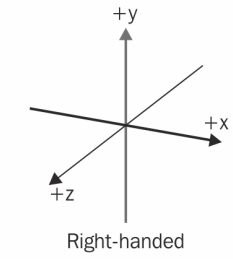
The axes of the coordinate system are measured in arbitrary units. All axes use the same unit scaling and do not necessarily correspond to any physical unit of measurement, unless spatialScale is supplied.
All 3D resources that can be added to a Scene have an implicit (e.g. Lights, Cameras) or explicit (e.g. Models, Scenes) local coordinate space. Transforms may modify the local coordinate space of a resource relative to the Scene’s “global” space.
Properties
A Scene may have the following additional properties: duration, backgroundColor, spatialScale.
Annotation Classes
The following set of classes are defined by the W3C’s Web Annotation Data Model and Vocabulary, and are heavily used within the IIIF Presentation API Data Model. Any necessary deviations from those specifications are explicitly noted and explained, such as the need for internationalization of labels.
Annotation
"type": "Annotation"
Annotations are used to associate content resources with Containers, as well as for transcriptions, commentary, tags and the association of other content. This provides a single, unified method for aligning information, and provides a standards-based framework for distinguishing parts of resources and parts of Canvases.
An Annotation must have an HTTP(S) URI given in id. The JSON-LD description of the Annotation should be returned if the URI is dereferenced, according to the Web Annotation Protocol.
When Annotations are used to associate content resources with a Canvas, the content resource is linked in the body of the Annotation. The URI of the Canvas must be repeated in the target property of the Annotation, or the source property of a Specific Resource used in the target property. Note that the URI of the Canvas in the target property may have a media fragment appended to it, thereby selecting a rectangular region within the Container’s frame of reference. Content that is to be rendered as part of the Container must be associated by an Annotation that has the motivation value painting.
Annotations in IIIF should not use the bodyValue property defined by the Web Annotation Data Model, but instead use the more consistent TextualBody class.
For Timelines and Canvases, Annotations must not target spatial or temporal points or regions outside of the bounds of the Container. For Scenes with a duration, Annotations must not target temporal points or regions outside of that duration. Scenes, Canvases and other content with spatial extents must not be annotated directly onto a Timeline which does not have a spatial extent. Resources with a duration, including Timelines and Canvases, must not be painted into Canvases and Scenes without a duration, however they may instead be referenced by a non-painting Annotation or using the rendering property.
Properties
An Annotation must have the following properties: id, type, target, motivation.
An Annotation should have the following properties: body.
An Annotation may have the following properties: label, metadata, summary, provider, thumbnail, requiredStatement, rights, navDate, navPlace, provides, behavior, scope, timeMode, stylesheet, seeAlso, service, homepage, rendering, partOf, canonical, via, exclude.
Annotation Collection
"type": "AnnotationCollection"
Annotation Collections allow Annotations to be collected together into ordered groups. For example, all of the English translation Annotations of a medieval French document could be kept separate from the transcription or an edition in modern French, or the director’s commentary on a film can be separated from the script.
Annotation Collections must have an HTTP(S) URI. The JSON-LD description should be returned if the URI is dereferenced.
Annotation Collections are always paged using first and last, rather than items as is possible for IIIF Collections, following the regular Activity Streams paging model.
Properties
An Annotation Collection must have the following properties: id, type, label.
An Annotation Collection that has the items property must not have the following properties: first, last.
An Annotation Collection that does not have the items property must have the following properties: first, last.
An Annotation Collection should have the following properties: total.
An Annotation Collection may have the following properties: metadata, summary, provider, thumbnail, requiredStatement, rights, navDate, navPlace, behavior, seeAlso, service, homepage, rendering, partOf, canonical, via, annotations.
Annotation Page
"type": "AnnotationPage"
An Annotation Page is an ordered list of Annotations, typically associated with a Container, but may be referenced from other types of resource as well. Annotation Pages enumerate and order lists of Annotations, in the same way that Collection Pages order lists of Manifests and Collections within the containing Collection.
An Annotation Page must have an HTTP(S) URI given in id. The JSON-LD description should be returned if the URI is dereferenced. The Annotations are listed in the items property of the Annotation Page.
Properties
An Annotation Page must have the following properties: id, type, items
An Annotation Page should have the following properties: next, prev, partOf
An Annotation Page may have the following properties: label, startIndex, metadata, summary, provider, thumbnail, requiredStatement, rights, behavior, seeAlso, service, homepage, rendering, canonical, via, annotations.
Specific Resource
"type": "SpecificResource"
A Specific Resource is a resource in the context of an Annotation. They are used to record further properties or relationships needed to understand the particular contextual use, such as which part of the resource is used or how it should be rendered. In IIIF, the Specific Resource model from the Web Annotation Data Model has some additional properties beyond those defined by the W3C, such as transform and position.
When the source resource of a Specific Resource is a Content Resource, such as an image, then the Specific Resource should be treated as a Content Resource as well. In the case of an image, the Specific Resource might have the height and width properties.
A Specific Resource must have an HTTP(S) URI given in id. This allows it to be addressed by other parts of the model, such as an Activating Annotation.
Properties
A Specific Resource must have the following properties: id, type, source
A Specific Resource may have the following properties: selector, position, transform, scope, styleClass, height, width, duration, language, label, metadata, summary, provider, thumbnail, requiredStatement, rights, behavior, seeAlso, service, homepage, rendering, canonical, via, annotations, action.
Textual Body
"type": "TextualBody"
A Textual Body is an embedded resource within an Annotation that carries, as the name suggests, a text as the body of the Annotation. It is defined by the Web Annotation Data Model, and this specification defines a new property for position that allows it to be positioned within a Container for rendering. Textual Bodies can be considered as Content Resources.
Properties
A Textual Body must have the following properties: type, value
A Textual Body may have the following properties: id, position, styleClass, height, width, language, format, label, metadata, summary, provider, thumbnail, requiredStatement, rights, behavior, seeAlso, service, homepage, rendering, canonical, via, annotations.
Choice
"type": "Choice"
A Choice is a Web Annotation construction that allows one entry from a list to be selected for processing or display.
The client may use any method to determine which item to select, including presenting the Choice to the user for a decision or using the properties of the items to make the decision. In the absence of any information, the client should select the first item in the array and publishers should list the items in order of preference. This specification allows behavior and other properties to be added to a Choice to influence how it is processed.
A Choice should have a label in order to present the choice to the user, along with its items.
Properties
A Choice must have the following properties: type, items
A Choice should have the following properties: label
A Choice may have the following properties: id, metadata, summary, provider, thumbnail, requiredStatement, behavior, seeAlso.
Composite
"type": "Composite"
A Composite is a Web Annotation construction where all of the resources are required for the correct interpretation of the set of resources in the context of the Annotation, as opposed to Choice where the client selects only one of the items or allows the user to make that selection. For Composite, the client should present all of the resources listed in the items property, however order or priority is not specified. For example, if a Composite is used as the target of a commenting Annotation, then it is the unordered set of resources that is being commented on.
Properties
A Composite must have the following properties: type, items
A Composite should have the following properties: label
A Composite may have the following properties: id, metadata, summary, provider, thumbnail, requiredStatement, behavior, seeAlso.
List
"type": "List"
A List is a Web Annotation construction where all of the resources are required, in the given order, for the correct interpretation of the set. For example, if a List is used as the target of a commenting Annotation, then it is the ordered list of resources that are being commented on, rather than each independently.
Properties
A List must have the following properties: type, items
A List should have the following properties: label
A List may have the following properties: id, metadata, summary, provider, thumbnail, requiredStatement, behavior, seeAlso.
Independents
"type": "Independents"
An Independents resource is a Web Annotation construction where each of the resources independently participates in the annotation, rather than as a set. For example, if an Independents resource is used as the target of a commenting Annotation, then the body resource is about each of the entries in items separately, rather than the collection as a single entity. In the Web Annotation Data Model this is equivalent to having multiple independent bodies or targets listed directly in the Annotation, however this specification requires a single resource for both body and target.
Properties
An Independents must have the following properties: type, items
An Independents should have the following properties: label
An Independents may have the following properties: id, metadata, summary, provider, thumbnail, requiredStatement, behavior, seeAlso.
CSS Stylesheet
"type": "CssStylesheet"
A CSS Stylesheet is a resource class defined in the Web Annotation Data Model to represent external CSS Stylesheets, used to associate styles with resources used in the Annotation.
Properties
A CSS Stylesheet must have the following properties: type
A CSS Stylesheet may have the following properties: id, value
Content Resources
Content Resources are resources on the Web such as images, audio, video, 3D models, or text which can be associated with a Container via an Annotation, or be used with thumbnail, rendering or similar properties.
Content Resources must have an HTTP(S) URI given in id. It must be able to be dereferenced to retrieve the representation of the Content Resource.
If the Content Resource is an Image, and a IIIF Image service is available for it, then the id property of the Content Resource may be a complete URI to any particular representation supported by the Image Service, such as https://example.org/image1/full/1000,/0/default.jpg, but must not be just the URI of the Image Service. The Image should have the service referenced from it using the service property.
If the Content Resource is a 3D Model, then regardless of the file format, it is treated as being within an infinitely large three-dimensional space with an origin (0 on all three axes). This is described as its “local coordinate space”. 3D Content Resources may be painted into Scenes via a painting Annotation. When painted as an Annotation, the origin of the 3D Content Resource’s local coordinate space must be aligned with either the Scene coordinate origin by default or with a specific 3D point in the Scene if a Point Selector is used.
Non-3D Content Resources such as images, audio, and video must not be painted into a Scene as Annotations. Instead, to include image and video resources in a Scene, the resource(s) must be painted on to a Canvas that is painted into the Scene. To include audio resources in a Scene, the resource(s) or Timeline must be referenced by an AudioEmitter that is painted into the Scene.
If there is a need to distinguish between Content Resources, then all such resources should have the label property.
Containers may be treated as content resources for the purposes of annotating on to other Containers. In this situation, the Container may be embedded within the Annotation, be a reference within the same Manifest, or require dereferencing to obtain its description. This is often described as “nesting”.
A Canvas painted into a Scene has special requirements. The top-left corner of the Canvas must be aligned with either the Scene coordinate origin by default or with a specific 3D point in the Scene if a Point Selector is used. The Canvas must be scaled to the Scene such that Canvas coordinate dimensions after any Transforms are applied correspond to Scene coordinate dimensions with 1:1 scaling. A Canvas painted into a Scene as an Annotation has forward and backward faces, and by default the forward face is toward the positive z axis of the Scene, though this may be modified by Transforms. The content of the Canvas should be displayed on the forward face, and the backward face should display either any backgroundColor of the Canvas or a reverse view of the content.
A Scene painted into a Scene has two special processing rules. The first is that any backgroundColor of the Scene to be painted should be ignored. The second is that when both Scenes have Image-Based Light Annotations, clients may ignore any Image-Based Light Annotation of the Scene to be painted.
Properties
A Content Resource must have the following properties: id, type.
A Content Resource should have the following properties: label
A Content Resource may have the following properties: height, width, duration, language, format, fileSize, metadata, summary, provider, thumbnail, requiredStatement, rights, behavior, profile, seeAlso, service, homepage, rendering, canonical, via, annotations.
Selectors
The Web Annotation Data Model defines several Selectors, which describe how to find a specific segment of that resource to be used. As noted, the nature of a Selector is dependent on the type of resource that they select out of, and the methods needed for those descriptions will vary. The Selectors from the Web Annotation Data Model and other sources may be used within the IIIF Presentation API Data Model, including any not listed here. This specification defines several additional Selector classes for use.
Properties
All Selectors may have the following properties: refinedBy.
Fragment Selector
"type": "FragmentSelector"
Fragment Selectors use the fragment part of the URI specification to define a selection mechanism for parts of resources. The definition of the representation’s media type specifies the structure of the value of the fragment. This is commonly used in IIIF to include the media fragment syntax of xywh=<x>,<y>,<width>,<height> to define a 2 dimensional region.
For more information about Fragment Selectors, see the Web Annotation Data Model.
Properties
A Fragment Selector must have the following properties: type, value.
A Fragment Selector may have the following properties: id, conformsTo.
SVG Selector
"type": "SvgSelector"
SVG Selectors use the SVG specification to define a non-rectangular part of a resource. This allows for polygons, circles and multiple shapes to be used to highlight or otherwise select regions of images or other two-dimensional resources.
For more information about SVG Selectors, see the Web Annotation Data Model.
Properties
An SVG Selector must have the following properties: type, value.
An SVG Selector may have the following properties: id.
Point Selector
"type": "PointSelector"
There are common use cases in which a point, rather than a range or area, is the target of the Annotation. For example, putting a pin in a map should result in an exact point, not a very small rectangle. Points in time are not very short durations, and user interfaces should, equally, treat these differently. This is particularly important when zooming in (either spatially or temporally) beyond the scale of the frame of reference.
The spatial aspect of the point is given with x and y for a two-dimensional point, along with z for a three-dimensional point. The temporal aspect of the point is given with instant. If instant is not supplied, and the target resource has a duration, the selector is interpreted as targeting the entire duration. If instant is supplied, but no spatial point, the selector is interpreted as targeting the entire spatial aspect of the resource.
For 3D content resources painted into a Scene that have a local coordinate space relative to the global coordinate space of the Scene, clients must align the local coordinate origin of the content resource with the 3D point indicated by the Point Selector within the Scene. Thus the 3D resource’s origin is placed at the desired point in the Scene. For a Canvas painted into a Scene as an Annotation, the top-left corner of the Canvas (the Canvas coordinate origin) must be aligned with the 3D point indicated by the Point Selector within the Scene.
Properties
A Point Selector must have the following properties: type
A Point Selector may have the following properties: id, x, y, z, instant.
{
  "id": "https://example.org/selectors/1",
  "type": "PointSelector",
  "x": 0.001,
  "y": 12.3,
  "z": 0,
  "instant": 180.0
}
WKT Selector
"type": "WktSelector"
Well-Known Text, or WKT, is an ISO standard method for describing two- and three-dimensional geometries. This selector thus goes beyond what the Web Annotation’s SVG Selector enables by incorporating the z axis, as well as additional types of selection such as MULTIPOLYGON.
The text representation is given in the value property of the selector.
Properties
A WKT Selector must have the following properties: type, value.
A WKT Selector may have the following properties: id
{
  "id": "https://example.org/selectors/2",
  "type": "WktSelector",
  "value": "POLYGON Z (0 0 0, 10 0.5 3.2 10 5.0 0, 0 0 0)"
}
Audio Content Selector
"type": "AudioContentSelector"
Video content resources consist of both visual and audio content within the same bit-level representation. There are situations when it is useful to refer to only one aspect of the content – either the visual or the audio, but not both. For example, an Annotation might associate only the visual content of a video that has spoken English in the audio, and an audio file that has the translation of that content in Spanish. The Audio Content Selector selects all of the audio content from an A/V content resource, and may be further refined with subsequent selectors to select a segment of it, using refinedBy.
Properties
An Audio Content Selector must have the following properties: type.
An Audio Content Selector may have the following properties: id
{
  "id": "https://example.org/selectors/3",
  "type": "AudioContentSelector"
}
Visual Content Selector
"type": "VisualContentSelector"
Similar to Audio Content Selectors, Visual Content Selectors select the visual aspects of the content of an A/V content resource. They may also be further refined by subsequent selectors that select an area or temporal segment of it.
Properties
A Visual Content Selector must have the following properties: type.
A Visual Content Selector may have the following properties: id
{
  "id": "https://example.org/selectors/4",
  "type": "VisualContentSelector"
}
Animation Selector
"type": "AnimationSelector"
More interactive content resources, such as 3D models, may have animations or similar features that can be activated by user interaction. For example, a model of a box might have an animation that opens the lid and a second animation that closes the lid. In order to activate those animations, they need to be selectable, and thus the specification defines an Animation Selector. The identity of the activatable aspect is given in the value property.
Properties
An Animation Selector must have the following properties: type, value.
An Animation Selector may have the following properties: id
{
  "id": "https://example.org/selectors/5",
  "type": "AnimationSelector",
  "value": "opening-1"
}
IIIF Image API Selector
"type": "ImageApiSelector"
The Image API Selector is used to describe the operations expected to occur via the definitions of the IIIF Image API. This can be used with IIIF Image API services in order to retrieve a particular image representation, but also can be applied client side on static images, such as to process rotation via CSS. If an Image API Service is available, the source resource is the abstract image as identified by the IIIF Image API base URI plus identifier, and the retrieval process involves adding the correct parameters after that base URI.
The Image API Selector has properties following the parameters from the API, and records the values which would be used to fill out the URL structure in the request if a service is available. If the property is not given, then the default value for the version of the API should be used.
| Property | Default | Description |
|---|---|---|
region |
“full” | The string to put in the region parameter of the URI. |
size |
“max” | The string to put in the size parameter of the URI. If used with a version 2.0 Image API server, the default should be considered to be “full”. |
rotation |
“0” | The string to put in the rotation parameter of the URI. Note that this must be a string in order to allow mirroring, for example “!90”. |
quality |
“default” | The string to put in the quality parameter of the URI. |
format |
“jpg” | The string to put in the format parameter of the URI. Note that the ‘.’ character is not part of the format, just the URI syntax. |
version |
“2.1” | The string representation of a published version number in “major.minor” form of the IIIF Image API. If the version given in the Selector differs from the version exposed by an Image API service, the client is expected to translate between versions as possible. |
Properties
A IIIF Image API Selector must have the following properties: type.
A IIIF Image API Selector may have the following properties: id, region, size, rotation, quality, format, version.
{
  "id": "https://example.org/selectors/6",
  "type": "ImageApiSelector",
  "region": "0,0,256,256",
  "rotation": "90"
}
Range
"type": "Range"
Ranges are used to represent structure within a Manifest beyond the default order of the Containers in the items property.
Ranges must have an HTTP(S) URI given in id. Top level Ranges are embedded or externally referenced within the Manifest in the structures property. These top level Ranges then embed or reference other Ranges, Containers or parts of Containers in their items property. Each entry in the items property must be a JSON object, and it must have the id and type properties. If a top level Range needs to be dereferenced by the client, then it must not have the items property, such that clients are able to recognize that it should be retrieved.
The included Containers and parts of Containers need not be contiguous or in the same order as in the Manifest’s items property or any other Range. Examples include newspaper articles that are continued in different sections, a chapter that starts half way through a page, or time segments of a single Canvas that represent different sections of a piece of music.
Properties
A Range must have the following properties: id, type, items.
A Range should have the following properties: label.
A Range may have the following properties: start, supplementary, metadata, summary, provider, thumbnail, requiredStatement, rights, navDate, navPlace, placeholderContainer, accompanyingContainer, viewingDirection, behavior, seeAlso, service, homepage, rendering, partOf, canonical, via, annotations.
Scene Components
The following classes are typically used within Scenes. They might have utility in other contexts, however those uses have not been defined in this specification.
Cameras
A Camera provides a view of a region of a Scene’s space from a particular position within the Scene; the client constructs a viewport into the Scene and uses the Camera to render that region. The size and aspect ratio of the viewport is client and device dependent. The first Camera defined in a Scene without the hidden behavior is the default Camera. Camera is an abstract class and must not be instantiated directly.
If a Scene does not have any Cameras defined within it, then the client must provide a default Camera. The type, properties and position of this default camera are client-dependent. If, at any time, there are no non-hidden cameras in a Scene, then the client must provide a default Camera as if no Cameras were defined.
If either the position or direction is not specified, then the position defaults to the origin of the Scene, and the direction defaults to pointing along the z axis towards negative infinity.
Properties
All Cameras must have the following properties: type.
All Cameras may have the following properties: id, label, lookAt, near, far, interactionMode.
Orthographic Camera
"type": "OrthographicCamera"
An Orthographic Camera removes visual perspective, resulting in object size remaining constant regardless of its distance from the camera.
Properties
An Orthographic Camera should have the following additional properties: viewHeight.
{
  "id": "https://example.org/iiif/camera/1",
  "type": "OrthographicCamera",
  "near": 1.0,
  "far": 100.0,
  "viewHeight": 40.0
}
Perspective Camera
"type": "PerspectiveCamera"
A Perspective Camera mimics the way the human eye sees, in that objects further from the camera are presented as being smaller.
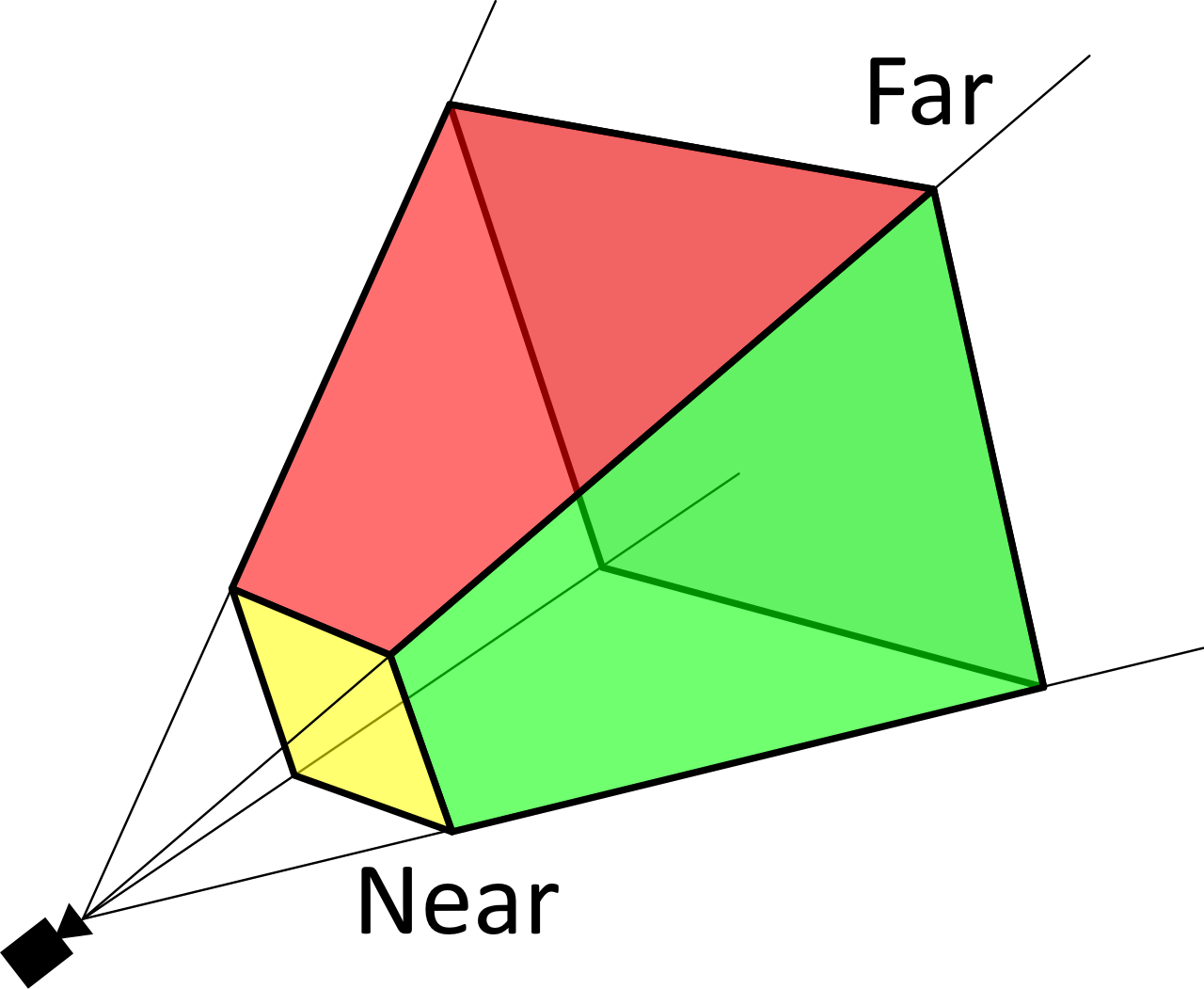
The region of the Scene’s space that is observable by the camera is bounded by two planes orthogonal to the direction the camera is facing, given in the near and far properties, and a vertical projection angle that provides the top and bottom planes of the region in the fieldOfView property.
Properties
A Perspective Camera should have the following additional properties: fieldOfView.
{
  "id": "https://example.org/iiif/camera/2",
  "type": "PerspectiveCamera",
  "near": 1.0,
  "far": 100.0,
  "fieldOfView": 45.0
}
Lights
It is necessary for there to be a Light within a Scene that illuminates the objects. If no Light is provided by the Scene’s description, then the client must provide default lighting. Light is an abstract class and must not be instantiated directly.
This specification does not define other aspects of Lights, such as the rate of decay of the intensity of the light over a distance, the maximum range of the light, or the penumbra of a cone. Implementation of these aspects is client-dependent.
The specification defines five types, or subclasses, of Light below.
Properties
All Lights must have the following properties: type.
All Lights should have the following properties: intensity.
All Lights may have the following properties: id, label.
Ambient Light
"type": "AmbientLight"
Ambient Light evenly illuminates all objects in the Scene, and does not have a direction or position. It does not have any new properties.
Properties
An Ambient Light should have the following additional properties: color.
{
  "id": "https://example.org/iiif/light/1",
  "type": "AmbientLight",
  "color": "#F0A0F0",
}
Directional Light
"type": "DirectionalLight"
Directional Lights emit their light in a specific direction as if infinitely far away, and as such the light does not come from a specific position. The rays produced are all parallel.
The light is emitted in the negative Y direction by default, thus straight down, but the orientation of the light can be altered with lookAt or with a Rotate Transform.
Properties
A Directional Light should have the following additional properties: color.
A Directional Light may have the following additional properties: lookAt.
{
  "id": "https://example.org/iiif/light/2",
  "type": "DirectionalLight",
  "color": "#A0A0F0",
  "lookAt": {"id": "https://example.org/iiif/annotations/models/1"}
}
Image-Based Light
"type": "ImageBasedLight"
Image-Based Lights illuminate objects in a Scene using lighting information derived from an image, typically a panoramic environment map. They simulate complex, realistic lighting without a specific position. Light cast is omnidirectional, but the orientation of the light can be altered with a Rotate Transform.
Properties
An Image-Based Light must have the following additional properties: environmentMap.
{
  "id": "https://example.org/iiif/light/3",
  "type": "ImageBasedLight",
  "environmentMap": {
    "id": "https://example.org/iiif/light/3/environment.hdr",
    "type": "Image",
    "format": "image/vnd.radiance",
    "profile": "equirectangular"
  },
  "intensity": {
    "type": "Quantity",
    "quantityValue": 0.5,
    "unit": "relative"
  }
}
Point Light
"type": "PointLight"
Point Lights emit in all directions from a single point within the Scene.
Properties
A Point Light should have the following additional properties: color.
{
  "id": "https://example.org/iiif/light/4",
  "type": "PointLight",
  "color": "#A0F0F0"
}
Spot Light
"type": "SpotLight"
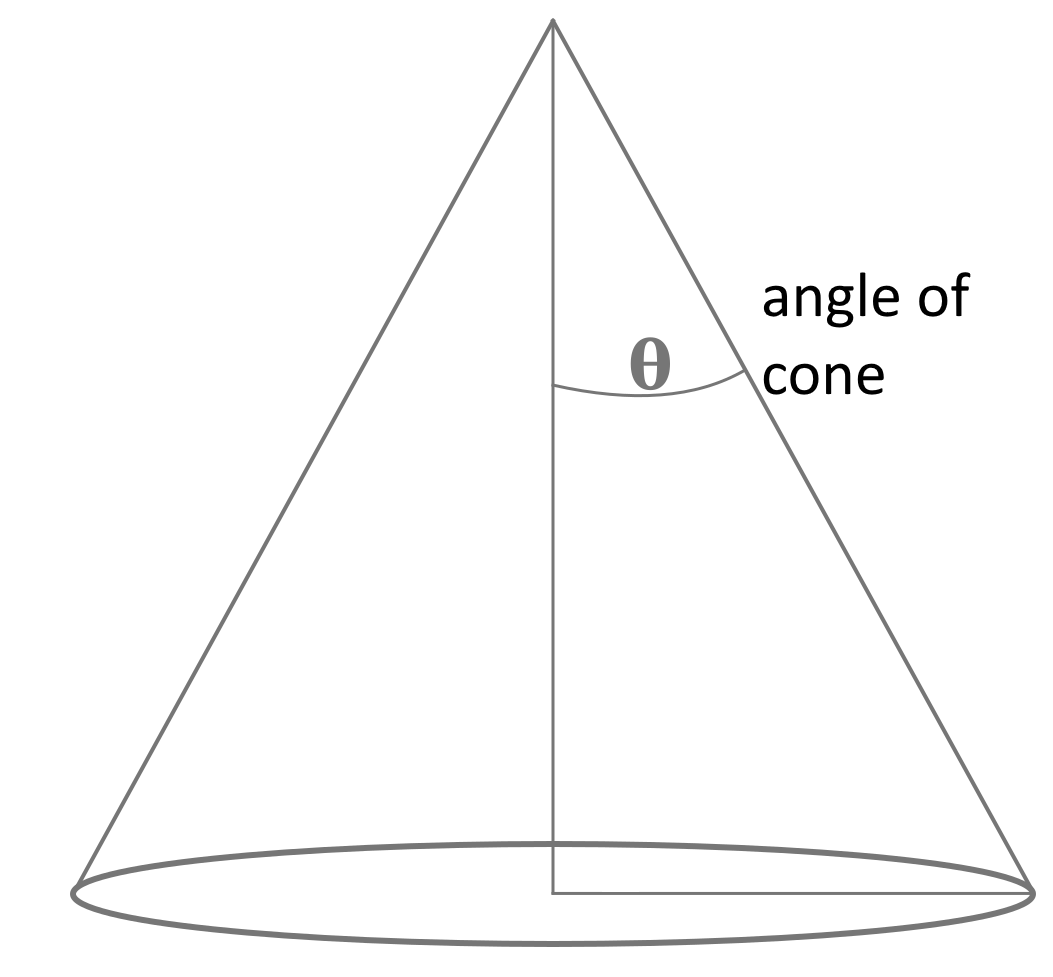
A Spot Light emits a cone of light in a given direction from a single point. The Spot Light’s angle property defines the radius of the cone. The default angle is client dependent if not specified.
A Spot Light emits in the negative Y direction by default, but the orientation of the light can be altered by subsequent transforms, or by setting the lookAt property.
Properties
Spot Lights should have the following additional properties: color, angle.
Spot Lights may have the following additional properties: lookAt.
{
  "id": "https://example.org/iiif/light/5",
  "type": "SpotLight",
  "angle": 15.0,
  "color": "#FFFFFF",
  "intensity": {
    "type": "Quantity",
    "quantityValue": 0.5,
    "unit": "relative"
  }
}
Audio Emitters
Audio is supported through the use of Audio Emitter resources annotated into Scenes, in the same way that light is emitted from the various subclasses of Light. Audio Emitter is also an abstract class, and thus must not be directly instantiated.
As the audio content must come from an audio resource, the Audio Emitter classes are subclasses of Specific Resource. Note that the source of the Audio could be a Timeline, or could be further constrained with additional specifiers as to start point, end point or other transformations.
Volume is given relative to the input audio content’s volume, and thus a volume of 1.0 is the volume as provided, 0.5 is half the volume, and 2.0 is double the volume.
Properties
All Audio Emitters must have the following properties: type, source.
All Audio Emitters should have the following properties: volume.
All Audio Emitters may have the following properties: id, label.
Ambient Audio
"type": "AmbientAudio"
Ambient Audio emits equally throughout the Scene, and does not have a position or direction.
{
  "id": "https://example.org/iiif/audio/1",
  "type": "AmbientAudio",
  "source": {
    "id": "https://example.org/media/path/to/my.mp3",
    "type": "Audio",
    "format": "audio/mp3"
  }
}
Point Audio
"type": "PointAudio"
Point Audio emits in all directions from a single point in the Scene.
{
  "id": "https://example.org/iiif/audio/2",
  "type": "PointAudio",
  "source": {
    "id": "https://example.org/media/path/to/my.mp3",
    "type": "Audio",
    "format": "audio/mp3"
  }
}
Spot Audio
"type": "SpotAudio"
Spot Audio emits a cone of sound in a given direction from a single point. The Spot Audio’s angle property defines the radius of the cone. The default angle is client dependent if not specified.
The Spot Audio emits in the negative Y direction by default, but the orientation of the sound can be altered by subsequent transforms, or by setting the lookAt property.
Properties
Spot Audio Emitters should have the following additional properties: angle
Spot Audio Emitters may have the following additional properties: lookAt
{
  "id": "https://example.org/iiif/audio/3",
  "type": "SpotAudio",
  "source": {
    "id": "https://example.org/media/path/to/my.mp3",
    "type": "Audio",
    "format": "audio/mp3"
  },
  "angle": 45.0,
  "volume": {
    "type": "Quantity",
    "quantityValue": 1.0,
    "unit": "relative"
  }
}
Transforms
An operation to apply a transformation to a resource to generate a Specific Resource. Transforms are specified by the transform property on a Specific Resource. In the context of Scenes, transforms are carried out on a resource in the implicit or explicit local coordinate space of the resource, and are performed prior to painting that resource into any subsequent coordinate space.
Properties
All Transforms must have the following properties: type.
All Transforms may have the following properties: id, label, x, y, z.
Rotate Transform
"type": "RotateTransform"
A Rotate Transform rotates the resource around one or more axes. If present, the values of properties x, y, and z must be angular values in degrees that specify the extent of rotation around each axis. Positive angular values indicate counter-clockwise rotation around the axis due to coordinate right-handedness. Axis rotation is performed with a pivot point at the origin of the local coordinate space. As an example, for a point at (1, 1, 0) in local coordinate space, rotating 90 degrees around the x axis would transform the point to be at (1, 0, 1). If any property x, y, or z is not specified or is specified to be 0.0, rotation around that axis does not occur. When more than one axis rotation is specified through multiple non-zero values for x, y, and z, rotations comprise a Euler angle with ordering x-y-z, and rotation must be carried out first around the x axis, second around the y axis, and third around the z axis.
{
  "id": "https://example.org/iiif/transform/1",
  "type": "RotateTransform",
  "x": 0.0,
  "y": 180.0,
  "z": 0.0
}
Scale Transform
"type": "ScaleTransform"
A Scale Transform scales the resource along one or more axes. If present, the values of properties x, y, and z must be multiplicative scale factors that specify the extent of scaling along each axis. As an example, for a point at 3.5 along the x axis in local coordinate space, scaling along the x axis by 2.0 would result in the point being at 7.0. If any property x, y, or z is not specified or is specified to be 1.0, scaling does not occur along that axis. Negative scale factor values indicate reflection as well as scaling along that axis.
{
  "id": "https://example.org/iiif/transform/2",
  "type": "ScaleTransform",
  "x": 2.0,
  "y": 2.0,
  "z": 2.0
}
Translate Transform
"type": "TranslateTransform"
A Translate Transform translates or moves the resource along one or more axes. If present, the values of properties x, y, and z must be coordinate unit distances that specify the distance across each axis to translate the resource. As an example, for a point at 1.0 on the x axis, translating across the x axis by 3.0 would result in the point being at 4.0. If any property x, y, or z is not present or is specified to be 0.0, translation does not occur along that axis.
{
  "id": "https://example.org/iiif/transform/3",
  "type": "TranslateTransform",
  "x": -1.0,
  "y": 0.0,
  "z": 0.0
}
Utility Classes
Agent
"type": "Agent"
An Agent represents a person or organization, typically referenced with the provider property. Note that Agent is not an abstract class with subclasses, and thus should be instantiated directly.
The Agent is not intended to be used as a primary identifier for the person or organization, nor to provide structured metadata, but instead to ensure that the information to be rendered to the user can be kept together in the situation when there are multiple agents being referenced.
Properties
An Agent must have the following properties: type, label.
An Agent should have the following properties: homepage, logo.
An Agent may have the following properties: id, seeAlso, summary.
{
  "id": "https://example.org/iiif/agent/1",
  "type": "Agent",
  "label": {"en": ["IIIF Consortium"]},
  "summary": {"en": ["The IIIF Consortium is a global community of organizations and individuals working to develop and promote the International Image Interoperability Framework (IIIF)."]},
  "homepage": [
    {
      "id": "https://iiif.io/",
      "type": "Text",
      "label": {"en": ["IIIF Home Page"]},
      "format": "text/html"
    }
  ],
  "logo": [
    {
     "id": "https://iiif.io/assets/images/logos/logo-sm.png",
     "type": "Image",
     "format": "image/png",
     "height": 30,
     "width": 34
    }
  ]
}
Quantity
"type": "Quantity"
A Quantity expresses a quantity through a numerical value and associated unit of measurement. The value of unit must be drawn from the list of possible units, or a registered extension. The definition of unit defines the list of possible unit values.
Properties
A Quantity must have the following properties: type, quantityValue, unit.
A Quantity may have the following properties: id, label.
{
  "type": "Quantity",
  "quantityValue": 1.0,
  "unit": "m"
}
Service
"type": "Service"
A Service is an external software application that a client might interact with to gain additional information or functionality for the resource that is associated with the Service. The IIIF Image API is an example of a Service, as are the Auth API services. Known types of Service are registered in the Service Registry.
For cross-version consistency, this specification defines the following values for the type or @type property for backwards compatibility with other IIIF APIs. Future versions of these APIs will define their own types. These type values are necessary extensions for compatibility of the older versions.
| Value | Specification |
|---|---|
ImageService1 |
Image API version 1 |
ImageService2 |
Image API version 2 |
SearchService1 |
Search API version 1 |
AutoCompleteService1 |
Search API version 1 |
AuthCookieService1 |
Authentication API version 1 |
AuthTokenService1 |
Authentication API version 1 |
AuthLogoutService1 |
Authentication API version 1 |
Implementations should be prepared to recognize the @id and @type property names used by older specifications, as well as id and type. Note that the @context key should not be present within the service, but instead included at the beginning of the document.
Properties
A Service must have the following properties: id, type.
A Service should have the following properties: label, profile.
A Service may have the following properties: service, @id, @type.
Services will also have specific requirements as to additional properties based on the type of service.
{
  "id": "https://example.org/iiif/image3/image1",
  "type": "ImageService3",
  "protocol": "http://iiif.io/api/image",
  "profile": "level2",
  "height": 3000,
  "width": 4500
}
Properties
accompanyingContainer
A Container that provides additional content for use while the resource that has the accompanyingContainer property is shown or played. Examples include an image to show while a duration-only Canvas is playing audio; or background audio to play while a user is navigating an image-only Manifest.
Clients may display the content of an accompanying Container when presenting the resource. As with placeholderContainer, when more than one accompanying Container is available, the client should pick the one most specific to the content. Publishers should not assume that the accompanying Container will be processed by all clients. Clients should take care to avoid conflicts between time-based media in the accompanying Container and the content of the resource that has the accompanyingContainer property.
The value of accompanyingContainer must be a JSON object with the id and type properties. The value of type must be a subclass of Container. The JSON object may have other properties valid for that Container type.
- A Collection may have the
accompanyingContainerproperty.
Clients may renderaccompanyingContaineron a Collection. - A Manifest may have the
accompanyingContainerproperty.
Clients may renderaccompanyingContaineron a Manifest. - All Container types may have the
accompanyingContainerproperty.
Clients may renderaccompanyingContaineron Containers. - A Range may have the
accompanyingContainerproperty.
Clients may renderaccompanyingContaineron a Range.
{
  "accompanyingContainer": {
    "id": "https://example.org/iiif/1/timeline/accompany",
    "type": "Timeline",
    "duration": 180.0
  }
}
action
The action property is used on Specific Resources that are in the body array of activating annotations (Annotations with the activating motivation). The values of the property are named actions which the client is being instructed to carry out upon the source of the Specific Resource. The list of possible values and their corresponding effects is given in the table below. Clients must process the Specific Resources in the order given in the Annotation, and must process the actions in the order given in the array. The client must perform all of the actions on the respective resources, and if it cannot, then it must not perform any of them. The set of actions within an Annotation is, thus, treated as an atomic transaction. If the activating annotation that is currently being processed is disabled as part of the processing, the client must not stop processing the ordered list when this occurs but keep processing until the end of the current Annotation’s set of actions. Each activating Annotation is processed completely before moving to another activating Annotation’s actions, even if an action causes another activating Annotation’s actions to be triggered. Instead, the activating Annotations are queued up in order that they are triggered, and when the client finishes one such annotation it can begin to process the next, and so on.
The possible values of action are:
| Value | Description |
|---|---|
enable |
The acted-upon resource is now able to be selected, or, if it is an activating annotation, it is able to be triggered |
disable |
The acted-upon resource is not able to be selected or triggered |
show |
The “hidden” behavior is removed from the acted-upon resource, if it has it |
hide |
The “hidden” behavior is added to the acted-upon resource, if it does not have it |
reset |
The acted-upon resource is reset to its initial state, as if it (or its Container) had just been loaded for the first time |
start |
Time-based content resources or animations within resources that are not playing are started |
stop |
Time-based content resources or animations within resources that are playing are stopped |
select |
The acted-upon resource is selected for use, such as a Camera within a Scene |
The value of action must be an array of strings, where each item in the array is drawn from the above list or a registered extension.
- A Specific Resource may have the
actionproperty.
Clients should process theactionproperty on Specific Resources.
{ "action": ["show", "enable"] }
angle
The angle property of Spot Lights and Spot Audio Emitters defines the dispersion of the cone of emitted light or sound from its direction. In other words, the angle extends from the center of the cone to the edge of the cone (the half-angle).
The value must be a floating point number greater than 0.0 and less than or equal to 90.0, and is measured in degrees. If this property is not specified, then the default value is client-dependent.
- A Spot Light should have the
angleproperty.
Clients should process theangleproperty on Spot Lights. - A Spot Audio Emitter should have the
angleproperty.
Clients should process theangleproperty on Spot Audio Emitters.
{ "angle": 15.0 }
annotations
An ordered list of Annotation Pages that contain commentary or other Annotations about this resource, separate from the Annotations that are used to paint content on to a Container. The motivation of the Annotations must not be painting, and the target of the Annotations must include this resource, or part of it, or some resource within its items hierarchy.
The value must be an array of JSON objects. Each item must have at least the id and type properties.
- A Collection may have the
annotationsproperty with at least one item.
Clients should processannotationson a Collection. - A Manifest may have the
annotationsproperty with at least one item.
Clients should processannotationson a Manifest. - A Container may have the
annotationsproperty with at least one item.
Clients should processannotationson a Container. - A Range may have the
annotationsproperty with at least one item.
Clients should processannotationson a Range. - A content resource may have the
annotationsproperty with at least one item.
Clients should processannotationson a content resource.
{
  "annotations": [
    {
      "id": "https://example.org/iiif/annotationPage/1",
      "type": "AnnotationPage",
      "items": [ { ... } ]
    }
  ]
}
backgroundColor
This property sets the background color behind any painted resources on a spatial Container, such as a Canvas or Scene.
The value must be a string which defines an RGB color. It should be a hex value starting with “#” and is treated in a case-insensitive fashion. If this property is not specified, then the default value is client-dependent.
- A Canvas may have the
backgroundColorproperty.
Clients should renderbackgroundColoron a Canvas. - A Scene may have the
backgroundColorproperty.
Clients should renderbackgroundColoron a Scene.
{ "backgroundColor": "#FFFFFF" }
behavior
A set of user experience features that the publisher of the content would prefer the client to use when presenting the resource. This specification defines the values in the table below. Others may be defined externally as an extension.
In order to determine the behaviors that are governing a particular resource, there are four inheritance rules from resources that reference the current resource:
- Collections inherit behaviors from their referencing Collection.
- Manifests DO NOT inherit behaviors from any referencing Collections.
- Containers inherit behaviors from their referencing Manifest, but DO NOT inherit behaviors from any referencing Ranges, as there might be several with different behaviors.
- Ranges inherit behaviors from any referencing Range and referencing Manifest.
Clients should interpret behaviors on a Range only when that Range is selected or is in some other way the context for the user’s current interaction with the resources. A Range with the behavior value continuous, in a Manifest with the behavior value paged, would mean that the Manifest’s Containers should be rendered in a paged fashion, unless the range is selected to be viewed, and its included Containers would be rendered in that context only as being virtually stitched together. This might occur, for example, when a physical scroll is cut into pages and bound into a codex with other pages, and the publisher would like to provide the user the experience of the scroll in its original form.
The descriptions of the behavior values have a set of which other values they are disjoint with, meaning that the same resource must not have both of two or more from that set. In order to determine which is in effect, the client should follow the inheritance rules above, taking the value from the closest resource. The user interface effects of the possible permutations of non-disjoint behavior values are client dependent, and implementers are advised to look for relevant recipes in the IIIF cookbook.
The value must be an array of strings.
- Any resource type may have the
behaviorproperty with at least one item.
Clients should processbehavioron any resource type.
| Value | Description |
|---|---|
| Temporal Behaviors | |
auto-advance |
Valid on Collections, Manifests, Containers, and Ranges that include or are Containers with at least the duration dimension. When the client reaches the end of a Canvas, or segment thereof as specified in a Range, with a duration dimension that has this behavior, it should immediately proceed to the next Container or segment and render it. If there is no subsequent Container in the current context, then this behavior should be ignored. When applied to a Collection, the client should treat the first Container of the next Manifest as following the last Container of the previous Manifest, respecting any start property specified. Disjoint with no-auto-advance. |
no-auto-advance |
Valid on Collections, Manifests, Containers, and Ranges that include or are Containers with at least the duration dimension. When the client reaches the end of a Container or segment with a duration dimension that has this behavior, it must not proceed to the next Container, if any. This is a default temporal behavior if not specified. Disjoint with auto-advance. |
repeat |
Valid on Collections and Manifests, that include Containers that have at least the duration dimension. When the client reaches the end of the duration of the final Container in the resource, and the behavior value auto-advance is also in effect, then the client should return to the first Container, or segment of a Container, in the resource that has the behavior value repeat and start playing again. If the behavior value auto-advance is not in effect, then the client should render a navigation control for the user to manually return to the first Container or segment. Disjoint with no-repeat. |
no-repeat |
Valid on Collections and Manifests, that include Containers that have at least the duration dimension. When the client reaches the end of the duration of the final Container in the resource, the client must not return to the first Container, or segment of Container. This is a default temporal behavior if not specified. Disjoint with repeat. |
| Layout Behaviors | |
unordered |
Valid on Collections, Manifests and Ranges. The resources included in resources that have this behavior have no inherent order, and user interfaces should avoid implying an order to the user. Disjoint with individuals, continuous, and paged. |
individuals |
Valid on Collections, Manifests, and Ranges. For Collections that have this behavior, each of the included Manifests are distinct objects in the given order. For Manifests and Ranges, the included Containers are distinct views, and should not be presented in a page-turning interface. This is the default layout behavior if not specified. Disjoint with unordered, continuous, and paged. |
continuous |
Valid on Collections, Manifests and Ranges, which include Canvases. Canvases included in resources that have this behavior are partial views and an appropriate rendering might display all of the Canvases virtually stitched together, such as a long scroll split into sections. This behavior has no implication for audio resources. The viewingDirection of the Manifest will determine the appropriate arrangement of the Canvases. Disjoint with unordered, individuals and paged. |
paged |
Valid on Collections, Manifests and Ranges, which include Canvases. Canvases included in resources that have this behavior represent views that should be presented in a page-turning interface if one is available. The first canvas is a single view (the first recto) and thus the second canvas likely represents the back of the object in the first canvas. If this is not the case, see the behavior value non-paged. Disjoint with unordered, individuals, and continuous. |
facing-pages |
Valid only on Canvases. Canvases that have this behavior, in a Manifest that has the behavior value paged, must be displayed by themselves, as they depict both parts of the opening. If all of the Canvases are like this, then page turning is not possible, so simply use individuals instead. Disjoint with non-paged. |
non-paged |
Valid only on Canvases. Canvases that have this behavior must not be presented in a page-turning interface, and must be skipped over when determining the page order. This behavior must be ignored if the current Manifest does not have the behavior value paged. Disjoint with facing-pages. |
| Collection Behaviors | |
multi-part |
Valid only on Collections. Collections that have this behavior consist of multiple Manifests or Collections which together form part of a logical whole or a contiguous set, such as multi-volume books or a set of journal issues. Clients might render these Collections as a table of contents rather than with thumbnails, or provide viewing interfaces that can easily advance from one member to the next. Disjoint with together. |
together |
Valid only on Collections. A client should present all of the child Manifests to the user at once in a separate viewing area with its own controls. Clients should catch attempts to create too many viewing areas. This behavior should not be interpreted as applying to the members of any child resources. Disjoint with multi-part. |
| Navigation Behaviors | |
sequence |
Valid on Ranges, where the Range is referenced in the structures property of a Manifest, and Annotation Pages. Ranges that have this behavior represent different orderings of the Containers listed in the items property of the Manifest, and user interfaces that interact with this order should use the order within the selected Range, rather than the default order of items. On an Annotation Page, this behavior indicates that the Annotations within the Page are intended to be shown in order, and the user discouraged from navigating arbitrarily amongst them. Disjoint with thumbnail-nav and no-nav. |
thumbnail-nav |
Valid only on Ranges. Ranges that have this behavior may be used by the client to present an alternative navigation or overview based on thumbnails, such as regular keyframes along a timeline for a video, or sections of a long scroll. Clients should not use them to generate a conventional table of contents. Child Ranges of a Range with this behavior must have a suitable thumbnail property. Disjoint with sequence and no-nav. |
no-nav |
Valid only on Ranges. Ranges that have this behavior must not be displayed to the user in a navigation hierarchy. This allows for Ranges to be present that capture unnamed regions with no interesting content, such as the set of blank pages at the beginning of a book, or dead air between parts of a performance, that are still part of the Manifest but do not need to be navigated to directly. Disjoint with sequence and thumbnail-nav. |
| Miscellaneous Behaviors | |
| Valid on Annotation Collections, Annotation Pages, Annotations, Specific Resources, Lights, Cameras and Choices. If this behavior is provided, then the client should not render the resource by default, but allow the user to turn it on and off. This behavior does not inherit, as it is not valid on Collections, Manifests, Ranges or Canvases. See the section on Dynamic Content for more information. |
{ "behavior": [ "auto-advance", "individuals" ] }
body
The body of an Annotation. The resources listed in body can be instances of Textual Body, Specific Resource, core Structural Resources, Content Resources, or the Annotation aggregate constructions of Choice, Composite, List and Independents if there are multiple bodies.
Some Annotations do not have bodies at all. For example a highlighting annotation only needs to visually highlight the region targeted. Note that use of the W3C bodyValue property is prohibited in IIIF, and the Textual Body class must be used instead.
For more information about Annotation bodies, see the W3C Annotation Model.
The value must be a JSON object. Each item must have the type property. Referenced resources must have the id property, which may have a fragment component such as #xywh=0,0,100,100. Aggregate constructions must have the items property.
- An Annotation should have the
bodyproperty.
Clients must process thebodyproperty on Annotations.
{ "body":
  {"type": "TextualBody", "value": "Great!"}
}
canonical
The URI that should be used to track the resource’s identity, regardless of where it is made accessible or the value of its id property. The canonical URI can then be used as the target for annotations, regardless of the URI from which it was retrieved. If this property is set, then clients must not change or delete it. Clients must not assign a canonical URI if one is not present, as the resource might already have one assigned by a different system but was not included in the representation received. Any reference to the canonical URI must be treated as a reference to this resource.
For more information about canonical, see the W3C Annotation Model.
The value must be a string, and the value must be an absolute HTTP(S) URI.
- Any resource may have the
canonicalproperty.
Clients may process thecanonicalproperty on any resource.
{ "canonical": "https://example.org/annotations/123569" }
color
This property sets the color of a Light.
The value must be a string, which defines an RGB color. It should be a hex value starting with “#” and is treated in a case-insensitive fashion. If this property is not specified, then the default value is #FFFFFF.
- An Ambient Light should have the
colorproperty.
Clients should rendercoloron an Ambient Light. - A Directional Light should have the
colorproperty.
Clients should rendercoloron a Directional Light. - A Point Light should have the
colorproperty.
Clients should rendercoloron a Point Light. - A Spot Light should have the
colorproperty.
Clients should rendercoloron a Spot Light.
{ "color": "#FFA0A0" }
conformsTo
The specification that the fragment identifier in the value property of a Fragment Selector conforms to. The value allows clients to correctly interpret the fragment identifier syntax. For example, a Fragment Selector using the media fragments specification would have a conformsTo value of http://www.w3.org/TR/media-frags/.
For more information about conformsTo, see the Web Annotation Data Model.
The value must be a string, and must be an absolute URI.
- A Fragment Selector may have the
conformsToproperty.
Clients should processconformsToon a Fragment Selector.
{ "conformsTo": "http://www.w3.org/TR/media-frags/" }
duration
The duration of a container or external content resource, given in seconds.
The value must be a positive floating point number.
- A Timeline must have the
durationproperty.
Clients must processdurationon a Timeline. - A Canvas or Scene may have the
durationproperty.
Clients must processdurationon a Canvas or Scene, if present. - Content resources should have the
durationproperty, if appropriate for the type of resource.
Clients should processdurationon content resources.
{ "duration": 125.0 }
environmentMap
A content resource representing the environment map image used by an Image-Based Light. The image provides omnidirectional lighting information and may use high dynamic range (HDR) encoding. The projection type of the image, such as equirectangular or cubic, is specified via the profile property.
The value must be a JSON object representing an Image which must have the id, type, and profile properties, and should have the format property.
- An Image-Based Light must have the
environmentMapproperty.
Clients should processenvironmentMapon an Image-Based Light.
"environmentMap": {
  "id": "https://example.org/iiif/light/3/environment.hdr",
  "type": "Image",
  "format": "image/vnd.radiance",
  "profile": "equirectangular"
}
exclude
Just as a Scene may contain multiple Annotations with models, light, and cameras, a single 3D model file can also contain a collection of 3D resources, including model geometry, assemblages of lights, and/or multiple cameras, with some of these potentially manipulated by animations. When painting Scenes, or models that themselves may contain multiple resources, into a Scene, it may be desirable to opt not to import some of these resources. This is accomplished through the Annotation property exclude, which prevents the import of audio, lights, cameras, or animations from a particular Scene or model prior to the Annotation’s body resource being painted into a Scene. When exclude is used, the excluded resource type or functionality should not be loaded into the Scene, and it is not possible to reactivate or turn on these excluded resources after loading.
| Value | Description |
|---|---|
audio |
Exclude all sound from resources, including audio tracks, audio emitters, and audio from video |
animations |
Exclude all definitions of animations from resources |
cameras |
Exclude all cameras from resources |
lights |
Exclude all lights from resources |
The value of exclude must be an array of strings, each of which is one of the values listed above. If the exclude property is not specified, then no resources are excluded.
- An Annotation may have the
excludeproperty.
Clients should process theexcludeproperty.
{ "exclude": [ "audio", "lights", "cameras", "animations" ] }
far
This property gives the distance along the axis of the camera’s orientation after which objects are no longer visible. Objects further from the camera than the far distance cannot be seen.
The value must be a non-negative floating point number in the units of the coordinate space of the Scene in which the Camera with the property is positioned. The value must be greater than the value for near of the same Camera. If this property is not specified, then the default value is client-dependent.
- A Camera may have the
farproperty.
Clients should process thefarproperty on Cameras.
{ "far": 200.0 }
fieldOfView
The vertical projection angle from the top plane to the bottom plane of the camera’s field of view, specified in degrees. The horizontal projection angle is dependent on the aspect ratio of the client’s viewport.
The value must be a floating point number greater than 0.0 and less than 180.0, and is measured in degrees. If this property is not specified, then the default value is client-dependent.
- A Perspective Camera should have the
fieldOfViewproperty.
Clients should process thefieldOfViewproperty on a Perspective Camera.
{ "fieldOfView": 50.0 }
fileSize
The size of a content resource in bytes. This will allow clients to determine whether the resource should be retrieved in the user’s current context. For example, the same 3D Model or AV file might be available in multiple formats, and the client can choose the most appropriate one based on the fileSize property.
The value must be a positive integer.
- Any Content Resource may have the
fileSizeproperty.
Clients should process thefileSizeproperty on a Content Resource.
{ "fileSize": 132465987 }
first
This property references the first Annotation Page within an Annotation Collection, or the first Collection Page within a Collection. Note that Collections will only have the first property if there is a large number of items, more than could conveniently be included in a single page.
The value must be a JSON object with id and type properties. The id must be the HTTP(S) URI of the referenced Annotation or Collection Page. The value of type must be AnnotationPage or CollectionPage.
- A non-empty Annotation Collection must have the
firstproperty.
Clients must process thefirstproperty on an Annotation Collection. - A non-empty Collection with pages must have the
firstproperty.
Clients must process thefirstproperty on a paged Collection.
{
  "first": {
     "id": "https://example.org/iiif/annotationPage/1",
     "type": "AnnotationPage"
  }
}
format
For Content Resources, the format property records the specific media type (often called a MIME type), for example image/jpeg. This is important for distinguishing different formats of the same overall type of resource, such as distinguishing text in XML from plain text. The value of the property should thus be the same as the value of the Content-Type header returned when the URI of the Content Resource is dereferenced.
For the IIIF Image API Selector class however, the value of format is the parameter to use in the Image API URL construction, and thus to request a jpeg image, the value would be jpg instead.
The value must be a string, and should either be a valid media type or an image extension format valid for the IIIF Image API.
- A Content Resource may have the
formatproperty.
Clients may process theformatof any content resource. - A Textual Body may have the
formatproperty.
Clients may process theformatproperty on a Textual Body. - A IIIF Image API Selector class should have the
formatproperty.
Clients must process theformatproperty on a IIIF Image API Selector.
For a Content Resource:
{ "format": "application/xml" }
For a IIIF Image API Selector:
{ "format": "jpg" }
height
The height of the Canvas or external Content Resource. For Content Resources, the value is in pixels. For Canvases, the value does not have a unit. Instead, in combination with the width property, it conveys an aspect ratio for the space in which Content Resources are located.
The value must be a positive integer.
- A Canvas must have the
heightproperty.
Clients must processheighton a Canvas. - Content Resources should have the
heightproperty, with the value given in pixels, if appropriate to the resource type.
Clients should processheighton content resources.
{ "height": 1800 }
homepage
A web page that is about the entity represented by the resource that has the homepage property. The web page is usually published by the organization responsible for the entity, and might be generated by a content management system or other cataloging system. The resource must be able to be displayed directly to the user. Resources that are related, but not home pages, must instead be added into the metadata property, with an appropriate label or value to describe the relationship.
The value of this property must be an array of JSON objects, each of which must have the id, type, and label properties, should have a format property, and may have the language property.
- An Agent should have the
homepageproperty.
Clients should renderhomepageon an Agent. - Other types of resource may have the
homepageproperty.
Clients should renderhomepageon a Collection, Manifest or Container, and may renderhomepageon other types of resource.
Model Alignment
Please note that this specification has stricter requirements about the JSON pattern used for the homepage property than the Web Annotation Data Model. The IIIF requirements are compatible, but the home page of an Agent found might have only a URI, or might be a JSON object with other properties. See the section on collisions between contexts for more information.
{
  "homepage": [
    {
      "id": "https://example.com/info/",
      "type": "Text",
      "label": { "en": [ "Homepage for Example Object" ] },
      "format": "text/html",
      "language": [ "en" ]
    }
  ]
}
id
The URI that identifies the resource. If the resource is only available embedded within another resource, such as a Range within a Manifest, then the URI may be the URI of the embedding resource with a unique fragment on the end. This is not true for Containers, which must have their own URI without a fragment.
The value must be a string, and the value must be an absolute HTTP(S) URI for resource classes defined or described in this specification. If the resource is retrievable via HTTP(S), then the URI must be the URI at which it is published. External resources, such as profiles, may have non-HTTP(S) URIs defined by other communities.
The existence of an HTTP(S) URI in the id property does not mean that the URI will always be dereferenceable. If the resource with the id property is embedded, it may also be dereferenceable. If the resource is referenced, it must be dereferenceable.
If a publisher wishes for a resource to be able to be referenced, such as in an Annotation, then the resource must have an id property.
- Collections, Collection Pages, Manifests, Timelines, Canvases, Scenes, Annotations, Annotation Pages, Annotation Collections, Ranges, Content Resources, and Services must have the
idproperty.
Clients may renderidon any resource type, and should renderidon Collections, Manifests and Containers. - All other resources may have the
idproperty.
Clients may renderidon any resource type.
{ "id": "https://example.org/iiif/1/manifest" }
instant
A floating point number giving the time of the point in seconds from the beginning of the temporal resource. For example, an instant value of 4.5 means the exact point 4.5 seconds from the beginning of the resource.
The value must be a non-negative floating point number.
- Point Selector may have the
instantproperty.
Clients should process theinstantproperty on a Point Selector.
{ "instant": 4.5 }
intensity
This property sets the strength or brightness of a Light. The quantityValue of the referenced Quantity indicates the desired intensity on a linear scale between 0.0 (no brightness) and 1.0 (as bright as the client will render). If this property is not specified, then the default intensity value is client-dependent.
The value of this property must be a Quantity.
The value of the unit property of the Quantity must be relative.
The value of the quantityValue property of the Quantity must be between 0.0 and 1.0.
- A Light should have the
intensityproperty.
Clients should process theintensityproperty on a Light.
{
 "intensity": {
    "type": "Quantity",
    "quantityValue": 0.5,
    "unit": "relative"
 }
}
interactionMode
A set of features that guide or limit user interaction with content within a Container that the publisher of the content would prefer the client to use when presenting the resource. This specification defines values in the table below that guide interactions with Cameras within a Scene. Other values for other Container types or specifying other interaction modes for 3D content may be defined externally as an extension. For interaction modes pertaining to Cameras within a Scene, the client should use interactionMode to determine the user experience features and approaches whereby users are permitted to change or adjust Cameras when viewing content within a Scene (e.g., orbiting around the scene or locking the user to a first-person perspective). If interactionMode is not set for a Camera, then the mode to be used is client-dependent.
When interactionMode is specified on a Scene and no Cameras are supplied within the Scene, then the default Camera created by the viewer should have the given mode. Other specific Cameras within the Scene may have different interactionMode values.
When more than one interaction mode is present, the client should pick the first interaction mode that the client is capable of supporting.
If action is used to disable a Camera, then it is the same as if the Camera had an interactionMode with the value locked. Thus a Camera can meaningfully be not hidden, selected, and disabled at the same time.
The value must be an array of strings.
- A Camera may have the
interactionModeproperty.
Clients should processinteractionModeon a Camera. - A Container may have the
interactionModeproperty.
Clients should processinteractionModeon a Container.
| Value | Description |
|---|---|
locked |
Camera is locked. User interaction must not modify Camera. |
orbit |
Camera orbits around a target point in response to user interaction. |
hemisphere-orbit |
Camera orbits around a target point in response to user interaction, but orbital freedom is limited to a hemisphere. |
free |
Camera mimics a first-person perspective. User interaction pans or tilts Camera perspective, trucks Camera position, and/or dollies or zooms Camera. |
free-direction |
Camera mimics a first-person perspective, but Camera position is fixed. User interaction pans or tilts Camera perspective. |
{ "interactionMode": [ "hemisphere-orbit", "orbit" ] }
items
The items property is an ordered list of resources that are contained within a parent resource. Much of the functionality of the IIIF Presentation API is simply recording the order in which child resources occur, such as Collections or Manifests within a parent Collection, or Containers within a Manifest.
The value must be an array of JSON objects. Each item must have the id and type properties. The items will be resources of different types, as described below.
- A Collection must either have the
itemsproperty or thefirstandlastproperties. If present, each item must be either a Collection or a Manifest.
Clients must processitemson a Collection. - An Annotation Collection must either have the
itemsproperty or thefirstandlastproperties. If present, each item must be an Annotation.
Clients must processitemson an Annotation Collection. - A Collection Page must have the
itemsproperty. Each item must be either a Collection or a Manifest.
Clients must processitemson a Collection Page. - An Annotation Page must have the
itemsproperty. Each item must be an Annotation.
Clients must processitemson an Annotation Page. - A Manifest must have the
itemsproperty with at least one item. Each item must be a Container.
Clients must processitemson a Manifest. - A Container should have the
itemsproperty with at least one item. Each item must be an Annotation Page.
Clients must processitemson a Container. - An Annotation Page should have the
itemsproperty with at least one item. Each item must be an Annotation.
Clients must processitemson an Annotation Page. - A Range must have the
itemsproperty with at least one item. Each item must be a Range, a Canvas or a Specific Resource where the source is a Canvas.
Clients should processitemson a Range. - A Choice, Composite, List or Independents must have the
itemsproperty with at least one item. There are no restrictions on the item type.
Clients must processitemson a Choice, Composite, List or Independents.
{
  "items": [
    {
      "id": "https://example.org/iiif/manifest1",
      "type": "Manifest"
    },
    {
      "id": "https://example.org/iiif/collection1",
      "type": "Collection"
    }
    // ...
  ]
}
label
A human readable label, name or title. The label property is intended to be displayed as a short, textual surrogate for the resource if a human needs to make a distinction between it and similar resources, for example between objects, pages, or options for a choice of images to display. The label property can be fully internationalized, and each language can have multiple values. This pattern is described in more detail in the languages section.
The value of the property must be a JSON object, as described in the languages section.
- A Collection must have the
labelproperty with at least one entry.
Clients must renderlabelon a Collection. - A Manifest must have the
labelproperty with at least one entry.
Clients must renderlabelon a Manifest. - All Container types should have the
labelproperty with at least one entry.
Clients must renderlabelon Container types, and should generate alabelfor Containers that do not have them. - All Content Resource types may have the
labelproperty with at least one entry. If there is a Choice of Content Resource for the same Container, then they should each have thelabelproperty with at least one entry.
Clients may renderlabelon Content Resources, and should render them when part of a Choice. - A Range should have the
labelproperty with at least one entry.
Clients must renderlabelon a Range. - An Annotation Collection should have the
labelproperty with at least one entry.
Clients should renderlabelon an Annotation Collection. - Other types of resource may have the
labelproperty with at least one entry.
Clients may renderlabelon other types of resource.
{ "label": { "en": [ "Example Object Title" ] } }
language
The language or languages used in the content of this external resource. It may be used for resources referenced from body, target, source, homepage, rendering, and partOf, amongst others.
The value must be an array of strings. Each item in the array must be a valid language code, as described in the languages section.
- An external resource should have the
languageproperty with at least one item.
Clients should process thelanguageof external resources.
{ "language": [ "en" ] }
last
This property references the last Annotation Page within an Annotation Collection, or last Collection Page within a Collection.
The value must be a JSON object with id and type properties. The id must be the HTTP(S) URI of the referenced Annotation or Collection Page. The value of type must be AnnotationPage or CollectionPage.
- A non-empty Annotation Collection should have the
lastproperty.
Clients should process thelastproperty on an Annotation Collection. - A non-empty Collection may have the
lastproperty.
Clients may process thelastproperty on a Collection.
{
  "last": {
     "id": "https://example.org/iiif/annotationPage/17",
     "type": "AnnotationPage"
  }
}
logo
A small image resource that represents the Agent resource it is associated with. The logo must be clearly rendered when the resource is displayed or used, without cropping, rotating or otherwise distorting the image. It is recommended that a IIIF Image API service be available for this image for other manipulations such as resizing.
When more than one logo is present, the client should pick only one of them, based on the information in the logo properties. For example, the client could select a logo of appropriate aspect ratio based on the height and width properties of the available logos. The client may decide on the logo by inspecting properties defined as extensions.
The value of this property must be an array of JSON objects, each of which must have id and type properties, and should have format. The value of type must be Image.
- Agent resources should have the
logoproperty.
Clients must renderlogoon Agent resources.
{
  "logo": [
    {
      "id": "https://example.org/img/logo.jpg",
      "type": "Image",
      "format": "image/jpeg",
      "height": 100,
      "width": 120
    }
  ]
}
lookAt
It is useful to be able to rotate a light or camera or audio resource such that it is facing another object or point in the Scene, rather than calculating the angles within the Scene’s coordinate space. This is accomplished with a property called lookAt, valid on Directional Light, Spot Light, Spot Audio and all Cameras. The value of the property is either a Point Selector, a WKT Selector, the URI of an Annotation which paints something into the current Scene, or a Specific Resource with a selector identifying a point or region in an arbitrary Container.
If the value is a Point Selector, then the light or camera resource is rotated around the x and y axes such that it is facing the given point. If the value is a WKT Selector, then the resource should be rotated to face the given region. If the value is an Annotation which targets a point via a Point Selector, URI fragment or other mechanism, then the resource should be rotated to face that point. If the value is a Specific Resource, the source container for the Specific Resource must be painted into the current Scene, and the Specific Resource selector should identify a point or region in the source container. In this case, the light or camera resource should be rotated to face the point or region in the source container where the point or region is located within the current Scene’s coordinate space. This allows light or camera resources to face a specific 2D point on a Canvas painted into a 3D scene.
This rotation happens after the resource has been added to the Scene and after any transforms have taken place in the local coordinate space. Therefore, the lookAt property takes precedence over any Rotate Transforms applied to the X or Y axes, though a Rotate Transform applied to the Z axis will continue to impact the painting of a Camera into a Scene.
The value must be a JSON object, conforming to either a reference to an Annotation, or an embedded Point Selector. If this property is not specified, then the default value for cameras is to look straight backwards (-Z) and for lights to point straight down (-Y).
- A Camera may have the
lookAtproperty.
Clients should process thelookAtproperty on Cameras. - A Spot Light or a Directional Light may have the
lookAtproperty.
Clients should process thelookAtproperty on Spot Light and Directional Light. - A Spot Audio may have the
lookAtproperty.
Clients should process thelookAtproperty on Spot Audio.
"lookAt": {
    "type": "PointSelector",
    "x": 3,
    "y": 0,
    "z": -10
}
metadata
An ordered list of descriptions to be displayed to the user when they interact with the resource, given as pairs of human readable label and value entries. The content of these entries is intended for presentation only; descriptive semantics should not be inferred. An entry might be used to convey information about the creation of the object, a physical description, ownership information, or other purposes.
The value of the metadata property must be an array of JSON objects, where each item in the array has both label and value properties. The values of both label and value must be JSON objects, as described in the languages section.
- A Collection should have the
metadataproperty with at least one item.
Clients must rendermetadataon a Collection. - A Manifest should have the
metadataproperty with at least one item.
Clients must rendermetadataon a Manifest. - All Container types may have the
metadataproperty with at least one item.
Clients should rendermetadataon Containers. - Other types of resource may have the
metadataproperty with at least one item.
Clients may rendermetadataon other types of resource.
Clients should display the entries in the order provided. Clients should expect to encounter long texts in the value property, and render them appropriately, such as with an expand button, or in a tabbed interface.
{
  "metadata": [
    {
      "label": { "en": [ "Creator" ] },
      "value": { "en": [ "Anne Artist (1776-1824)" ] }
    }
  ]
}
motivation
The motivation property records the reason that an Annotation was created. Motivations can also be thought of as a classification of the type of Annotation (a commenting motivation implies the annotation is somehow a Comment). The name of the motivation is often used as an adjective for the Annotation, and thus an Annotation with the painting motivation is a “painting Annotation”, or an annotation with the commenting motivation is a “commenting Annotation”.
This specification defines three new values for motivation. These motivations allow clients to determine how the Annotation should be rendered, by distinguishing between Annotations that provide the content of the Container (“painting” motivation) and content from the Container (supplementing motivation), from ones with externally defined motivations which are typically comments or additional information about the Container. The “activating” motivation determines interactions with the resource in the Container.
The value must be an array. Each item in the array must be a string, drawn from the table below, the values defined by the Web Annotation Data Model, the registry for motivations, or an included extension.
- An Annotation must have the
motivationproperty with at least one item.
Clients must process themotivationproperty on Annotations.
{
  "motivation": [ "painting" ]
}
| Value | Description |
|---|---|
painting |
Resources associated with a Container by an Annotation that has the motivation value painting must be presented to the user as the representation of the Container. The content can be thought of as being of the Container. The use of this motivation with target resources other than Containers is undefined. For example, an Annotation that has the motivation value painting, a body of an Image and the target of a Canvas is an instruction to present that Image as (part of) the visual representation of the Canvas. Similarly, a textual body is to be presented as (part of) the visual representation of the Container and not positioned in some other part of the user interface. |
supplementing |
Resources associated with a Container by an Annotation that has the motivation value supplementing may be presented to the user as part of the representation of the Container, or may be presented in a different part of the user interface. The content can be thought of as being from the Container. The use of this motivation with target resources other than Containers is undefined. For example, an Annotation that has the motivation value supplementing, a body of an Image and the target of part of a Canvas is an instruction to present that Image to the user either in the Canvas’s rendering area or somewhere associated with it, and could be used to present an easier to read representation of a diagram. Similarly, a textual body is to be presented either in the targeted region of the Container or otherwise associated with it, and might be OCR, a manual transcription or a translation of handwritten text, or captions for what is being said in a Timeline with audio content. |
activating |
Annotations with the motivation activating are referred to as activating annotations, and are used to link a resource that triggers an action with the resource(s) to change, and the type of change to put into effect. See the action property for information about processing actions. |
navDate
A date that clients may use for navigation purposes when presenting the resource to the user in a date-based user interface, such as a calendar or timeline. More descriptive date ranges, intended for display directly to the user, should be included in the metadata property for human consumption. If the resource contains Containers that have the duration property, the datetime given corresponds to the navigation datetime of the start of the resource. For example, a Range that includes a Canvas that represents a set of video content recording a historical event, the navDate is the datetime of the first moment of the recorded event.
The value must be an XSD dateTime literal. The value must have a timezone, and should be given in UTC with the Z timezone indicator, but may instead be given as an offset of the form +hh:mm.
- A Collection may have the
navDateproperty.
Clients may rendernavDateon a Collection. - A Manifest may have the
navDateproperty.
Clients may rendernavDateon a Manifest. - A Range may have the
navDateproperty.
Clients may rendernavDateon a Range. - All Container types may have the
navDateproperty.
Clients may rendernavDateon Containers. - Annotations may have the
navDateproperty.
Clients may rendernavDateon Annotations.
{ "navDate": "2010-01-01T00:00:00Z" }
navPlace
A geographic location that clients may use for navigation purposes when presenting the resource to the user in a map-based user interface. The location is identified using structured data, described below, with latitude and longitude based points or polygons. If the location is only textual, then the information should instead be included in the metadata property.
The value of the property must be a GeoJSON Feature Collection containing one or more Features. The value should be embedded and may be a reference. Feature Collections referenced in the navPlace property must have the id and type properties and must not have the features property.
- A Collection may have the
navPlaceproperty.
Clients may rendernavPlaceon a Collection. - A Manifest may have the
navPlaceproperty.
Clients may rendernavPlaceon a Manifest. - A Range may have the
navPlaceproperty.
Clients may rendernavPlaceon a Range. - All Container types may have the
navPlaceproperty.
Clients may rendernavPlaceon Containers. - Annotations may have the
navPlaceproperty.
Clients may rendernavPlaceon Annotations.
{
   "navPlace":{
      "id": "https://example.com/feature-collection/1",
      "type": "FeatureCollection",
      "features":[
         {
            "id": "https://example.com/feature/1",
            "type": "Feature",
            "geometry":{
               "id": "https://example.com/geometry/1",
               "type": "Point",
               "coordinates":[
                  9.938,
                  51.533
               ]
            }
         }
      ]
   }
}
near
This property gives the distance along the Camera’s axis of orientation from which objects are visible. Objects closer to the camera than the near distance cannot be seen.
The value must be a non-negative floating point number, in the units of the coordinate space of the Scene in which the Camera that has the property is positioned. The value must be less than the value for far for the same Camera. If this property is not specified, then the default value is client-dependent.
- A Camera may have the
nearproperty.
Clients should process thenearproperty on Cameras.
{ "near": 1.5 }
next
A reference from an Annotation Page to the following Annotation Page within an Annotation Collection, or from a Collection Page to the following Collection Page.
The value must be a JSON object, with the id and type properties. The value of the id property must be a string, and must be the HTTP(S) URI of the following Annotation or Collection Page. The value of the type property must be AnnotationPage or CollectionPage.
- An Annotation Page must have the
nextproperty, unless it is the last page in the Annotation Collection or Collection.
Clients must process thenextproperty on an Annotation Page or Collection Page.
{
  "next": {
     "id": "https://example.org/iiif/annotationPage/3",
     "type": "AnnotationPage"
  }
}
partOf
The partOf property references resources which the current resource is contained within, or is otherwise part of. When a client encounters the partOf property, it might retrieve the referenced containing resource, if it is not embedded in the current representation, in order to contribute to the processing of the contained resource. For example, the partOf property on a Canvas can be used to reference an external Manifest in order to enable the discovery of further relevant information. Similarly, a Manifest can reference a containing Collection using partOf to aid in navigation.
The value must be an array of JSON objects. Each item must have the id and type properties, and should have the label property.
- A Collection Page must have the
partOfproperty with at least one item. The items must be Collections.
Clients should renderpartOfon a Collection Page. - An Annotation Page should have the
partOfproperty with at least one item. The items must be Annotation Collections.
Clients should renderpartOfon an Annotation Page. - Any resource type may have the
partOfproperty with at least one item.
Clients may renderpartOfon any resource type.
{ "partOf": [ { "id": "https://example.org/iiif/1", "type": "Manifest" } ] }
The resources referred to by the accompanyingContainer and placeholderContainer properties are partOf that referring Container.
placeholderContainer
The value of the placeholderContainer property is a single Container that provides additional content for use before the main content of the resource that has the placeholderContainer property is rendered, or as an advertisement or stand-in for that content. Examples include images, text and sound standing in for video content before the user initiates playback; or a film poster to attract user attention. The content provided by placeholderContainer differs from a thumbnail: a client might use thumbnail to summarize and navigate multiple resources, then show content from placeholderContainer as part of the initial presentation of a single resource. A placeholder Container is likely to have different dimensions to those of the Container(s) of the resource that has the placeholderContainer property. A placeholder Container may be of a different type from the resource that has the placeholderContainer property. For example, a Scene may have a Canvas as its placeholder Container.
Clients may display the content of a linked placeholder Container when presenting the resource. When more than one such Container is available, for example if placeholderContainer is provided for the currently selected Range and the current Manifest, the client should pick the one most specific to the content. Publishers should not assume that the placeholder Container will be processed by all clients. Clients should take care to avoid conflicts between time-based media in the rendered placeholder Container and the content of the resource that has the placeholderContainer property.
The value of placeholderContainer must be a JSON object with the id and type properties. The value of type must be a Container type. The JSON object may have other properties valid for that Container type.
- A Collection may have the
placeholderContainerproperty.
Clients may renderplaceholderContaineron a Collection. - A Manifest may have the
placeholderContainerproperty.
Clients may renderplaceholderContaineron a Manifest. - All Container types may have the
placeholderContainerproperty.
Clients may renderplaceholderContaineron Containers. - A Range may have the
placeholderContainerproperty.
Clients may renderplaceholderContaineron a Range.
{
  "placeholderContainer": {
    "id": "https://example.org/iiif/1/canvas/placeholder",
    "type": "Canvas",
    "height": 1400,
    "width": 1200
  }
}
position
The position property conveys to the client the position at which the body of an Annotation should be rendered within the Container’s space. For example, a description of part of an image in a Canvas should be positioned such that it does not obscure the image region itself and labels to be displayed as part of a Scene should not be rendered such that the text is hidden by the three-dimensional geometry of the model. If this property is not supplied, then the client should do its best to ensure the content is visible to the user. The body resource must be either a Textual Body or a Specific Resource.
The value of this property must be a JSON object conforming to the Specific Resource pattern of the Web Annotation Model. The Specific Resource must have a source property that refers to a Container, and a selector that describes a point or region within the Container.
- A Textual Body may have the
positionproperty.
Clients should process thepositionproperty on Textual Body instances. - A Specific Resource may have the
positionproperty.
Clients should process thepositionproperty on Specific Resource instances.
{ "position": {
    "type": "SpecificResource",
      "source": {
        "id": "https://example.org/iiif/scene1",
        "type": "Scene"
      },
      "selector": [
        {
          "type": "PointSelector",
          "x": 1.0,
          "y": 19.2,
          "z": 2.7
        }
      ]
    }
}
prev
A reference from an Annotation Page to the preceding Annotation Page within an Annotation Collection, or from a Collection Page to the preceding Collection Page.
The value must be a JSON object, with the id and type properties. The value of the id property must be a string, and must be the HTTP(S) URI of the preceding Annotation or Collection Page. The value of the type property must be AnnotationPage or CollectionPage.
- An Annotation Page should have the
prevproperty, unless it is the first page in the Annotation Collection.
Clients should process theprevproperty on an Annotation Page. - A Collection Page should have the
prevproperty, unless it is the first page in the Collection.
Clients should process theprevproperty on a Collection Page.
{
  "prev": {
     "id": "https://example.org/iiif/annotationPage/1",
     "type": "AnnotationPage"
  }
}
profile
A schema or named set of functionality available from the resource. The profile can further clarify the type and/or format of an external resource or service, allowing clients to customize their handling of the resource that has the profile property.
When profile is used in a resource referenced by the environmentMap property, the specification defines values in the table below for environment map projection types. Other values for additional projection types may be taken from the profiles registry or as a full URI.
The value must be a string, either taken from the profiles registry, a full URI, or from the table below.
- Resources referenced by the
environmentMapproperty must have theprofileproperty.
Clients should process theprofileof an environment map. - Resources referenced by the
seeAlsoorserviceproperties should have theprofileproperty.
Clients should process theprofileof a service or external resource. - Other types of resource may have the
profileproperty.
Clients may process theprofileof other types of resource.
| Value | Description |
|---|---|
equirectangular |
For environment map, the image uses equirectangular projection, mapping a full spherical environment onto a 2:1 rectangular image. |
cubic |
For environment map, the image uses cube map projection, representing the environment as six square faces of a cube. |
{ "profile": "https://example.org/profile/statuary" }
provider
An organization or person that contributed to providing the content of the resource. Clients can then display this information to the user to acknowledge the provider’s contributions. This differs from the requiredStatement property, in that the data is structured, allowing the client to do more than just present text but instead have richer information about the people and organizations to use in different interfaces.
The organization or person is represented as an Agent resource.
- Agents must have the
idproperty, and its value must be a string. The string must be a URI that identifies the agent. - Agents must have the
typeproperty, and its value must beAgent. - Agents must have the
labelproperty, and its value must be a JSON object as described in the languages section. - Agents should have the
homepageproperty, and its value must be an array of JSON objects as described in the homepage section. - Agents should have the
logoproperty, and its value must be an array of JSON objects as described in the [logo][prezi-40-model-logo] section. - Agents may have the
seeAlsoproperty, and its value must be an array of JSON objects as described in the seeAlso section.
The value must be an array of JSON objects, where each item in the array conforms to the structure of an Agent, as described above.
- A Collection should have the
providerproperty with at least one item.
Clients must renderprovideron a Collection. - A Manifest should have the
providerproperty with at least one item.
Clients must renderprovideron a Manifest. - Other types of resource may have the
providerproperty with at least one item.
Clients should renderprovideron other types of resource.
{
  "provider": [
    {
      "id": "https://example.org/about",
      "type": "Agent",
      "label": { "en": [ "Example Organization" ] },
      "homepage": [
        {
          "id": "https://example.org/",
          "type": "Text",
          "label": { "en": [ "Example Organization Homepage" ] },
          "format": "text/html"
        }
      ],
      "logo": [
        {
          "id": "https://example.org/images/logo.png",
          "type": "Image",
          "format": "image/png",
          "height": 100,
          "width": 120
        }
      ],
      "seeAlso": [
        {
          "id": "https://data.example.org/about/us.jsonld",
          "type": "Dataset",
          "format": "application/ld+json",
          "profile": "https://schema.org/"
        }
      ]
    }
  ]
}
provides
A set of features or additional functionality that a linked resource enables relative to the linking or including resource, often for accessibility purposes and which are not defined by the type, format or profile of the linked resource. It provides information as to why and how a client might want to interact with the resource, rather than what the resource is. For example, a text file (linked resource) that provides a closedCaptions for a Video (context resource), or an audio file (linked resource) that provides an audioDescription of a Canvas (context resource).
The value must be an array of strings, each string identifies a particular feature and must be taken from the table below or the provides registry.
Note that the majority of the values align with the W3C accessibility features vocabulary and thus use the original form rather than being consistent with the hyphen-based form of the values of behavior and viewingDirection.
- Annotations with the
supplementingmotivation may have theprovidesproperty.
Clients should process theprovidesproperty on Annotations.
| Value | Description |
|---|---|
closedCaptions |
Closed captions are content that is defined separately from A/V material, but synchronized with it |
alternativeText |
Textual content to be provided to users that cannot or do not wish to interact with the image, audio or video file directly |
longDescription |
A textual representation of visual, auditory or complex structured data |
highContrastAudio |
An alternative form of the audio where the contrast is high, making it easier to hear |
highContrastDisplay |
An alternative form of visual content where the contrast is high, making it easier to see |
transcript |
A transcript of the audio content, as opposed to closed captions which might include other descriptions such as music or sound effects |
translation |
A translation of the content into another language, defined on the content resource |
{ "provides": [ "closedCaptions" ] }
quality
The quality parameter in the IIIF Image API URL structure, as recorded in an Image API Selector.
The value of quality must be a string, drawn from the list of acceptable qualities for the Image API.
- The IIIF Image API Selector may have the
qualityproperty with exactly one value.
Clients must process thequalityproperty on a IIIF Image API Selector.
{ "quality": "default" }
quantityValue
The quantityValue property of a Quantity conveys its numerical component, used with unit to determine how to interpret the number relative to quantities.
The value of quantityValue must be a floating point number.
- A Quantity must have the
quantityValueproperty.
Clients must process thequantityValueproperty on a Quantity.
{ "quantityValue": 0.1234123 }
refinedBy
The refinedBy property allows Selectors to be chained together to incrementally select more specific aspects of the resource given in source on the Specific Resource. The first selector on a Specific Resource describes how to select part of the main resource, and a subsequent selector in refinedBy then describes how to further select part of that part. This can be used, for example, to extract a rectangular region with a Fragment Selector and then further refine that region with an SVG Selector or a WKT Selector.
For more information about refinedBy, please see the Web Annotation Data Model.
The value of the refinedBy property must be a JSON Object, which must describe a Selector.
- A Selector may have the
refinedByproperty with exactly one value.
Clients should process therefinedByproperty on Selectors.
{ "refinedBy": { "type": "WktSelector", "wktLiteral": "POLYGON ((0 0, 0 100, 100 100, 100 0, 0 0))" } }
region
The value of the region parameter in the IIIF Image API URL structure, as recorded in an Image API Selector.
The value of region must be a string, and must conform to the requirements for the region parameter described in the Image API.
- The IIIF Image API Selector may have the
regionproperty with exactly one value.
Clients must process theregionproperty on a IIIF Image API Selector.
{ "region": "full" }
rendering
A resource that is an alternative, non-IIIF representation of the resource that has the rendering property. Such representations typically cannot be painted onto a single Container, as they either include too many views, have incompatible dimensions, or are compound resources requiring additional rendering functionality. The rendering resource must be able to be displayed directly to a human user, although the presentation may be outside of the IIIF client. The resource must not have a splash page or other interstitial resource that mediates access to it. If access control is required, then the IIIF Authentication API is recommended. Examples include a rendering of a book as a PDF or EPUB, a slide deck with images of a building, or a 3D model of a statue otherwise represented as an Image on a Canvas.
The value must be an array of JSON objects. Each item must have the id, type and label properties, and should have the format and language properties.
- Any resource type may have the
renderingproperty with at least one item.
Clients should renderrenderingon a Collection, Manifest or Canvas, and may renderrenderingon other types of resource.
{
  "rendering": [
    {
      "id": "https://example.org/1.pdf",
      "type": "Text",
      "label": { "en": [ "PDF Rendering of Book" ] },
      "format": "application/pdf"
    }
  ]
}
requiredStatement
Text that must be displayed when the resource is displayed or used. For example, the requiredStatement property could be used to present copyright or ownership statements, an acknowledgement of the owning and/or publishing institution, or any other text that the publishing organization deems critical to display to the user. Given the wide variation of potential client user interfaces, it will not always be possible to display this statement to the user in the client’s initial state. If initially hidden, clients must make the method of revealing it as obvious as possible.
The value of the property must be a JSON object, that has the label and value properties, in the same way as a metadata property entry. The values of both label and value must be JSON objects, as described in the languages section.
- Any resource type may have the
requiredStatementproperty.
Clients must renderrequiredStatementon every resource type.
{
  "requiredStatement": {
    "label": { "en": [ "Attribution" ] },
    "value": { "en": [ "Provided courtesy of Example Institution" ] }
  }
}
rights
A string that identifies a license or rights statement that applies to the content of the resource, such as the JSON of a Manifest or the pixels of an image. The value must be drawn from the set of Creative Commons license URIs, the RightsStatements.org rights statement URIs, or those added in the rights registry. The inclusion of this property is informative, and for example could be used to display an icon representing the rights assertions.
If displaying rights information directly to the user is the desired interaction, or a publisher-defined label is needed, then it is recommended to include the information using the requiredStatement property or in the metadata property.
The value must be a string. If the value is drawn from Creative Commons or RightsStatements.org, then the string must be a URI defined by that specification.
- Any resource type may have the
rightsproperty.
Clients may renderrightson any resource type.
{ "rights": "http://creativecommons.org/licenses/by/4.0/" }
Machine actionable URIs and links for users
The machine actionable URIs for both Creative Commons licenses and RightsStatements.org right statements are http URIs. In both cases, human readable descriptions are available from equivalent https URIs. Clients may wish to rewrite links presented to users to use these equivalent https URIs.
rotation
The value of the rotation parameter in the IIIF Image API URL structure, as recorded in an Image API Selector.
The value must be a string, not a number, in order to allow for the “!” character which indicates a mirror image.
- The IIIF Image API Selector may have the
rotationproperty with exactly one value.
Clients must process therotationproperty on a IIIF Image API Selector.
{ "rotation": "0" }
scope
The scope of an Annotation or Specific Resource is the context in which it should be interpreted, viewed, or used. For the purposes of IIIF, it is a pointer to one or more resources that are intended to be used by the client for the user to view or interact with the resource.
In a Scene, scope would typically be applied to a Content Resource or commenting Annotation and would reference a Camera that should be activated and selected to set the correct viewpoint in response to user interaction with that resource. Clients must process scope as a short-hand expression of an Annotation where motivation is “activating”; where action values are show, enable, and select; where the source of the activating Annotation body is the Resource referenced by scope; and where the target is the Annotation or Specific Resource on which scope is specified.
This specification does not establish specific expectations for references to other classes.
The value must be an array of JSON objects.
- A Specific Resource may have the
scopeproperty with at least one item.
Clients should processscopeon Specific Resources. - An Annotation may have the
scopeproperty with at least one item.
Clients should processscopeon Annotations.
{
  "scope": [
    {
      "id": "https://example.org/iiif/camera/1",
      "type": "PerspectiveCamera"
    }
  ]
}
seeAlso
A machine-readable resource such as an XML or RDF description that is related to the current resource that has the seeAlso property. Properties of the resource should be given to help the client select between multiple descriptions (if provided), and to make appropriate use of the document. If the relationship between the resource and the document needs to be more specific, then the document should include that relationship rather than the IIIF resource. Other IIIF resources are also valid targets for seeAlso, for example to link to a Manifest that describes a related object. The URI of the document must identify a single representation of the data in a particular format. For example, if the same data exists in JSON and XML, then separate resources should be added for each representation, with distinct id and format properties.
The value must be an array of JSON objects. Each item must have the id and type properties, and should have the label, format and profile properties.
- Any resource type may have the
seeAlsoproperty with at least one item.
Clients may processseeAlsoon any resource type.
{
  "seeAlso": [
    {
      "id": "https://example.org/library/catalog/book1.xml",
      "type": "Dataset",
      "label": { "en": [ "Bibliographic Description in XML" ] },
      "format": "text/xml",
      "profile": "https://example.org/profiles/bibliographic"
    }
  ]
}
selector
The selector property on a Specific Resource references an array of Selector instances, any of which can be used to determine the desired region or part of the resource in the source property of the Specific Resource. Each Selector in the array should select the same content, however some Selector classes can be more precise than others. Publishers should order the array based on the preferred Selector to use, likely the most accurate. Clients must choose one of the Selectors to process, based on which are supported, in the preference order.
For more information about Selectors and the selector property, please see the Web Annotation Data Model.
The value of selector must be an array of JSON objects. Each item must have the type property and be an instance of a Selector.
- A Specific Resource may have the
selectorproperty with at least one item.
Clients should processselectoron a Specific Resource.
{
  "selector": [
    {
      "type": "AudioContentSelector"
    }
  ]
}
service
A service that the client might interact with directly and gain additional information or functionality for using the resource that has the service property, such as from an Image to the base URI of an associated IIIF Image API service. The service resource should have additional information associated with it in order to allow the client to determine how to make appropriate use of it. Please see the Service Registry document for the details of currently known service types.
The value must be an array of JSON objects. Each object will have properties depending on the service’s definition, but must have either the id or @id and type or @type properties. Each object should have a profile property.
- Any resource type may have the
serviceproperty with at least one item.
Clients may processserviceon any resource type, and should process the IIIF Image API service.
{
  "service": [
    {
      "id": "https://example.org/service",
      "type": "ExampleExtensionService",
      "profile": "https://example.org/docs/service"
    }
  ]
}
Implementations should be prepared to recognize the @id and @type property names used by older specifications, as well as id and type. Note that the @context key should not be present within the service, but instead included at the beginning of the document. The example below includes both version 2 and version 3 IIIF Image API services.
{
  "service": [
    {
      "@id": "https://example.org/iiif2/image1/identifier",
      "@type": "ImageService2",
      "profile": "http://iiif.io/api/image/2/level2.json"
    },
    {
      "id": "https://example.org/iiif3/image1/identifier",
      "type": "ImageService3",
      "profile": "level2"
    }
  ]
}
services
A list of one or more service definitions on the top-most resource of the document, that are typically shared by more than one subsequent resource. This allows for these shared services to be collected together in a single place, rather than either having their information duplicated potentially many times throughout the document, or requiring a consuming client to traverse the entire document structure to find the information. The resource that the service applies to must still have the service property, as described above, where the service resources have at least the id and type or @id and @type properties. This allows the client to know that the service applies to that resource. Usage of the services property is at the discretion of the publishing system.
A client encountering a service property where the definition consists only of an id and type should then check the services property on the top-most resource for an expanded definition. If the service is not present in the services list, and the client requires more information in order to use the service, then it should dereference the id (or @id) of the service in order to retrieve a service description.
The value must be an array of JSON objects. Each object must be a service resource, as described above.
- A Collection may have the
servicesproperty, if it is the topmost Collection in a response document.
Clients should processserviceson a Collection. - A Manifest may have the
servicesproperty.
Clients should processserviceson a Manifest.
{
  "services": [
    {
      "@id": "https://example.org/iiif/auth/login",
      "@type": "AuthCookieService1",
      "profile": "http://iiif.io/api/auth/1/login",
      "label": "Login to Example Institution",
      "service": [
        {
          "@id": "https://example.org/iiif/auth/token",
          "@type": "AuthTokenService1",
          "profile": "http://iiif.io/api/auth/1/token"
        }
      ]
    }
  ]
}
size
The value of the size parameter in the IIIF Image API URL structure, as recorded in an Image API Selector.
The value of size must be a string, and conform to the size parameter definition of the IIIF Image API.
- A IIIF Image API Selector may have the
sizeproperty with exactly one value.
Clients must process thesizeproperty on a IIIF Image API Selector.
{ "size": "max" }
source
The source property refers to the URI of the resource that the Specific Resource is a more constrained version or representation of.
For more information about source and Specific Resources, see the W3C Annotation Model.
The value must be a JSON Object with the id and type properties. The value of id must not include a media fragment.
- A Specific Resource must have the
sourceproperty with exactly one value.
Clients must process thesourceproperty on a Specific Resource.
{ "source": "https://example.org/museum/images/1" }
spatialScale
A single Quantity that defines a real-world scale factor for the coordinate units of a Canvas or Scene. For a Canvas, this defines the physical distance corresponding to the length of a single Canvas coordinate unit. A Canvas with a width of 5000 and a spatialScale with quantityValue of 0.00008 and a unit of m represents a physical space 0.4 meters wide. For a Scene, this defines the physical distance corresponding to the XYZ coordinate units, or in other words, the physical distance length of a unit vector in the 3D coordinate space. The value of unit must be a length unit. In this specification, the only length unit defined is m, i.e., meters. Unless other values are defined externally as an extension, the value of unit should always be m.
To assert a spatialScale for a Content Resource, the resource must first be painted into a Container and the spatialScale is asserted on that Container. For example, a 3D model would be painted into a Scene, and then spatialScale is asserted on the Scene.
- A Canvas may have the
spatialScaleproperty.
Clients should processspatialScaleon a Canvas. - A Scene may have the
spatialScaleproperty.
Clients should processspatialScaleon a Scene.
{
  "type": "Canvas",
  "spatialScale": {
    "type": "Quantity",
    "quantityValue": 0.00008,
    "unit": "m"
  }
}
start
A Container, or part of a Container, which the client should show on initialization for the resource that has the start property. The reference to part of a Container is handled in the same way that Ranges reference parts of Containers by using either its URI, a URI with a fragment specifier, or a Specific Resource with a Selector. This property allows the client to begin with the first Container that contains interesting content rather than requiring the user to manually navigate to find it.
If the resource with the start property is a Collection, then the Container (or Specific Resource) must have the partOf property referring to the Manifest that it is part of, such that the client can retrieve it.
The value must be a JSON object, which must have the id and type properties. The object must be either a Container (as in the first example below), or a Specific Resource with a Selector and a source property where the value is a Canvas (as in the second example below).
- A Collection may have the
startproperty.
Clients should processstarton a Collection. - A Manifest may have the
startproperty.
Clients should processstarton a Manifest. - A Range may have the
startproperty.
Clients should processstarton a Range.
{ "start": { "id": "https://example.org/iiif/1/canvas/1", "type": "Canvas" } }
{
  "start": {
    "id": "https://example.org/iiif/1/canvas-segment/1",
    "type": "SpecificResource",
    "source": {
      "id": "https://example.org/iiif/1/canvas/1",
      "type": "Canvas"
    },
    "selector": [
      {
        "type": "PointSelector",
        "instant": 14.5
      }
    ]
  }
}
startIndex
A non-negative, 0-based integer value identifying the relative position of the first entry in the items list of a Collection Page or Annotation Page within the overall logical order of its parent Collection or Annotation Collection. If this is the second page, and there are 100 entries on the first page, then the value is 100 (the first page contains entries 0 through 99 inclusive).
The value of startIndex must be an integer greater than -1.
- An Annotation Page may have the
startIndexproperty.
Clients may processstartIndexon an Annotation Page. - A Collection Page may have the
startIndexproperty.
Clients may processstartIndexon a Collection Page.
{ "startIndex": 0 }
structures
The structure of an object represented as a Manifest can be described using a hierarchy of Ranges. Ranges can be used to describe the “table of contents” of the object or other structures that the user can interact with beyond the order given by the items property of the Manifest. The hierarchy is built by nesting the child Range resources in the items array of the higher level Range. The top level Ranges of these hierarchies are given in the structures property.
The value must be an array of JSON objects. Each item must have the id and type properties, and the type must be Range.
- A Manifest may have the
structuresproperty.
Clients should processstructureson a Manifest. The first hierarchy should be presented to the user by default, and further hierarchies should be able to be selected as alternative structures by the user.
{
  "structures": [
    {
      "id": "https://example.org/iiif/range/1",
      "type": "Range",
      "items": [ { ... } ]
    }
  ]
}
styleClass
The name of a CSS class to apply when rendering the Specific Resource the style class is associated with. This might change the color of the text, the background color, add borders to the element, change the font size or family, or any other CSS-based styling. The class definition is given using the stylesheet property, defined below, which can be used on an Annotation. While Specific Resources may appear outside of Annotations, styleClass is not valid in these circumstances as there will not be a corresponding stylesheet to define the style. If the stylesheet does not define the class given in styleClass, then the class must be ignored.
The value of the styleClass must be a string.
For more information about styleClass, see the Web Annotation Data Model.
- A Specific Resource may have the
styleClassproperty.
Clients should process thestyleClassproperty.
{ "styleClass": "red" }
stylesheet
The stylesheet property conveys either a reference to an external CSS stylesheet document, or carries an embedded stylesheet. This stylesheet is used to resolve CSS classes for processing the styleClass directive on Specific Resources, described above.
The value for stylesheet must be a JSON object. If the stylesheet is referenced, then the JSON object must have the id and type properties. Conversely, if the stylesheet’s content is embedded, then it must have the type and value properties, and must not have the id property. The value of type must be “CssStylesheet”.
For more information about stylesheet, see the Web Annotation Data Model.
- An Annotation may have the
stylesheetproperty.
Clients should process thestylesheetproperty on Annotations.
{ "stylesheet":
  {
    "type": "CssStylesheet",
    "value": ".red { color: red }"
  }
}
summary
A short textual summary intended to be conveyed to the user when the metadata entries for the resource are not being displayed. This could be used as a brief description for item level search results, for small-screen environments, or as an alternative user interface when the metadata property is not currently being rendered. The summary property follows the same pattern as the label property described above.
The value of the property must be a JSON object, as described in the languages section.
- A Collection should have the
summaryproperty with at least one entry.
Clients should rendersummaryon a Collection. - A Manifest should have the
summaryproperty with at least one entry.
Clients should rendersummaryon a Manifest. - All Container types may have the
summaryproperty with at least one entry.
Clients should rendersummaryon Containers. - Other types of resource may have the
summaryproperty with at least one entry.
Clients may rendersummaryon other types of resource.
{ "summary": { "en": [ "This is a summary of the object." ] } }
supplementary
A link from this Range to an Annotation Collection that includes the supplementing Annotations of content resources for the Range. Clients might use this to present additional content to the user from a different Canvas when interacting with the Range, or to jump to the next part of the Range within the same Canvas. For example, the Range might represent a newspaper article that spans non-sequential pages, and then uses the supplementary property to reference an Annotation Collection that consists of the Annotations that record the text, split into Annotation Pages per newspaper page. Alternatively, the Range might represent the parts of a manuscript that have been transcribed or translated, when there are other parts that have yet to be worked on. The Annotation Collection would be the Annotations that transcribe or translate, respectively.
The value must be a JSON object, which must have the id and type properties, and the type must be AnnotationCollection.
- A Range may have the
supplementaryproperty.
Clients may processsupplementaryon a Range.
{ "supplementary": { "id": "https://example.org/iiif/1/annos/1", "type": "AnnotationCollection" } }
target
The target of an Annotation. The resources listed in target can be instances of Specific Resource, core Structural Resources, Content Resources, or one of the aggregate constructions of Choice, Composite, List and Independents if there are multiple targets.
For more information about Annotation targets, see the W3C Annotation Model.
The value must be a JSON Object. It must have the type property. Referenced resources must have the id property, which may have a fragment component such as #xywh=0,0,100,100. Aggregate constructions must have the items property.
- An Annotation must have the
targetproperty.
Clients must process thetargetproperty on Annotations.
{ "target":
  { "id": "https://example.org/iiif/1/canvas/1", "type": "Canvas" }
}
temporalScale
A single Quantity that defines a multiplier or scale factor for the duration property of a Container, indicating that one second in “Container time” represents some other real world duration. A Canvas with a duration of 450 and a temporalScale with quantityValue of 1000 and a unit of s represents a real-world duration of 450,000 seconds (5.2 days), for example a time-lapse video of a growing plant. The value of unit must be a time unit. In this specification, the only time unit defined is s, i.e., seconds. Unless other values are defined externally as an extension, the value of unit should always be s.
To assert a temporalScale for a Content Resource, the resource must first be painted into a Container with a duration and the temporalScale is asserted on that Container. For example, an Audio file is painted into a Timeline, and then temporalScale is asserted on the Timeline.
- A Timeline may have the
temporalScaleproperty.
Clients may processtemporalScaleon a Timeline. - A Canvas may have the
temporalScaleproperty.
Clients may processtemporalScaleon a Canvas. - A Scene may have the
temporalScaleproperty.
Clients may processtemporalScaleon a Scene.
{
  "type": "Canvas",
  "temporalScale": {
    "type": "Quantity",
    "quantityValue": 1000.0,
    "unit": "s"
  }
}
thumbnail
A content resource, such as a small image or short audio clip, that represents the resource that has the thumbnail property. A resource may have multiple thumbnail resources that have the same or different type and format.
The value must be an array of JSON objects, each of which must have the id and type properties, and should have the format property. Images and videos should have the width and height properties, and time-based media should have the duration property. It is recommended that a IIIF Image API service be available for images to enable manipulations such as resizing.
- A Collection should have the
thumbnailproperty with at least one item.
Clients should renderthumbnailon a Collection. - A Manifest should have the
thumbnailproperty with at least one item.
Clients should renderthumbnailon a Manifest. - All Container types should have the
thumbnailproperty with at least one item.
Clients should renderthumbnailon Containers. - Content Resource types may have the
thumbnailproperty with at least one item. Content Resources should have thethumbnailproperty with at least one item if it is an option in a Choice of resources.
Clients should renderthumbnailon a content resource. - Other types of resource may have the
thumbnailproperty with at least one item.
Clients may renderthumbnailon other types of resource.
{
  "thumbnail": [
    {
      "id": "https://example.org/img/thumb.jpg",
      "type": "Image",
      "format": "image/jpeg",
      "width": 300,
      "height": 200
    }
  ]
}
timeMode
A mode associated with an Annotation that is to be applied to the rendering of any time-based media, or otherwise could be considered to have a duration, used as a body resource of that Annotation. Note that the association of timeMode with the Annotation means that different resources in the body cannot have different values. This specification defines the values specified in the table below. Others may be defined externally as an extension.
The value must be a string.
- An Annotation may have the
timeModeproperty.
Clients should processtimeModeon an Annotation.
| Value | Description |
|---|---|
trim |
(default, if not supplied) If the content resource has a longer duration than the duration of the portion of the Canvas it is associated with, then at the end of the Canvas’s duration, the playback of the content resource must also end. If the content resource has a shorter duration than the duration of the portion of the Canvas it is associated with, then, for video resources, the last frame should persist on-screen until the end of the Canvas portion’s duration. For example, a video of 120 seconds annotated to a Canvas with a duration of 100 seconds would play only the first 100 seconds and drop the last 20 seconds. |
scale |
Fit the duration of content resource to the duration of the portion of the Canvas it is associated with by scaling. For example, a video of 120 seconds annotated to a Canvas with a duration of 60 seconds would be played at double-speed. |
loop |
If the content resource is shorter than the duration of the Canvas, it must be repeated to fill the entire duration. Resources longer than the duration must be trimmed as described above. For example, if a 20 second duration audio stream is annotated onto a Canvas with a duration of 30 seconds, it will be played one and a half times. |
{ "timeMode": "trim" }
total (totalItems)
For compatibility with Activity Streams and the Change Discovery API, clients should also accept totalItems as the name of this property.
The total property indicates the total number of annotations contained in an Annotation Collection, or the total number of Collections and Manifests within a Collection. A Collection should have total if it uses pages, and may have it if it does not, however the information is readily available by finding the length of the items array in the latter case.
The value of this property must be a non-negative integer.
- An Annotation Collection should have the
totalproperty.
Clients should process thetotalproperty on an Annotation Collection. - A Collection should have the
totalproperty.
Clients should process thetotalproperty on a Collection.
{ "total": 1701 }
transform
An ordered list of 3D transform operations (translation, rotation, and scale) to be performed on a resource prior to painting that resource into a Scene. Transforms must be applied to the resource in the order given. The resulting state of the resource after applying a transform must be the input state for the subsequent transform in the ordered list. Therefore, transforms are not independent, and different orders of the same set of transforms can produce different results. The list of transforms may include multiple transforms of the same type, e.g., multiple rotation operations.
The value of this property must be array of JSON objects, each of which must be a Transform.
- A Specific Resource may have the
transformproperty.
Clients should process thetransformproperty on Specific Resources.
{
  "transform": [
    {
      "type": "RotateTransform",
      "x": 0.0,
      "y": 180.0,
      "z": 0.0
    }
  ]
}
type
The type or class of the resource. For classes defined for this specification, the value of type will be described in the sections below describing each individual class.
For content resources, the value of type is drawn from other specifications. Recommendations for common content types such as image, text or audio are given in the table below.
The JSON objects that appear in the value of the service property will have many different classes, and can be used to distinguish the sort of service, with specific properties defined in a registered context document.
The value must be a string.
- All resource types must have the
typeproperty.
Clients must process, and may render,typeon any resource type.
| Class | Description |
|---|---|
Audio |
Auditory resources primarily intended to be heard, such as might be rendered with an <audio> HTML tag |
Dataset |
Data not intended to be rendered to humans directly, such as a CSV, an RDF serialization or a zip file |
Image |
Two-dimensional visual resources primarily intended to be seen, such as might be rendered with an <img> HTML tag |
Model |
A three-dimensional spatial model intended to be visualized, such as might be rendered with a 3D javascript library |
Text |
Resources primarily intended to be read |
Video |
Moving images, with or without accompanying audio, such as might be rendered with a <video> HTML tag |
For compatibility with previous versions, clients should accept
Soundas a synonym forAudio.
{ "type": "Image" }
unit
The unit of measurement of a quantity expressed by a Quantity. This unit is necessary to interpret the value, as the same number could result in very different processing for different units: consider a physical scale of 1 meter vs 1 inch, and how clients might misrepresent the intent of the content of the Manifest.
The value must be a string value. This specification defines the values in the table below. Others may be registered via the IIIF unit registry.
| Value | Unit |
|---|---|
m |
meters |
s |
seconds |
relative |
relative |
- A Quantity must have the
unitproperty.
Clients should process theunitproperty on Quantity instances.
{ "unit": "m" }
value
The value property is used in several situations to convey a value of a resource. The value is always string-based, however the strings might be wrapped in the language map construction.
In the metadata and requiredStatement properties, the value property is used to record the text of the metadata field or statement. The value of the property in this case is a language map represented as a JSON object, as previously described.
Many selector classes use value to convey a string representation of the selection definition, such as Fragment Selector and WKT Selector. Textual Body similarly uses value to convey the string of the body of an Annotation, and CSS Stylesheet uses it to embed a short snippet of CSS. In these cases the value of value must be a string.
Language Map value:
{"value": { "en": [ "Example Description" ]}}
Embedded CSS Stylesheet, Selector or Textual Body value:
{ "value": "Example Textual Body" }
version
The version property of a resource gives the version of a specification by which it should be understood as a string. The primary use within the Presentation API is as a property of the IIIF Image API Selector class, where it describes the version of the Image API by which the other properties of the selector should be interpreted.
The value of the version property must be a string, and should be of the form “major.minor”. It must be this form when used with the IIIF Image API Selector.
- A IIIF Image API Selector may have the
versionproperty.
Clients should processversionon a IIIF Image API Selector. - Other resources may have the
versionproperty.
Clients may processversionon other resources.
{ "version": "2.1" }
via
The via property of a resource may be used to indicate one or more URIs which are the chain of sources from which the current resource was obtained. Each URI in the via list must be different from the URI in id, but may be the same as the URI in canonical if it is present. Recording via allows servers to provide the provenance chain of the resource, regardless of how many copy operations have occurred in the past.
The value of the via property must be an array of strings, and each string must be a valid URI.
- Any resource may have the
viaproperty.
Clients should processviaon any resource.
{ "via": [ "https://example.com/manifests/6" ] }
viewHeight
The height of the visible region for an Orthographic Camera, in the coordinate space of the Scene. Unlike a Perspective Camera which uses a field of view angle, an Orthographic Camera defines its visible region by a rectangular volume. The viewHeight gives the vertical extent of that region in Scene coordinate units; the corresponding horizontal extent is derived proportionally from the aspect ratio of the client’s viewport.
The value must be a positive floating point number in the coordinate space of the Scene. If this property is not specified, then the default value is client-dependent.
- An Orthographic Camera should have the
viewHeightproperty.
Clients should process theviewHeightproperty on Orthographic Cameras.
{ "viewHeight": 40.0 }
viewingDirection
The visual direction in which navigating to the next or previous item in a resource with items should be displayed to the user. This specification defines four direction values in the table below. Others may be defined externally as an extension. For example, if the viewingDirection value is left-to-right, then backwards in the list is to the left in the UI, and forwards in the list is to the right.
The value must be a string.
- A Collection may have the
viewingDirectionproperty.
Clients should processviewingDirectionon a Collection. - A Manifest may have the
viewingDirectionproperty.
Clients should processviewingDirectionon a Manifest. - A Range may have the
viewingDirectionproperty.
Clients may processviewingDirectionon a Range.
| Value | Description |
|---|---|
left-to-right |
The object is displayed from left to right. The default if not specified. |
right-to-left |
The object is displayed from right to left. |
top-to-bottom |
The object is displayed from the top to the bottom. |
bottom-to-top |
The object is displayed from the bottom to the top. |
{ "viewingDirection": "left-to-right" }
volume
The volume property represents the relative volume of an audio source. The quantityValue of the specified Quantity represents the desired volume on a linear scale from 0.0 (silence) to 1.0 (maximum volume). If this property is not specified, then the default volume value is client-dependent.
The value of this property must be a Quantity.
The unit property of the Quantity must be relative.
The quantityValue property of the Quantity must be between 0.0 and 1.0.
- An Audio Emitter should have the
volumeproperty.
Clients should process thevolumeproperty on an Audio Emitter.
{
  "volume": {
    "type": "Quantity",
    "quantityValue": 0.5,
    "unit": "relative"
  }
}
width
The width of the Canvas or external content resource. For content resources, the value is in pixels. For Canvases, the value does not have a unit. In combination with the height, it conveys an aspect ratio for the space in which content resources are located.
The value must be a positive integer.
- A Canvas must have the
widthproperty.
Clients must processwidthon a Canvas. - Content resources should have the
widthproperty, with the value given in pixels, if appropriate to the resource type.
Clients should processwidthon content resources.
{ "width": 1200 }
x
A number giving the x coordinate of a point on the horizontal or width axis (e.g. for Point Selector), an angular value in degrees around the x axis (e.g. for Rotate Transform), a scale factor to multiply another x value by (e.g. for Scale Transform), or an offset along the x axis to add to another x value (e.g. for Translate Transform). The interpretation of the value is, thus, dependent on the class of the resource that has the x property.
The value must be a number (floating point or integer).
- A Point Selector may have the
xproperty.
Clients must processxon a Point Selector. - A Transform may have the
xproperty.
Clients must processxon a Transform.
{ "x": 100.0 }
y
A number giving the y coordinate of a point on the vertical or height axis (e.g. for Point Selector), an angular value in degrees around the y axis (e.g. for Rotate Transform), a scale factor to multiply another y value by (e.g. for Scale Transform), or an offset along the y axis to add to another y value (e.g. for Translate Transform). The interpretation of the value is, thus, dependent on the class of the resource that has the y property.
The value must be a number (floating point or integer).
- A Point Selector may have the
yproperty.
Clients must processyon a Point Selector. - A Transform may have the
yproperty.
Clients must processyon a Transform.
{ "y": 100.0 }
z
A number giving the z coordinate of a point on the “depth” axis (e.g. for Point Selector), an angular value in degrees around the z axis (e.g. for Rotate Transform), a scale factor to multiply another z value by (e.g. for Scale Transform), or an offset along the z axis to add to another z value (e.g. for Translate Transform). The interpretation of the value is, thus, dependent on the class of the resource that has the z property.
The value must be a number (floating point or integer).
- A Point Selector may have the
zproperty.
Clients must processzon a Point Selector. - A Transform may have the
zproperty.
Clients must processzon a Transform.
{ "z": 100.0 }
Processing Model
Scope
The IIIF Presentation API processing model is intended to inform and clarify the requirements of the features described in the classes and properties above for the purposes of interoperability between the publisher and the consuming application. It specifies how the content should be presented, but not how the application should look, in the same way that the HTML specification describes how to render the elements and does not describe the panes, menus and features of web browsers. This processing model attempts to be as unintrusive as possible, with only the rules needed to ensure that content isn’t inadvertently presented in an unusable fashion.
Collections and Collection Pages
Collections are intended to be navigational constructs across the member collections and manifests, which are separate resources on the web. Collections can be included as members of other Collections, forming a hierarchy where Manifests are the leaf nodes. A single collection can also be included in multiple higher level Collections, forming a polyhierarchy rather than a strict tree structure.
Care must be taken that Collections are not cyclic, where Collection A includes B, which includes C, which then includes A, forming a loop. Clients should detect this condition and stop processing collections that have already been processed.
Collections can be divided up into pages at any level of the hierarchy, and thus the processing model must not be dependent on the document structure, but rather on the more abstract membership structure, regardless of which document (a Collection or a Collection Page) includes the items property that lists the members.
Navigation within a Manifest
The Manifest has an items list of Containers. The most common scenario is that this list is the only structure available for navigation, and all views are listed in the correct order. The client might thus allow the user to step through or skip around in the list.
Ranges, listed in the structures field of a Manifest, provide alternative ways to navigate between and within the Containers. A typical use case is a hierarchical, rather than flat, table of contents in which Containers and parts of Containers are grouped together into sections. A Range with the behavior value of sequence provides an alternative ordering, and a Range with no-nav is not to be rendered in the hierarchy.
There are no requirements as to the interaction with the user and the navigational UI generated from these structures as to how the tree is expanded and collapsed, the exact effects of activating a node to navigate to it, and so forth. Those user interface details are left to the client implementations to decide what is the most intuitive experience within their own contexts.
Annotating Containers
The core paradigm of the Presentation API is the painting of resources into an abstract container (a Timeline, Canvas or Scene) as identified and specified in a painting Annotation. As the spatial dimensions of Canvases and Scenes are abstract rather than pixel or real-world distances, it is always necessary to scale content into the abstract area or volume and perform all calculations with those values. There is only one scale for time, which is seconds.
For painting to Canvases, the main processing rule is that the painting annotations are to be processed in order. This means that, lacking an explicit z or depth axis, the first annotations to be painted into the two-dimensional space are at the bottom of the z stack, and the last is at the top.
Dynamic Content
Interactions are also associated with resources using annotations in the same way that resources are associated with their position in the container. Annotations that create interactivity are called activating Annotations and have the motivation of “activating”. The body is a Specific Resource, or aggregate class with members that are Specific Resources, each of which has an action property that lists the actions to take, and a reference to a source resource on which to apply the actions. The target of the activating Annotation is the resource which, when interacted with, will activate the actions. The target resource can be one of two different patterns: an Annotation, in which case interacting with the painted resource, the rendering of the non-painting resource, or the activation of another activating annotation, will trigger the activation; or an extent within a Container such as a volume of a Scene, a region of a Canvas, or an interval of time in any Container with a duration. The method of interaction is left up to the client.
If multiple actions are listed for a single Specific Resource, then they must be processed in the order given. If multiple Specific Resources are given in a List, then they must be processed in order.
If a resource has a built in named Animation feature, then these can be activated (including starting, stopping and resetting) by adding an Animation Selector to the Specific Resource with the action property.
JSON-LD and Extensions
JSON-LD Contexts
The top level resource in the response must have the @context property, and it should appear as the very first key/value pair of the JSON representation. This tells Linked Data processors how to interpret the document. The IIIF Presentation API context, below, must occur once per response in the top-most resource, and thus must not appear within embedded resources. For example, when embedding a Canvas within a Manifest, the Canvas must not have the @context property.
The value of the @context property must be either the URI http://iiif.io/api/presentation/4/context.json or a JSON array with the URI http://iiif.io/api/presentation/4/context.json as the last item. Further contexts, such as those for local or registered extensions, must be added at the beginning of the array.
{
  "@context": "http://iiif.io/api/presentation/4/context.json"
}
Any additional properties beyond those defined in this specification should be mapped to RDF predicates using further context documents. These extensions should be added to the top level @context property, and must be added before the above context. The JSON-LD 1.1 functionality of predicate-specific context definitions, known as scoped contexts, must be used to minimize cross-extension collisions. Extensions intended for community use should be registered in the extensions registry, but registration is not mandatory.
{
  "@context": [
    "http://example.org/extension/context.json",
    "http://iiif.io/api/presentation/4/context.json"
  ]
}
The JSON representation must not include the @graph key at the top level. This key might be created when serializing directly from RDF data using the JSON-LD 1.0 compaction algorithm. Instead, JSON-LD framing and/or custom code should be used to ensure the structure of the document is as defined by this specification.
Term Collisions between Contexts
There are some common terms used in more than one JSON-LD context document. Every attempt has been made to minimize these collisions, but some are inevitable. In order to know which specification is in effect at any given point, the class of the resource that has the property is the primary governing factor. Thus properties on Annotation based resources use the context from the Web Annotation Data Model, whereas properties on classes defined by this specification use the IIIF Presentation API context’s definition.
There is one property that is in direct conflict - the label property is defined by both and is available for every resource. The use of label in IIIF follows modern best practices for internationalization by allowing the language to be associated with the value using the language map construction described above, also allowing multiple languages to be used. The Web Annotation Data Model uses it only for Annotation Collections, and mandates the format is a string. For this property, the API overrides the definition from the Annotation model to ensure that labels can consistently be represented in multiple languages.
Incompatibility Warning
The definition of label in the Web Annotation specification does not produce JSON conformant with the structure defined in this specification for languages. Given the absolute requirement for internationalized labels and the strong desire for consistently handling properties, the label property on Annotation model classes does not conform to the string requirement of the Web Annotation Data Model. This issue has been filed with the W3C and will hopefully be addressed in a future version of the standard.
The following properties are defined by both, and the IIIF representation is more specific than the Web Annotation Data Model but are not in conflict, or are never used on the same resource:
homepage: In IIIF the home page of a resource is represented as a JSON object, whereas in the Web Annotation Data Model it can also be a string.type: In IIIF the type is singular, whereas in the Web Annotation Data Model there can be more than one type.format: In IIIF the format of a resource is also singular, whereas in the Web Annotation Data Model there can be more than one format.language: In IIIF thelanguageproperty always takes an array, whereas in the Web Annotation Data Model it can be a single string.start: Thestartproperty is used on a Manifest to refer to the start Canvas or part of a Canvas and thus is a JSON object, whereas in the Web Annotation Data Model it is used on a TextPositionSelector to give the start offset into the textual content and is thus an integer.
The rights, partOf, and items properties are defined by both in the same way.
Keyword Mappings
The JSON-LD keywords @id, @type and @none are mapped to id, type and none by the Presentation API linked data context. Thus in content conforming to this version of the Presentation API, the only JSON key beginning with @ will be @context. However, the content may include data conforming to older specifications or external specifications that use keywords beginning with @. Clients should expect to encounter both syntaxes.
Protocol
This section outlines recommendations and requirements related to URIs, HTTP requests, and authentication for IIIF resources.
URI Recommendations
While any HTTP(S) URI is technically acceptable for any of the resources in the API, there are several best practices for designing the URIs for the resources.
- The URI should use the HTTPS scheme, not HTTP.
- The URI should not include query parameters or fragments.
- Once published, they should be as persistent and unchanging as possible.
- Special characters must be encoded.
HTTP Requests and Responses
This section describes the recommended request and response interactions for the API. The REST and simple HATEOAS approach is followed where an interaction will retrieve a description of the resource, and additional calls may be made by following links obtained from within the description. All of the requests use the HTTP GET method; creation and update of resources is not covered by this specification. It is recommended that implementations also support HTTP HEAD requests.
Requests
Clients are only expected to follow links to Presentation API resources. Unlike IIIF Image API requests, or other parameterized services, the URIs for Presentation API resources cannot be assumed to follow any particular pattern.
Responses
The format for all responses is JSON, as described above. It is good practice for all resources with an HTTP(S) URI to provide their description when the URI is dereferenced. If a resource is referenced within a response, rather than being embedded, then it must be able to be dereferenced.
If the server receives a request with an Accept header, it should respond following the rules of content negotiation. Note that content types provided in the Accept header of the request may include parameters, for example profile or charset.
If the request does not include an Accept header, the HTTP Content-Type header of the response should have the value application/ld+json (JSON-LD) with the profile parameter given as the context document: http://iiif.io/api/presentation/4/context.json.
Content-Type: application/ld+json;profile="http://iiif.io/api/presentation/4/context.json"
If the Content-Type header application/ld+json cannot be generated due to server configuration details, then the Content-Type header should instead be application/json (regular JSON), without a profile parameter.
Content-Type: application/json
The HTTP server must follow the CORS requirements to enable browser-based clients to retrieve the descriptions. If the server receives a request with one of the content types above in the Accept header, it should respond with that content type following the rules of content negotiation. Recipes for enabling CORS and conditional Content-Type headers are provided in the Apache HTTP Server Implementation Notes.
Responses should be compressed by the server as there are significant performance gains to be made for very repetitive data structures.